



The cryptocurrency market has entered a new phase of maturity. While early activity was defined by long-term spot investing, user behavior has recently expanded toward outcome speculation, allowing participants to profit from being right about specific events rather than just price movements. This shift has propelled prediction markets like Polymarket and Kalshi into the mainstream, with major exchanges now racing to integrate prediction interfaces to capture this surge in liquidity and interest.
In this guide, we will build a functional crypto prediction market app, using the CoinGecko API to power the platform with real-time cryptocurrency data, from market discovery and creation to resolution.

What Is A Prediction Market And How Does It Work?
A prediction market is a platform where users trade on the outcome of future events. Prices (or odds) represent the collective probability assigned by participants, often proving more accurate than expert forecasts. For example, users may bet on questions such as “Will Bitcoin exceed $100,000 by year-end?”
Markets are created with defined outcomes and resolution dates, and users trade shares or place bets, influencing real-time odds. Once the deadline passes, the result is confirmed, and payouts are made accordingly.
What Is the Architecture Of A Crypto Prediction Market App?
A crypto prediction market app follows a straightforward flow to enable speculation on asset outcomes. Here's a high-level overview of the key components:
- Data Fetching: The platform fetches market data from data providers such as the CoinGecko API.
- Market Creation: An admin defines a market, such as a binary question ("Will BTC exceed $100k by December 31?") with yes/no options, a deadline, and initial odds. These can also be defined programmatically, as we will explore in our project.
- Betting Period: Users browse markets, analyze data, and place bets. Wagers are recorded in a database (or optionally on-chain for added transparency), updating live odds based on participant activity.
- Resolution: At the specified deadline, the system retrieves real-time data from providers such as the CoinGecko API to verify the outcome: e.g., checking BTC's price against the threshold.
- Payout: The backend calculates winners, distributes rewards, and updates user balances.

Prerequisites
- Node.js and npm
- SvelteKit or Svelte
- Typescript and TailwindCSS (optional)
- A CoinGecko API key is required to fetch live crypto prices. The free Demo API key is sufficient to get started, while a paid API plan offers higher rate limits and access to WebSocket API data streams. You can follow our guide to get your free Demo API key.
Setting up the project environment
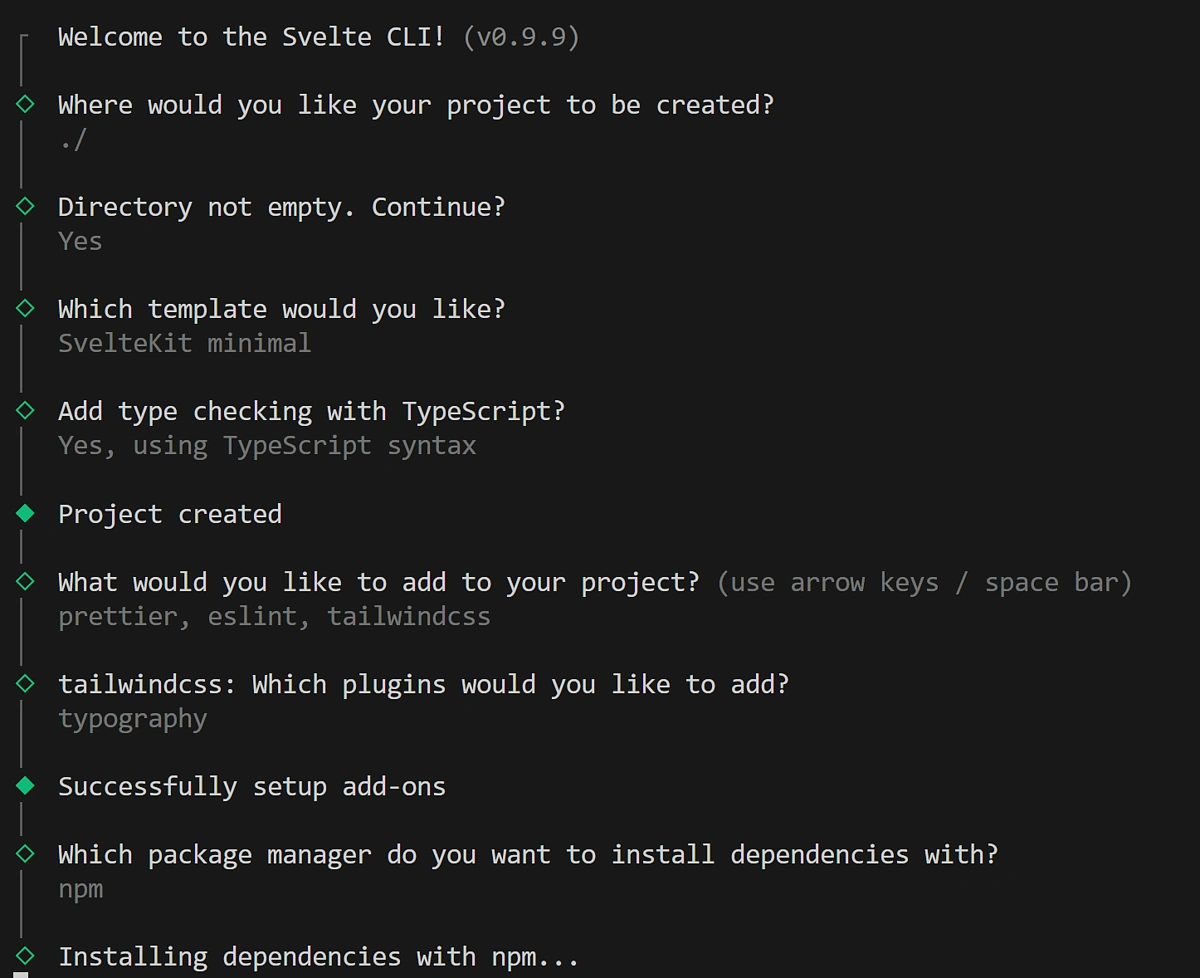
Start by creating a SvelteKit project with npx sv create. For a quick start, use TypeScript and TailwindCSS, and copy the settings below:
For our component library, we’re going to use Flowbite-svelte: npm i -D flowbite-svelte flowbite && npm i -D flowbite-svelte-icons.
At the root of your directory, create an empty .env file and paste your CoinGecko API key like so:
COINGECKO_API_KEY = "CG-API-KEY"
This will allow us to safely import it on the server side later in the application.
Step 1: Integrating Real-Time & Historical Data for Prediction Market Analysis
In a prediction market app, users stay engaged when they have meaningful data to analyse before making a prediction or placing a bet. By giving them access to the data and insights they need directly within your app, you can reduce the user's need to switch between multiple tools.
For our prediction markets, we’ll rely on CoinGecko API’s /coins/markets and /coins/{id} endpoints. Together, they provide the pricing, metadata, and market cap information we need to power our core prediction engine and shape the structure of our UI. You may further enrich this data by adding and plotting market charts with /coins/{id}/market_chart.
Defining Data Types
Start by defining the shape of the CoinMarket response in a file under src/lib/types/coinMarket.ts:
Next, let’s define the structure of our MarketPrediction. This will represent a single prediction market entry, so it needs to include key details such as the end date, the predicted price, and the associated odds.
Under the same directory as above, create a new file called marketPrediction.ts and define the following type:
Odds uses the OddsEntry type, which specifies how odds are stored and tracked for a prediction market. Define this in the same directory, inside a new file called oddsEntry.ts:
Prediction Markets Data
Under src/lib/providers/CoinGecko.ts we’ll build a CoinGecko API wrapper. This helper function will streamline our requests to the endpoints mentioned above, ensuring our data fetching logic is reusable and clean.
Step 2: Building the Prediction Markets Discovery Dashboard
Your app needs a dashboard for browsing active markets, using high-level data such as rankings and prices to draw users in. To power this, we’ll use the CoinGecko wrapper we built, which maps to our endpoints and returns coins ranked by market cap along with key details like price, 24-hour change, and volume.
Under src/lib/, create a new Svelte component called MarketCard.svelte:
This represents a single prediction market object, and the component receives two separate objects to render:
- MarketPrediction, which includes the current price, predicted price, end date, and odds.
- MarketOutcome, which includes the final odds and the amounts won.
Now under src/lib/routes, modify the existing +page.svelte, to create a simple grid view iterator for our MarketCard component:
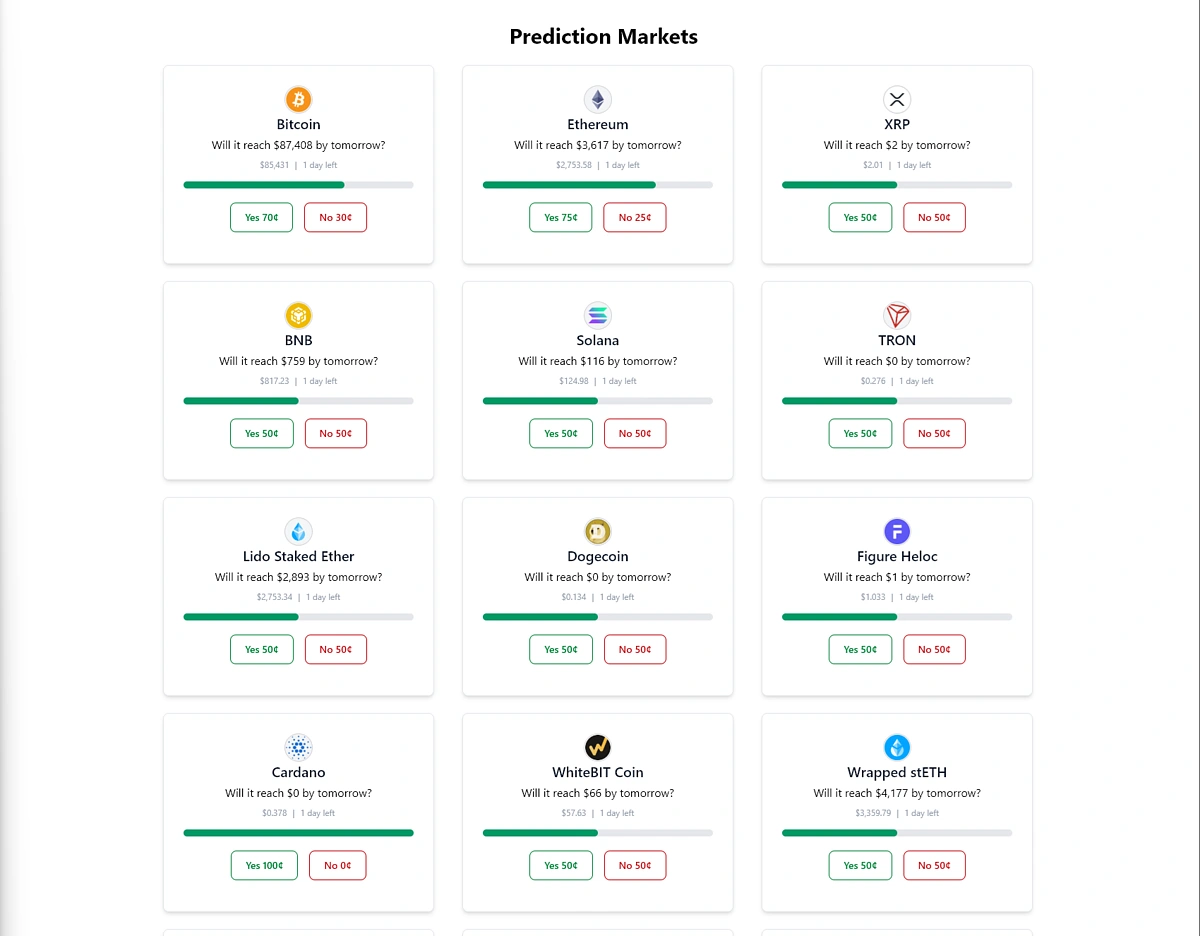
This will give us a clean UI capable of handling the core features of a crypto prediction market, including placing bets and adjusting odds in real time based on user activity.
The final result will look something like this once the prediction market platform is populated with CoinGecko data:
Step 3: Building the Prediction Market Settlement Engine
Now we need to build two core services to manage market operations:
- The OddsService monitors live odds for each market, updating them in real time as users place bets. This ensures the odds always reflect current sentiment and market activity.
- The PredictionMarketService oversees the full lifecycle of each market. It creates new markets, tracks user participation, and determines outcomes once events conclude, automating settlements and keeping the system running smoothly.
Under src/lib/services/ create a new file called OddsService.ts:
The OddsService uses recordClick() to update yes/no counts and recalculate odds, and getOdds() to retrieve current odds for a specific coin.
Now, under the same directory, create a new file for our PredictionMarketService.ts:
The PredictionMarketService is essentially the engine for managing crypto prediction markets. Its primary role is to create, refresh, and track markets for different coins over time.
At a high level:
- It automatically generates markets for the top assets. The logic checks for expired markets (older than 30 days) and refreshes them by setting a new prediction price based on a randomized percentage offset from the current price, ensuring a continuous stream of new prediction opportunities.
- Each market includes a predicted future price, start and end dates, current price, market cap, and odds.
- It stores markets in a JSON file, so they persist between runs.
- It can evaluate market outcomes, determining whether predictions were met once a market closes.
The focus is on maintaining an up-to-date set of prediction markets for coins, automatically refreshing them after 30 days and providing the core data for any prediction-based features in your application.

Under src/lib/data, create a new file called prediction_markets.json. This is where we’re going to store our prediction market data. The services we defined above will use this file to read and write data to, so it can just be an empty file for now.
Next, we need a way to securely fetch this data.
Under src/routes/ create a file called +page.server.ts. This will act as the glue between our API layer and our UI.
This is a SvelteKit server-side file that handles both loading data for the page and processing user actions. It runs on the server, so sensitive operations like accessing API keys happen safely.
This structure ensures the page displays up-to-date market data while safely handling user interactions on the server. To access the server data, simply store it in a data variable on the client. To update the server, we’ll send a POST request from the client to the server endpoint.
Update the +page.svelte file like so:
You can now run your application locally with npm run dev, and you should be able to see a working Prediction Market App with dynamically updating odds and real-time price data.

How To Create Prediction Markets for New Memecoins & Long-Tail Tokens
New memecoins and long-tail tokens are highly volatile, making them popular options in prediction markets. To access rich on-chain data for these DEX-traded tokens, we'll use CoinGecko's on-chain API endpoints, such as: /onchain/simple/token_price/{address}
This fetches live prices directly from blockchains like Ethereum (Uniswap), Solana, and over 250+ blockchain networks. New token launches tend to get significant traction, as they are volatile in nature. This endpoint enables you to automatically create markets such as “Will this new memecoin 10x in 24 hours?”.
When dealing with on-chain data, it’s essential to implement safeguards to prevent bad actors from exploiting your prediction market. The endpoint above works well with /onchain/tokens/{address}/info, which provides security details about a token, such as whether it’s a honeypot or has a low trust score assigned by GeckoTerminal (CoinGecko’s on-chain & DEX data aggregator).
To include on-chain tokens in your prediction market app, extend your CoinGecko.ts wrapper class to include the following functions:
You can then render them on the UI underneath your regular tokens, like so:

Here, we dynamically display a checkmark or an exclamation mark based on whether the coin passes our safety checks. This indicates to users which coins or tokens are safe from on-chain manipulations such as rug pulls.
What Are the Challenges of Building a Prediction Market App?
Building a prediction market app comes with several technical challenges, primarily around liquidity and data integrity.
- Liquidity Risks: Low volume can lead to wide spreads and unreliable odds. Using CoinGecko API endpoints like /coins/markets and /onchain/pools/megafilter, you can filter for high-liquidity coins to ensure your markets only feature prediction markets for tokens with sufficient trading activity.
- Data integrity Risk: If your resolution relies on easily manipulated sources like a single DEX’s price, attackers could exploit vulnerabilities, such as flash loans, to rig outcomes and undermine trust.
CoinGecko mitigates these risks by aggregating data from hundreds of exchanges via Volume Weighted Average Price (VWAP), detailed in our methodology documentation. This approach resists manipulation from single-exchange pumps or flash loan attacks, ensuring fair and tamper-proof market resolutions for your prediction market app.
Further Enhancements
Once your core prediction engine is in place, you can further extend your application by including more advanced functionality such as:
- Real-Time Updates with WebSockets: For sub-second price and chart refreshes, consider integrating CoinGecko's WebSocket API.
- Enhance Token Discovery with Metadata: Use the /coins/{id} or /onchain/tokens/{address}/info endpoint to display rich metadata, including project descriptions, social links, and categories. This educates users on specific tokens, helping them make more informed predictions.
- Display AI Price Predictions: Integrate a predictive model to show users what the system forecasts for an outcome, giving users a helpful nudge when placing their bets. Learn how to build a simple AI Model for Crypto Price Prediction.
- Build an Automated Betting Bot: To boost participation and liquidity, create a Python-based bot to forecast price movements and automate bets. Explore our guide on how to build a Crypto Trading Algorithm to get started.
Conclusion
In this guide, we've covered the essentials of building a crypto prediction market app, from creating a discovery dashboard to integrating real-time and historical data for user analysis, automating settlements, and supporting on-chain memecoins. Using CoinGecko API as the core data layer, you've achieved a seamless system for market population, odds tracking, and fair resolutions, all with one reliable source.
If you're planning to deploy your app in production, a CoinGecko API paid plan gives you access to higher rate limits, exclusive endpoints, and WebSocket API for real-time data streams and market resolutions.






 Or check it out in the app stores



