





 Make us preferred on Google
Building a decentralized application (dApp) has traditionally been a technically demanding process, requiring deep knowledge of Rust, smart contracts, and RPC nodes. This complexity creates a high barrier to entry for many creators and developers.
However, a new wave of AI-native, no-code tools are changing the landscape. In this guide, we will walk you through creating a data-rich decentralized application without writing a single line of code. We will achieve this by using simple, natural language prompts with two key tools:
-
CoinGecko API: The industry-standard source for reliable cryptocurrency market data to access data such as real-time token prices, market capitalization, historical trends, and more.
-
Noah AI: An AI-native builder that generates smart contracts, frontends, websites, and deployment for Solana, Celo, Scroll, and Monad apps.

What is Noah AI?
Noah AI is an AI native, no-code platform for building onchain applications. Instead of manually writing, testing, and deploying smart contracts or building a user interface, you simply describe your application's logic in natural language.
Noah AI interprets these prompts and generates the necessary components:
-
Smart Contract Scaffolding: Creates the on-chain logic if your app requires it.
-
Frontend Generation: Builds a functional dashboard or user interface.
-
API Integration: Automatically connects to external data sources, like the CoinGecko API.
-
Deployment: Pushes your application to a live, shareable link.
This "vibe coding" approach, as some call it, makes it possible to move from an idea to a live dApp in minutes, regardless of your technical background.
How it Works
Building an application with Noah AI and the CoinGecko API follows a simple flow:
-
Write a User Prompt: You start by describing what you want to build in plain English.
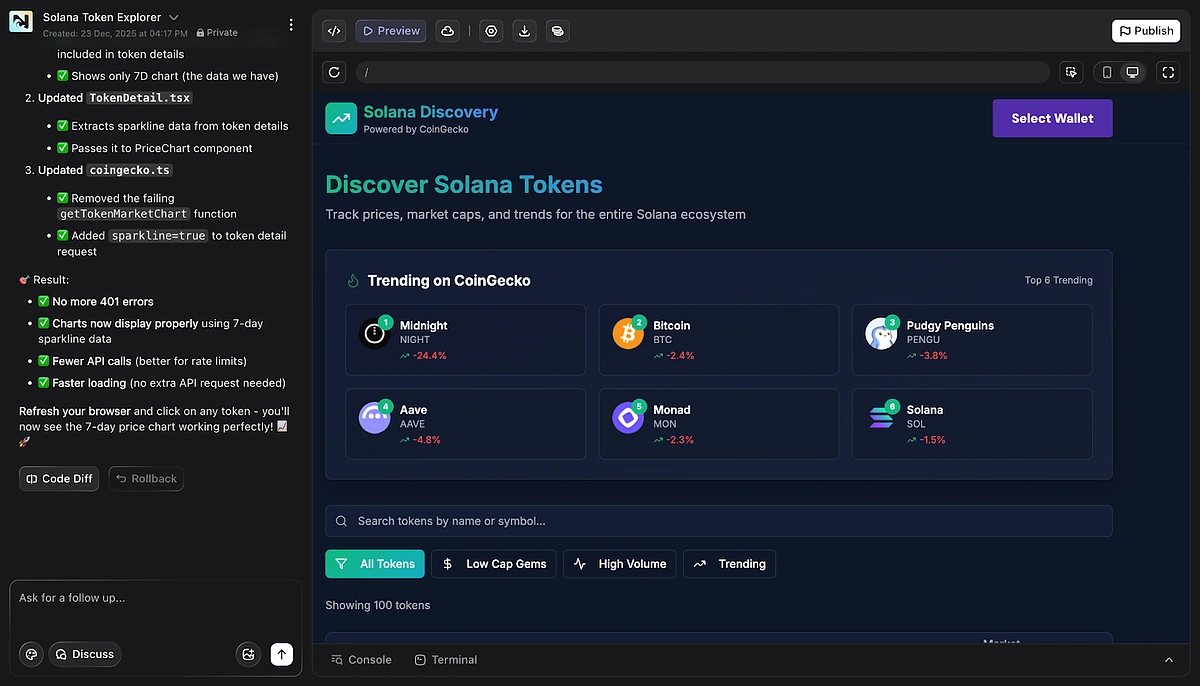
Example Prompt: “Build a Solana token discovery web app using CoinGecko that lists Solana ecosystem tokens with price, FDV, 24h volume, and 24h change. Add filters for low market cap, high volume, and trending tokens, plus a “Trending on CoinGecko” section. Clicking a token opens a detail page with a 24h and 7d price chart and key stats. Use a clean, modern dashboard UI with dark mode and mobile support.”

-
Noah AI Generates the App: Noah AI takes your prompt and builds all the necessary parts of the application, including:
-
API integration code to fetch data from CoinGecko.
-
A frontend dashboard with charts and data fields.
-
A live deployment link for you to access the app.
-
-
Data from CoinGecko API: The app automatically calls the CoinGecko API to fetch prices, volumes, and historical data in real-time.
-
App goes live: In minutes, you’ve got a working Solana application you can share with users.
Integrating the CoinGecko API
The CoinGecko API is powerful and straightforward to use. For example, fetching Solana’s current price in USD and USDT requires just one API call:
curl "https://api.coingecko.com/api/v3/simple/price?ids=solana&vs_currencies=usd,usdt"
Response:
{
"solana": {
"usd": 154.12,
"usdt": 154.05
}
}
Normally, a developer would need to write code to make this API request, handle the JSON response, and then write more code to display that data in a user interface.
With Noah AI, this entire integration is abstracted away. Your prompt instructs Noah AI to connect to the correct API endpoint, parse the response, and render the data in the appropriate component on your app’s frontend.
Example Output
Within minutes of entering a prompt, Noah deploys a live Solana app that includes:
-
Live token price (powered by CoinGecko)
-
24h trading volume and market cap
-
7-day price chart rendered in the frontend
-
Auto-generated dashboard UI accessible via a shareable link
What would normally take a significant amount of backend and frontend development is abstracted into a single user prompt.

Further Enhancements
Once you grasp the basics, you can build far more ambitious apps on Solana using Noah and CoinGecko API together:
-
Portfolio tracker: You can instruct Noah AI to fetch a user's wallet balances from the Solana chain and then call the CoinGecko API to enrich that data with live token prices, allowing you to display its portfolio value.
-
DeFi monitor: Combine on-chain data, such as the liquidity in a specific Solana-based pool (fetched via Noah AI), with CoinGecko's comprehensive token data for a complete DeFi dashboard.
-
Trading alerts: Create an application that triggers a notification when a token's price or trading volume crosses a specific threshold.
-
Education tools: Build simple, interactive dashboards designed to help students and newcomers learn how blockchain data and market data interact.

Conclusion
The combination of Noah AI and CoinGecko API makes it possible for anyone to build data rich applications without facing the steep learning curve of blockchain development. CoinGecko provides the reliable data backbone, while Noah acts as the builder engine that turns prompts into production ready apps.
This new approach to building, where data meets AI, significantly lowers the barrier to shipping applications on-chain.
Ready to start building? Get your free Demo API key and when you're ready to launch a production-ready application, consider subscribing to a CoinGecko paid API plan. This will unlock higher rate limits and exclusive endpoints needed for production-scale projects.








 Or check it out in the app stores



