



 Make us preferred on Google
Developing smart contracts on the Ethereum blockchain has revolutionized various industries by enabling decentralized, automated transactions. Combining Solidity, Ethereum, and the CoinGecko API creates an efficient way to interact with cryptocurrency price data. In this guide, we’ll cover how to set up your environment, write and deploy a Solidity smart contract, integrate the CoinGecko API, and fetch Ethereum price data for your contract in a secure, programmatic way.

Prerequisites
Before getting started, ensure you have the following installed:
-
Node.js and npm as our development environment: Ensure that Node.js and npm are installed on your machine. Node.js is a JavaScript runtime built on Chrome's V8 JavaScript engine, and npm is the package manager for Node.js, which you'll use to manage your project's dependencies.
-
CoinGecko API for crypto price and market data: We will use the CoinGecko API to fetch market data for cryptocurrencies. The free Demo plan is sufficient for our needs, with a rate limit of 30 calls per minute and a monthly cap of 10,000 calls. Check out our API documentation or create a Demo account to try it out.
-
Truffle Framework: Provides a suite of tools for Ethereum development, including compiling, deploying, and managing smart contracts. Install it via npm:
npm install -g truffle -
Ganache CLI: A local Ethereum blockchain that enables testing. Install with:
npm install -g ganache-cli -
Infura Account: Necessary for connecting to the Ethereum network. Create an account at Infura.io, and obtain an API key.
Setting Up the Development Environment
1. Installing Required Packages
We’ll use several libraries, including Web3.js for blockchain interaction, Express for setting up an API server, and Axios for making HTTP requests to the CoinGecko API. Install these dependencies with:
npm install web3 express axios dotenv
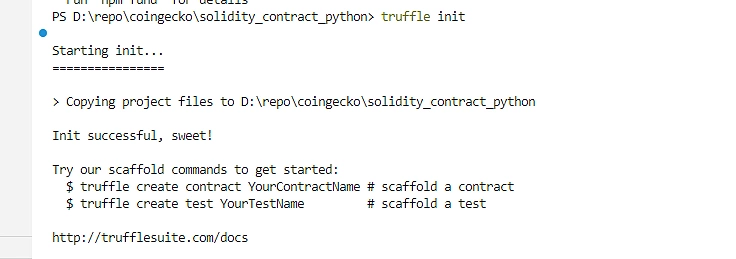
2. Initializing a Truffle Project
Create a new Truffle project to house your smart contracts:
mkdir eth-coingecko-project
cd eth-coingecko-project
truffle init
3. Configuring Truffle for Deployment
To deploy a smart contract using Truffle, you need to configure truffle-config.js to specify the target networks and compiler version. This file includes the network settings and compiler options for deploying contracts both locally (e.g., to Ganache) and to remote networks (e.g., using Infura for connecting to Ethereum's mainnet or testnets).
Edit the truffle-config.js file to connect to a local Ganache network and an Infura endpoint for deployment. Configure network options as follows:
Explanation of the Code
-
Networks Configuration:
-
Development: The development network section is used for deploying and testing contracts locally on Ganache.
-
host: "127.0.0.1": This specifies the IP address of the local blockchain instance. For Ganache, this is typically 127.0.0.1 (localhost).
-
port: 8545: Specifies the port where Ganache listens for incoming connections. By default, Ganache CLI runs on port 8545.
-
network_id: "*": Allows Truffle to connect to any network ID. This is useful since Ganache generates a unique network ID each time it’s launched, and this wildcard ensures compatibility with any ID it generates.
-
In the Truffle configuration (truffle-config.js), Infura and a mnemonic are used to securely deploy contracts to a public Ethereum network (like Rinkeby or Mainnet) without running a full Ethereum node yourself.
-
-
-
Compilers Configuration:
-
solc: This section configures the Solidity compiler settings.
-
version: "0.8.0": Specifies the Solidity compiler version to use. Setting an exact version ensures compatibility with specific language features and syntax in your contracts. Using "0.8.0" will fetch this version from the solc-bin repository.
-
-
Why Configure for Development and Compilation?
Configuring these settings helps to ensure that:
-
Local Deployment: Truffle knows to deploy the contract to a local blockchain like Ganache, making it easier to test and debug without using real Ether.
-
Controlled Solidity Version: Using a specific Solidity version avoids issues with language features and compiler optimizations that could vary across different compiler versions.
Writing and Deploying the Solidity Smart Contract
1. Creating the Solidity Contract File
In the contracts directory, create MyToken.sol for your ERC20-based token contract.
The MyToken.sol Solidity file defines a basic ERC20 token smart contract, which includes essential functionality for transferring tokens and querying balances. This simple token is suitable for learning and testing how ERC20 tokens work on the Ethereum blockchain. Let’s break down each part of this code:
2. Writing the Smart Contract Code
Here’s a basic ERC20 token with a balanceOf & transfer function for querying user balances:
This token contract includes the fundamental features of an ERC20 token, enabling it to track balances, perform transfers, and provide metadata. For a complete ERC20 token (suitable for mainnet), additional functions like approve, transferFrom, and allowance would be added to comply fully with the ERC20 standard.
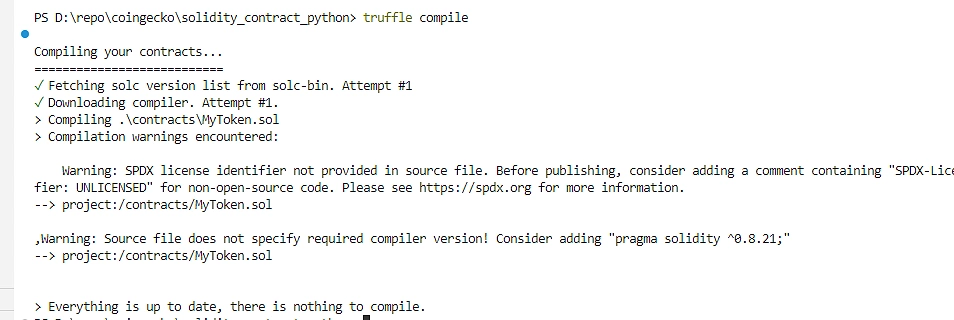
3. Compiling the Smart Contract
Compile the contract with:
truffle compile
4. Deploying the Smart Contract using Truffle
Add a migration script in migrations/2_deploy_contracts.js:
const MyToken = artifacts.require("MyToken");
module.exports = function (deployer) {
deployer.deploy(MyToken, 1000000); // Deploy with 1 million initial supply
};
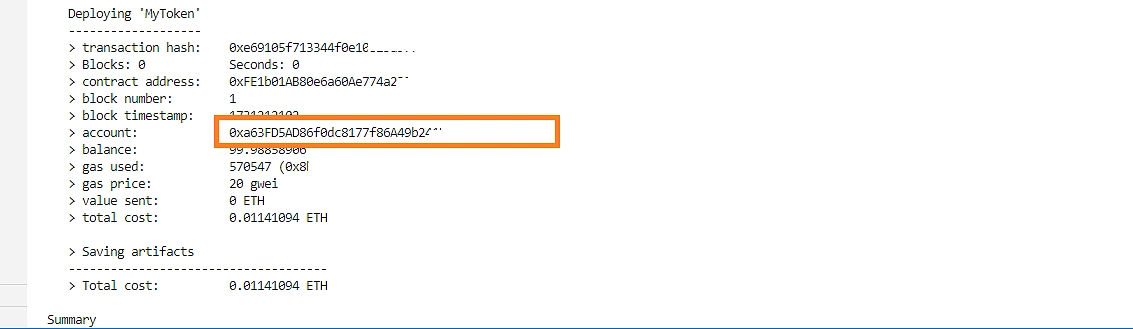
Deploy it locally:
truffle migrate --network development
Running Ganache CLI
To start Ganache CLI, open a new terminal or command prompt and run the following command:
ganache-cli
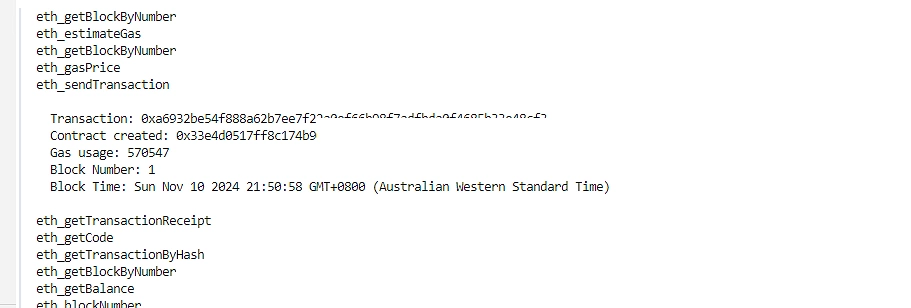
This will start a local Ethereum blockchain on http://127.0.0.1:8545 by default. You will see a list of generated accounts with their addresses and private keys, which you can use for your development and testing purposes.
Example Output
When you run ganache-cli, you should see output similar to this:
The Complete Node.js Program
Here is the complete Node.js program integrating Web3.js, the CoinGecko API, and the Express server, to interact with the Ethereum blockchain, retrieve data, and interface with smart contracts:
Using Web3.js, it connects to a local Ganache blockchain instance for simulating blockchain transactions and account operations. The program defines functions to create a new Ethereum account, check Ethereum and ERC20 token balances, and interact with a deployed smart contract. It also fetches Ethereum market data from CoinGecko, allowing users to get historical price data. The Express server sets up several API endpoints—such as /balance, /eth_balance, and /market_chart—allowing users to retrieve an ERC20 balance, Ethereum balance, and market chart data. The program runs on port 3000 and is ready for testing smart contract interactions locally through these RESTful API endpoints.
Integrating CoinGecko API with the Smart Contract
1. Setting Up CoinGecko API Key
Add your CoinGecko API key to a .env file in your project root:
COINGECKO_API_KEY=your_coingecko_api_key
Configure dotenv to load the environment variables in your script:
require('dotenv').config();
Expected Output
To run the program and view the output, enter the following command in your terminal:
node index.js
For a full understanding of the output, a screenshot of the terminal window displaying these messages and API responses as they are logged.
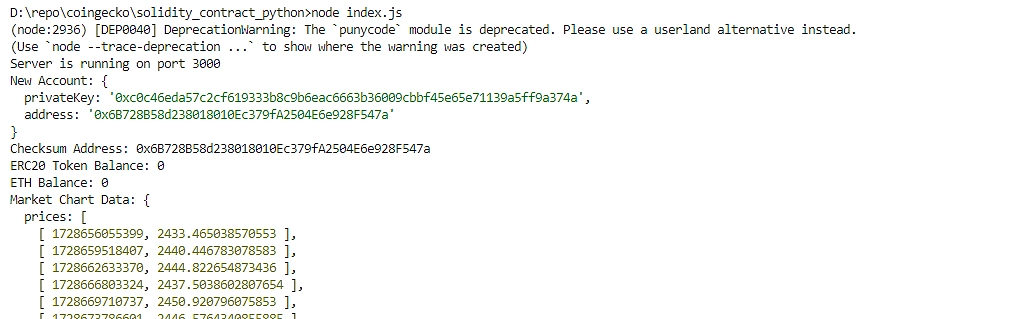
When you run node index.js, the program will:
-
Create a New Ethereum Account: A new Ethereum account is created, and its details (address and private key) are printed to the console.
Example Output:
New Account: { privateKey: '0x...', address: '0x...' } -
Retrieve ERC20 Token Balance: It fetches the balance of the deployed ERC20 token for the created account, displaying it in the console.
Example Output:
ERC20 Token Balance: 1000000
-
Get ETH Balance: It checks and displays the account's ETH balance, converting it from Wei to Ether.
Example Output:
ETH Balance: 0.0
-
Fetch Market Data from CoinGecko: Using CoinGecko’s API, it retrieves the Ethereum price data for the past 30 days and displays it in JSON format.
Example Output:
Market Chart Data: { prices: [...], market_caps: [...], total_volumes: [...] } -
Interact with the Smart Contract: Calls the totalSupply function (or another specified function) of your smart contract and outputs the result.
Example Output:
Smart Contract Result: 1000000
Testing the API Endpoints
After running the program, you can test the endpoints provided by the Express server. For example:
-
Check ETH Balance:
http://localhost:3000/eth_balance/<user_address> -
Check ERC20 Token Balance:
http://localhost:3000/balance/<contract_address> -
Fetch Market Chart Data:
http://localhost:3000/market_chart/30
Troubleshooting Common Issues
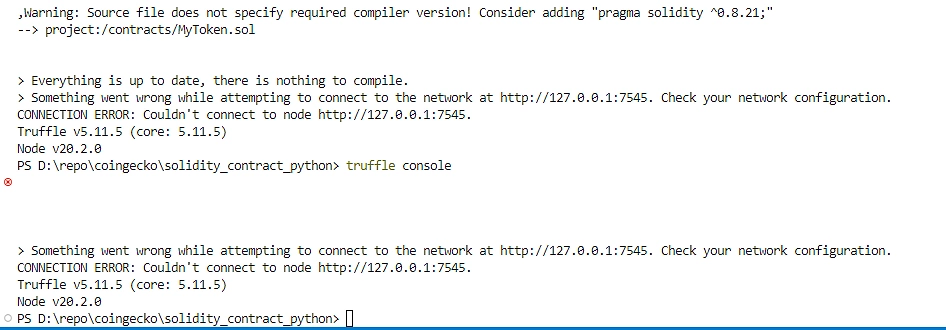
1. Connection Error with Truffle
If you encounter connection issues with truffle, ensure that your api endpoint is correctly configured in the index.js file and referenced in the Truffle configuration.
2. ABI Mismatch Error
Ensure your contract ABI in the MyToken_abi.json file matches the deployed contract’s ABI.
3. Increasing Timeout Settings
For slow connections or larger data calls, increase the timeout settings in axios:
axios.defaults.timeout = 5000; // Set to 5 seconds
Conclusion
Integrating Ethereum smart contracts with the CoinGecko API empowers developers to enhance blockchain projects with real-time cryptocurrency data, creating a more dynamic and valuable user experience. This setup is especially beneficial for building financial tools and decentralized applications, where live market data is crucial for decision-making, portfolio tracking, or trading tools. With this solution, you can automate data retrieval, efficiently manage user balances, and interact with smart contracts directly from your backend, paving the way for more sophisticated, data-driven decentralized apps.
By following this approach, you’ll also be well-prepared to expand your application, adding new features like tracking multiple tokens, implementing advanced transaction flows, or deploying smart contracts to other Ethereum networks. This foundational integration serves as a flexible and scalable entry point for those looking to explore the potential of blockchain with reliable, real-world data.
If you enjoyed this article, be sure to check out these other API tutorials and guides.







 Or check it out in the app stores



