



 Make us preferred on Google
What Is Loan Shifting on DeFi Saver?
Loan Shifting on DeFi Saver lets users move their debt position from one protocol to another instantly, allowing them to capture better rates, while saving time and money.
Key Takeaways
-
DeFi Saver is a DeFi management tool that supports a variety of DeFi protocols, allowing users to access multiple DeFi opportunities from a single platform.
-
One major feature of DeFi Saver is its Loan Shifting feature, which allows borrowers to move their debt and collateral instantly from one supported DeFi protocol to another.
-
With Loan Shifter, users can move their positions to protocols offering better rates and other opportunities at any time.
-
DeFi Saver’s Loan Shifting feature supports over 10 DeFi protocols (including Aave, Compound Finance, Maker, and Spark Finance) across four networks (Ethereum, Base, Arbitrum, and Optimism).
This article is brought to you by DeFi Saver.
DeFi Saver has one primary goal: to empower users to do more in DeFi by providing them with advanced features that are not available in the native UIs of supported protocols. They do this by simplifying the complex processes in DeFi, making it easy for users to conduct advanced DeFi operations across different protocols.
According to data from the platform, over $7.5 billion worth of crypto assets have been transacted through its protocol. Its automation tools have been used to automate debt positions worth over $260 million across supported decentralized finance.
What Is DeFi Saver?
DeFi Saver is a non-custodial DeFi management tool that allows users to manage their positions and crypto assets across various DeFi protocols on its platform. It supports DeFi protocols including Aave, Liquidity, Compound, CurveUSD and more, across the Ethereum, Arbitrum, Optimism, and Base networks.
DeFi Saver also offers a collection of tools that enable users to improve their DeFi strategies and automate where possible. Here are some of the tools available on the platform:
-
Automation: Enabling the automation feature lets users set conditions at which the protocol will automatically take specified actions on their loans.
-
Smart Wallets: These smart contract-based wallets allow users to easily manage positions on DeFi Saver as users can execute multiple actions within a single transaction.
-
Smart Savings: Users can use their Smart Wallet to deposit assets into supported pools and monitor the profitability of different pools and move their assets accordingly.
-
Recipe Creator: Users can create their own strategy (or use pre-made Recipes) for the DeFi Saver app to bundle up and execute in a single transaction.
-
Exchange: DeFi Saver is also a DEX meta aggregator, enabling users to run asset swaps through several decentralized exchanges. Users can also set limit orders and utilize dollar cost averaging (DCA).
-
Simulation Mode: A test environment for users to try out advanced operations before depositing their real assets.
Check out this article for a detailed coverage of tools on the DeFi Saver platform.
Another primary tool on the DeFi Saver platform is Loan Shifter. According to available data, over 4,000 debt positions have been ‘shifted’ between 15 different DeFi protocols using the Loan Shifter feature. Like other products on the Loan Shifter is supported across Ethereum, Base, Arbitrum, and Optimism networks.
Now, let’s take a closer look at Loan Shifting on DeFi Saver.
Benefits of DeFi Saver’s Loan Shifting
Loan Shifting on DeFi Saver involves moving your debt position from one supported protocol to another. Loan Shifter allows Collateralized Debt Positions (CDPs) swaps between protocols, or selective shifts like collateral and debt swaps, enabling users to capture better rates instantly, while reducing the likelihood of errors.
When switching debt positions between protocols, Loan Shifter keeps user funds safe with flash loans. Flash loans are uncollateralized loans that are borrowed and repaid within the same transaction. Flash loans are self-enforcing; borrowers are required to repay the loan within the same transaction, else the whole transaction fails. With flash loans, DeFi Saver’s Loan Shifter adds a layer of security to users’ funds during the Loan Shifting operation. The transaction is either successful, and users’ debt and collateral assets are swapped, or it fails, and the funds remain in the wallet.
For users who prefer to familiarize themselves with the process first, Loan Shifter is supported on DeFi Saver’s simulation, where users can simulate the operation with test funds on the Simulation mode before running the operation with their real assets.
Loan Shifting offers a number of advantages for DeFi enthusiasts, this includes;
Swap Collateral or Debt Without Closing Your Position
DeFi protocols, including ones deployed on the same blockchain network, are independent of each other. Here’s how the process works manually: Users who wish to interact with multiple protocols in the same network are required to exit their positions, before moving their assets and creating a new position on the new protocol. Users need to pay transaction and platform fees; furthermore, depending on the liquidity conditions, even more may be lost to slippage while swapping collateral and debt assets.
With Loan Shifter, you can easily move your debt positions as-is to another protocol within the same chain. The protocol handles the asset swapping process while users pay minimal fees (0.25% and gas fees for one transaction). You can move your position between different lending structures on the same protocol or to a totally different protocol. You can also swap your debt or collateral assets for a different asset without closing the loan position or redeeming your assets.
Should you wish to move your position to a different chain, you will still need to close the position, bridge your funds, and open your position again.
Find Better Rates Instantly
Unlike traditional finance, where banks or central authorities set interest rates, DeFi rates are determined algorithmically based on supply and demand dynamics within the platform’s liquidity pools, managed by smart contracts. Most DeFi platforms, like Aave and Compound, use algorithms to adjust rates in real time. For example, if a pool has low utilization (few borrowers), rates drop; if utilization is high (many borrowers), rates increase. The fluctuating rates across DeFi lending platforms influence the passive income generated by lenders or the interest paid by borrowers.
As a borrower, DeFi Saver’s Loan Shifter comes in handy in both situations. With the integration of multiple protocols, you can easily compare the rates on other lending platforms and move your debt positions or collateral assets to a lending protocol or plan that offers the best rates for such assets. Loan Shifter’s instant execution also enables users to capture the favorable rates instantly.
One-Click Collateral Transfers Between Protocols
Loan Shifter utilizes DeFi Saver’s multi-protocol system to offer an easy way to move your collateral assets between multiple protocols. With a few clicks, users can easily complete complicated asset transfers between different lending protocols.
Decentralized lending protocols also have varying offers and opportunities for assets accepted as collateral. Loan Shifter also enables users to also swap between supported collateral assets as they move them between these protocols. Loan Shifter’s one-click collateral transfer offers a unique flexibility: first as a means to simply move these assets, and also as a way to perform instant asset swaps while moving between protocols.
Loan Shifter offers a cost and time-efficient way to transfer collateral between protocols, saving borrowers the hassles of splitting funds in an attempt to benefit from the varying opportunities across different lending protocols and chains.
Save Money and Time
With the DeFi Saver dashboard, users can track multiple debt positions, estimate the profitability of each one (or lower rates), and move their assets accordingly. Every advantage mentioned so far contributes to the cost and time effectiveness of the Loan Shifting feature.
For instance, DeFi users save with Loan Shifter, as they only pay gas fees for one transaction. If they are moving their position from one protocol to another and don’t change their debt or collateral, the fee is 0%. If they are doing a swap of their assets, there is a flat 0.25% fee due to the advanced operations required.
Users are also protected from the risk of slippage while swapping to different protocols, as the time to complete the transaction is only a fraction of the time it would take to manually exit the loan position and move assets to another protocol.
Loan Shifter also enables lenders and borrowers to pursue the best possible rates for their assets. This way, lenders maximize their passive income while borrowers pay the lowest available interest rate for the asset they wish to borrow. Loan Shifter not only saves time and money for borrowers but it also boosts their profitability by enabling them to take advantage of the best loan rates without the complications of switching between protocols manually.
How to Use Loan Shifter
Loan Shifter only supports positions held in DeFi Saver’s Smart Wallet.
Before proceeding with the Loan Shifting procedure, ensure that your assets and positions are held in a Smart Wallet. You can also import your existing positions to the Smart Wallet.
Shift Your Debt or Collateral Position(s) Using Loan Shifter
-
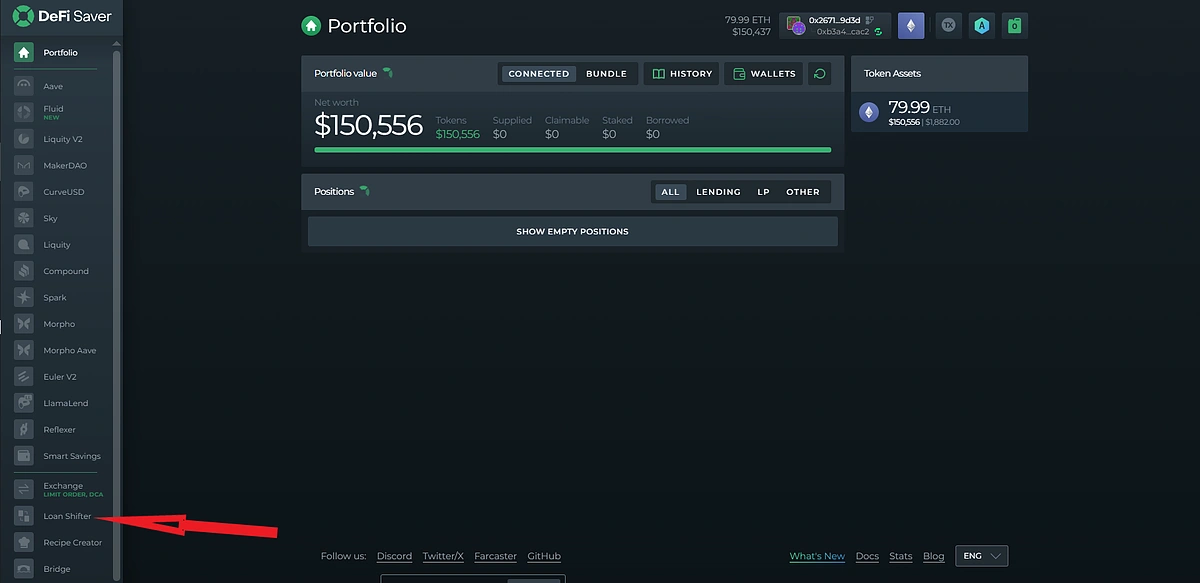
Click on Loan Shifter from the side menu of the DeFi Saver dashboard.
-
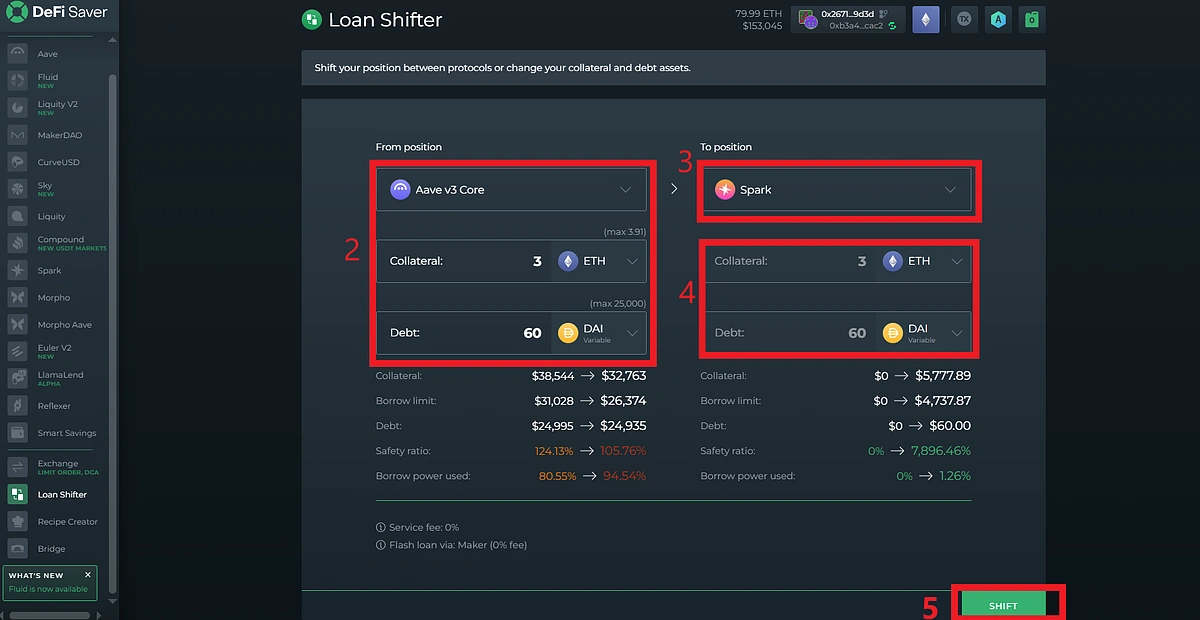
Select the protocol where your existing position is held and the collateral or debt asset you wish to shift.
-
Select the protocol to which you wish to shift your debt or collateral asset.
-
Select the collateral or debt asset you wish to shift to and set the amount. Note that debt and collateral assets cannot be shifted at the same time.
-
Review the transaction details and click SHIFT to proceed.
-
Approve the transaction from your smart wallet to complete.

Your loan will be shifted once the transaction is confirmed.

Ready to try Loan Shifter?
Final Thoughts
DeFi Saver is a one-stop platform that connects DeFi enthusiasts to multiple protocols across multiple networks, making it easier for users to discover and interact with several protocols and the benefits they offer. With its Loan Shifting feature, DeFi Saver expands the scope of interoperability in DeFi, enabling seamless transfers across multiple protocols and networks, enabling users to find better rates instantly while saving money and time.
While DeFi Saver has abstracted away the complexities of shifting loans across chains and networks, advanced computing operations are still going on behind the scenes. Users are advised to test out Loan Shifter in simulation mode to familiarize themselves with the feature before using their real assets.
This article is only for informational purposes and should not be taken as financial advice, and all protocols used in the guide are for illustrative purposes only and should not be taken as endorsement or investment advice.







 Or check it out in the app stores



