



 Make us preferred on Google
Can You Add Solana to MetaMask?
Yes. You can now create a new Solana account, or import an existing wallet directly in MetaMask, which you can use to interact with the Solana blockchain.
Key Takeaways
-
MetaMask now supports Solana natively, eliminating the need for MetaMask Snaps.
-
The user experience for MetaMask Solana accounts are similar to MetaMask Ethereum and EVM accounts, offering users the same interface, security features, and easy access to DeFi.
-
You can create new Solana accounts or import existing wallets using private keys or Secret Recovery Phrases
MetaMask serves over 100 million users worldwide and has been one of crypto’s most established wallets for nearly a decade for Ethereum and EVM chains. Recently, on July 8, 2025, MetaMask announced native Solana support, marking a shift from its Ethereum-first approach toward true multichain functionality, with Bitcoin support planned to come later in the year.
Now, you can use MetaMask to manage your Solana assets alongside your Ethereum and EVM accounts without needing to switch wallets when interacting with Solana.
How to Set Up Solana on MetaMask Wallet
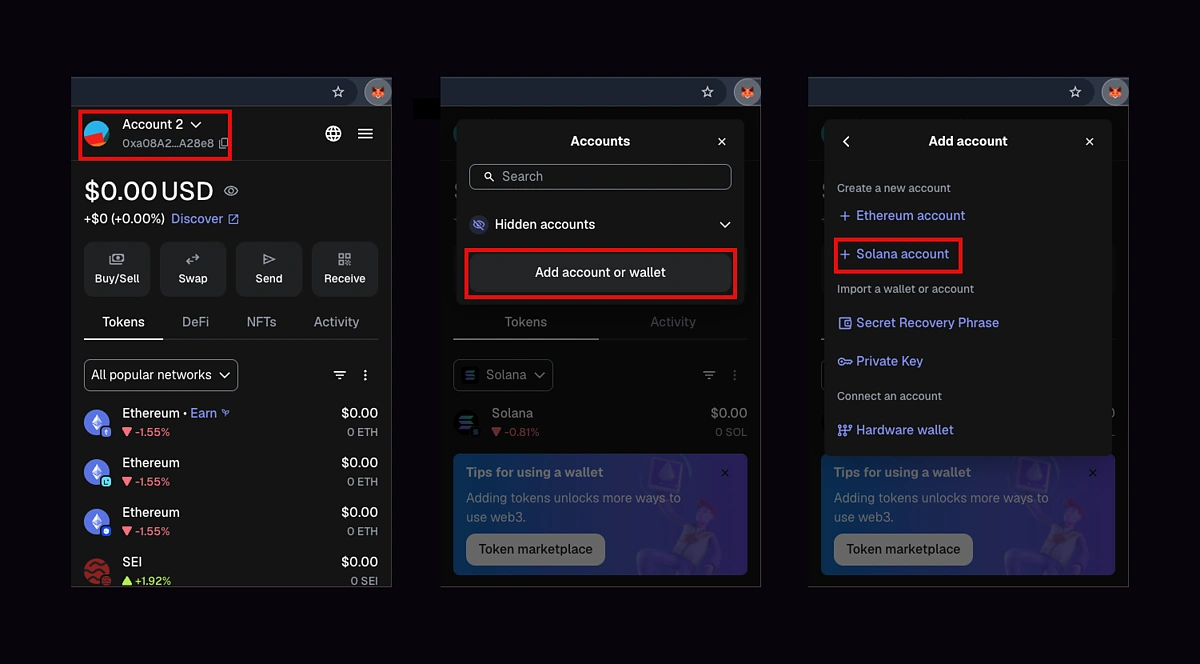
To set up a Solana account on MetaMask through browser extension:
-
Open your MetaMask wallet and click on your account at the top left corner.
-
Click on Add account or wallet to proceed
-
Selecting + Solana account will automatically create a new wallet for you.
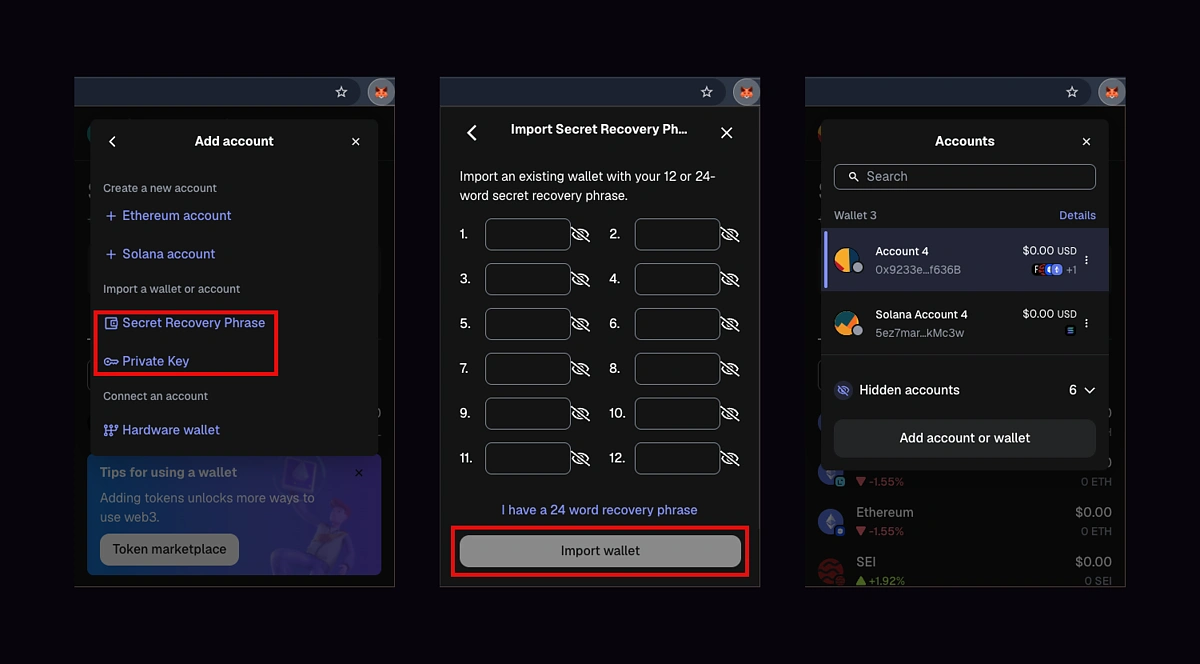
Alternatively, you can import an existing Solana wallet.
-
Under Add account, select either Secret Recovery Phrase or Private Key. In this example, we are importing a wallet through its Secret Recovery Phrase.
-
Enter your Secret Recovery Phrase for the Solana wallet you'd like to import.
-
MetaMask will import all accounts associated with the imported wallet.
Your MetaMask Solana account is now ready for use. You can now send, receive, and swap tokens with your Solana wallet on MetaMask.
Next, we’ll connect to and use a dApp on the Solana network via MetaMask Wallet.
Interacting with Solana dApps via MetaMask
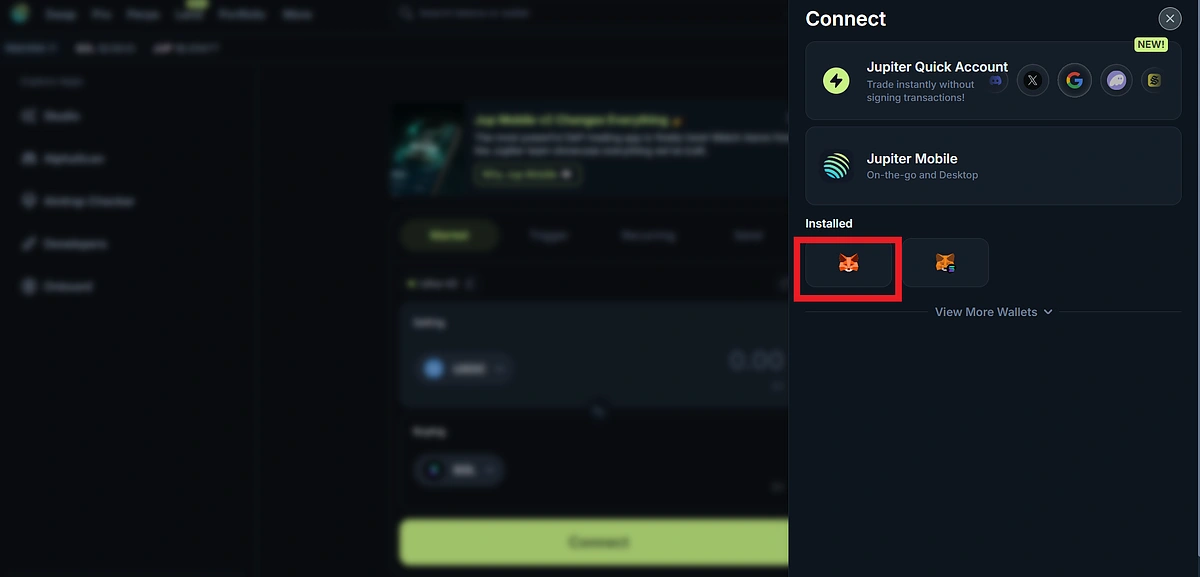
To connect and use a Solana dApp with the MetaMask browser extension or mobile wallet:
-
Visit the platform.
-
Click Connect Wallet and select MetaMask wallet (not Solana Snap) from the wallet list.
-
Approve the connection request on your wallet to complete.

-
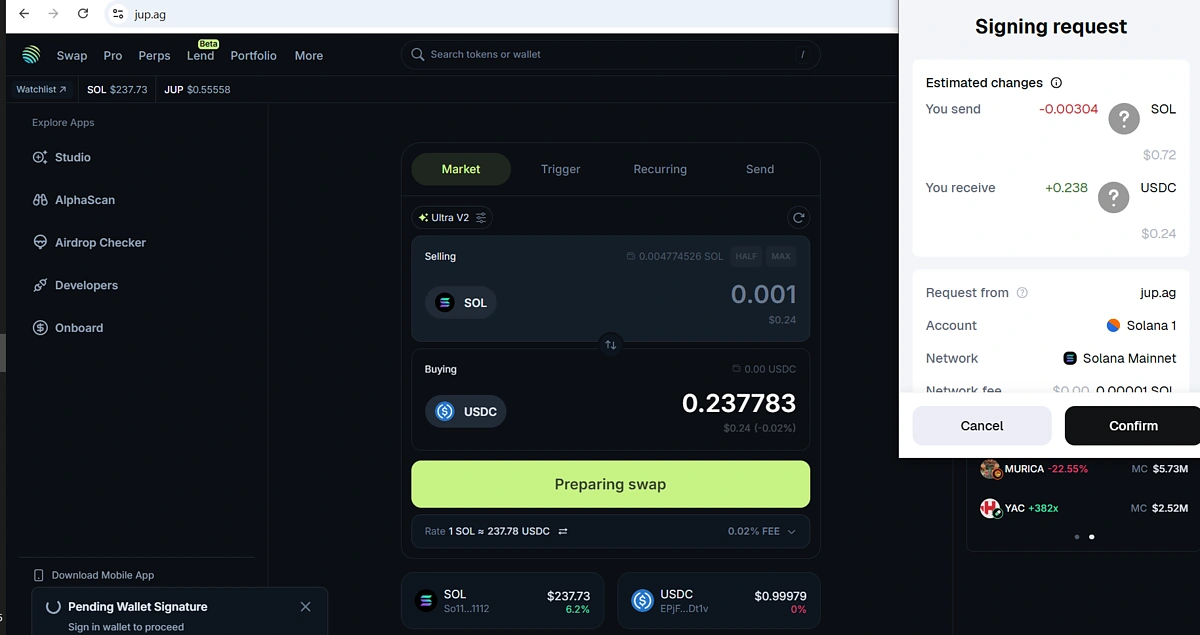
You can now interact with the platform, where approval requests will be sent for each transaction.
Features of MetaMask’s Solana Wallet
Here are some additional features of MetaMask’s Solana wallet.
Multichain Support: Solana, EVM, Bitcoin Coming Soon
Solana is the first non-EVM network natively supported, with Bitcoin and other networks planned. With native support for multiple networks beyond Ethereum and EVM, this will simplify crypto management by enabling investors to manage all their assets on the same interface.
Now, with Solana support, you can swap assets between Solana and:
Security Features on MetaMask
MetaMask's proven security features now also protect Solana accounts:
-
Real-Time Alerts: Customizable notifications for incoming transactions, security threats, and product updates.
-
Malicious dApp Detection: The Malicious dApp Detection feature for Solana was developed in partnership with Blockaid, a specialized security platform for detecting and responding to fraud, scams, financial risks, and smart contract exploits in real time.
It maintains a database of fraudulent decentralized applications and platforms that have suffered technical exploitations recently. This feature simulates transactions and warns users who intend to connect or interact with applications in this database. -
Password and Biometric Protection: You can set up a password to protect your account on the mobile app and web extension. Biometric protection for log-in and transaction signing is also available on the mobile app.
-
Transaction Simulations: Transaction simulations enable users to preview transaction outcomes, showing them what will happen if they approve the transaction. This protects users from accidentally signing and approving malicious transactions, like wallet drainers.
Gas Included Swaps
The Gas included swap function is triggered when users do not have enough SOL to cover the gas fee for a token swap. In this scenario, MetaMask automatically calculates and deducts the gas costs from your swap amount, saving users the hassle of maintaining SOL balances to cover gas fees.
Final Thoughts
You can now manage your Solana assets via MetaMask, alongside your Ethereum and EVM assets. MetaMask will also be expanding to include native support for more non-EVM networks will be added in the future, bringing even more chains, like Bitcoin, to the wallet. This will enable investors to manage their portfolio on different blockchains using the MetaMask wallet.
This article guides readers on how to set up their Solana account on MetaMask and interact with decentralized applications on the network. While MetaMask offers several security features, it is also recommended that you apply personal safety precautions to keep your account safe.
Disclaimer: This article only guides readers on how to set up a Solana account on the MetaMask wallet application. It is not financial advice. Featured projects are not endorsed, and users should do their own research when connecting to projects.








 Or check it out in the app stores



