





 Make us preferred on Google
TL;DR: Using AI for Crypto Research with CoinGecko MCP
-
CoinGecko MCP connects AI tools like Claude to real-time crypto data, giving them access to current prices, market caps, trends, and other CoinGecko market data instead of relying only on training data.
-
You can set it up without an API key: The free public remote server connects to Claude and other MCP-compatible clients through a connector URL.
-
Good prompts lead to more useful research: This guide covers practical setup steps and example prompts for token discovery, fundamentals checks, asset comparisons, and trend analysis, along with tips for breaking complex requests into multiple steps and specifying exact dates.
Conducting effective crypto research has always been a challenge for most people. Traditionally, it involved writing code, connecting APIs, building dashboards, and analyzing data to uncover actionable market insights. More recently, Large Language Models (LLMs) like ChatGPT seemed to offer a solution, but they come with a critical flaw. They cannot access real-time market data. Relying on their outdated or pre-trained information is a deal-breaker for anyone needing reliable and actionable market insights.
This is the exact problem the CoinGecko Model Context Protocol (MCP), a specialized Crypto MCP, is designed to solve. It acts as a vital bridge, connecting powerful AI models to CoinGecko API's comprehensive, real-time crypto data.
In this article, we'll explore how to use the CoinGecko MCP to transform your crypto research process. Whether you're a beginner seeking clear, data-driven insights or an advanced user looking to supercharge crypto research, you'll learn how to get reliable, timely information about the crypto markets with the help of AI.
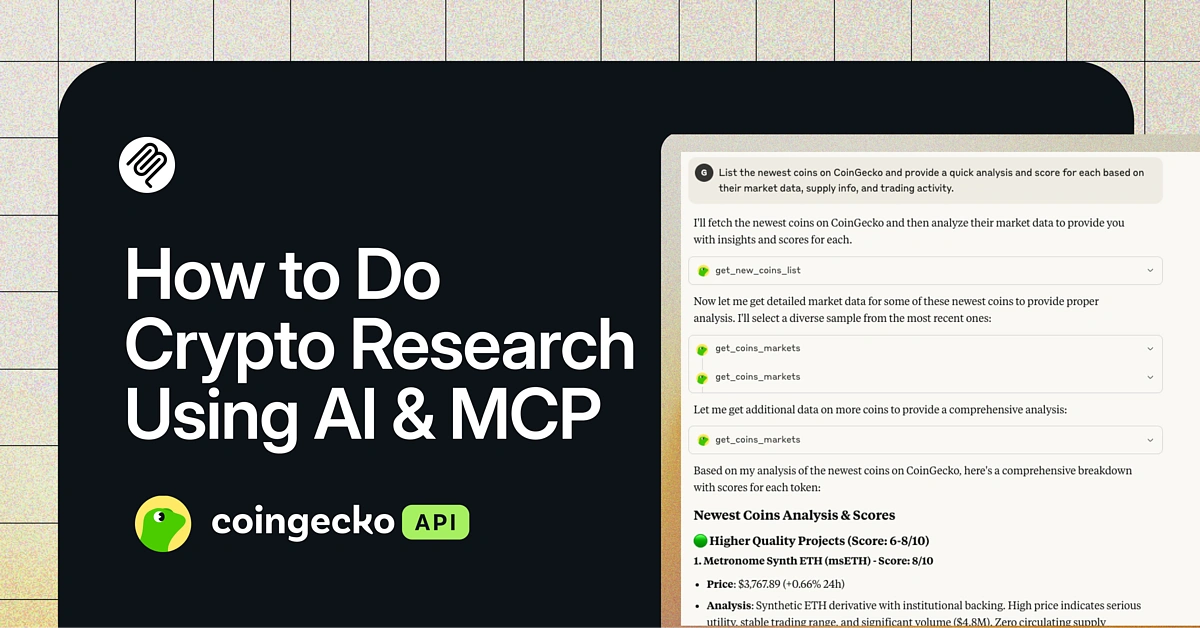
What is the CoinGecko MCP Server?
MCPs can be described like a standardized set of instructions that lets AI models communicate with external tools and data sources. The CoinGecko MCP allows LLMs and AI tools like Claude to access real-time crypto market data through natural language prompts. This makes it easier for beginners to conduct comprehensive crypto research and helps advanced users build faster, data-driven tools that rely on accurate, real-time data. The CoinGecko MCP is available as both a fully-hosted Remote Server for a quick setup and a Local Server that runs on your own infrastructure for full control over your deployment environment.
What data can you access with CoinGecko MCP?
In short, the MCP allows AI tools and LLMs to access the same key endpoints available through the CoinGecko API, including real-time token prices, market caps, historical OHLCV chart data, trending tokens, and more. The exact data available depends on your API plan. For a complete breakdown, explore our official documentation.
How to Set Up CoinGecko MCP with Claude
One of the easiest ways to get started with the CoinGecko MCP is by connecting it to Claude. We recommend using the free public remote server, as it requires no API key for a quick setup.
The steps below show how to connect the MCP using a Claude Pro account. If you do not have a Claude Pro account, you can learn more about how to connect CoinGecko MCP server using a Claude free account or watch our video tutorial instead.
Step 1: Add a Custom Connector
First, open Claude and select Manage Connectors in the chat interface. From there, choose the option to Add Custom Connector.


Step 2: Enter the Server URL
In the Server URL field, enter the public remote MCP server address: https://mcp.api.coingecko.com/sse. Once entered, click Add.

Step 3: Confirm the Connection
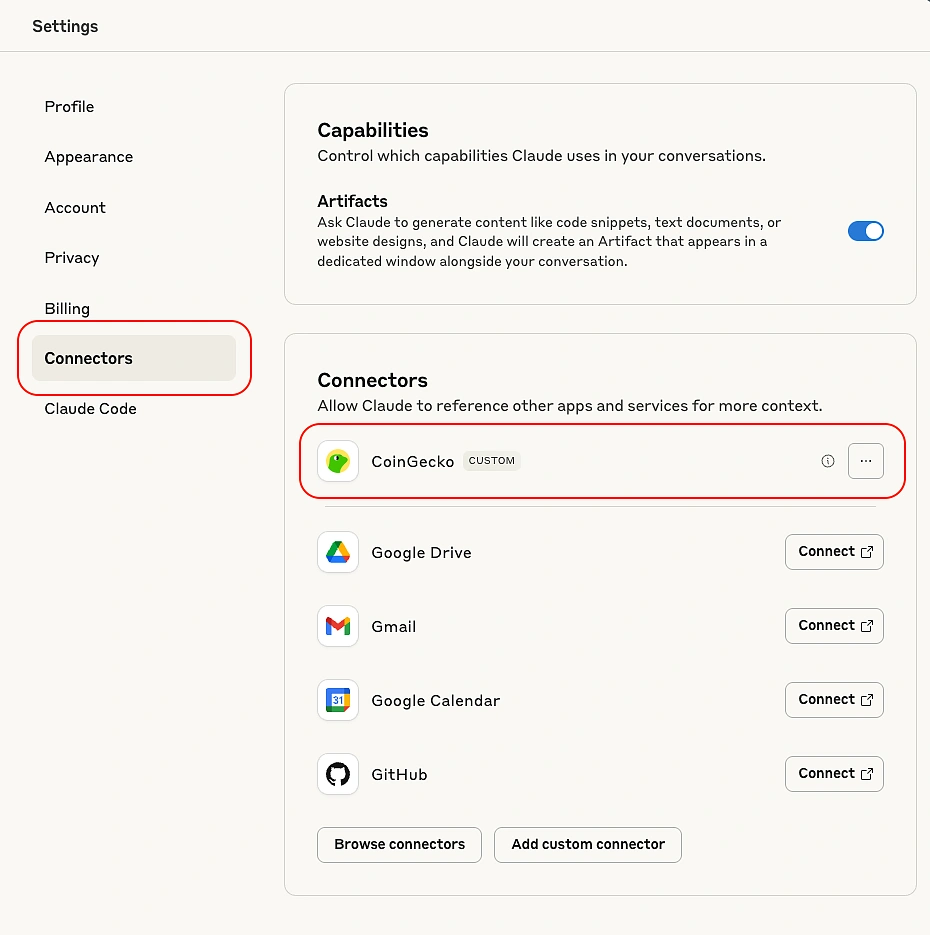
Once connected, you will see CoinGecko appear in your list of Connectors, indicating the connection was successful.
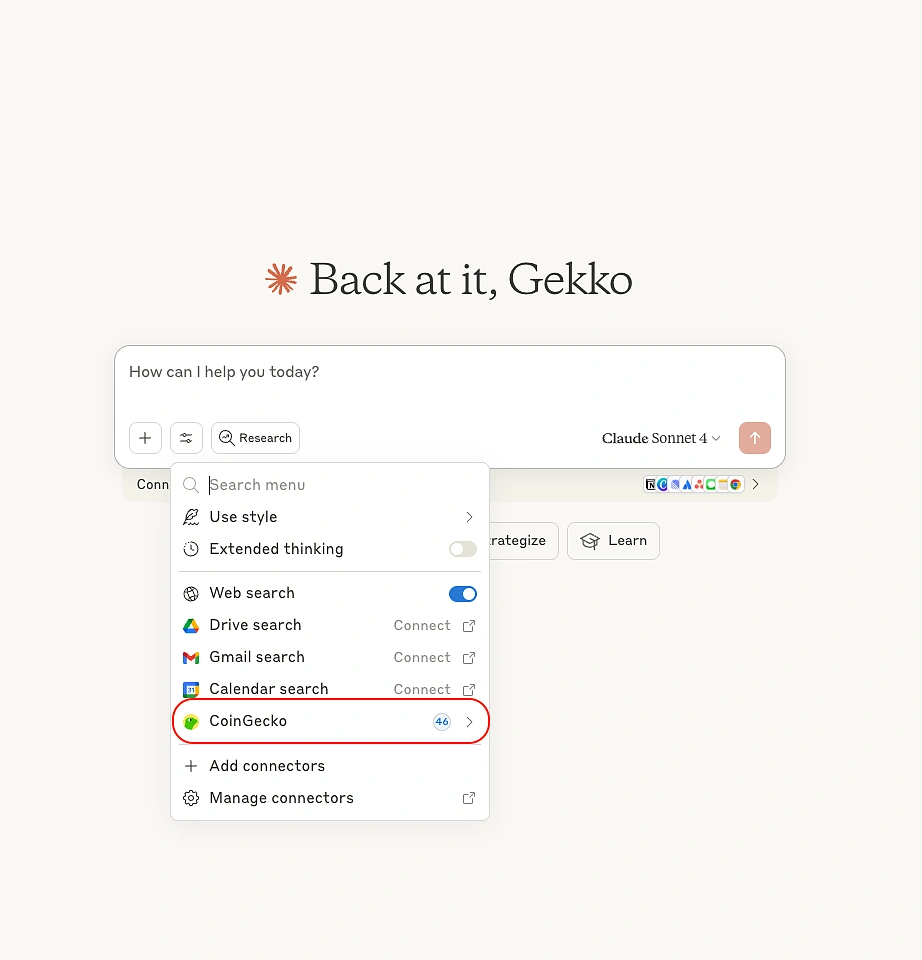
The CoinGecko logo will also be visible under the Search and Tools section of your chat interface.
Step 4: Test the Connection
Now let’s test it out with a simple prompt such as “What’s the current price of Bitcoin?”.
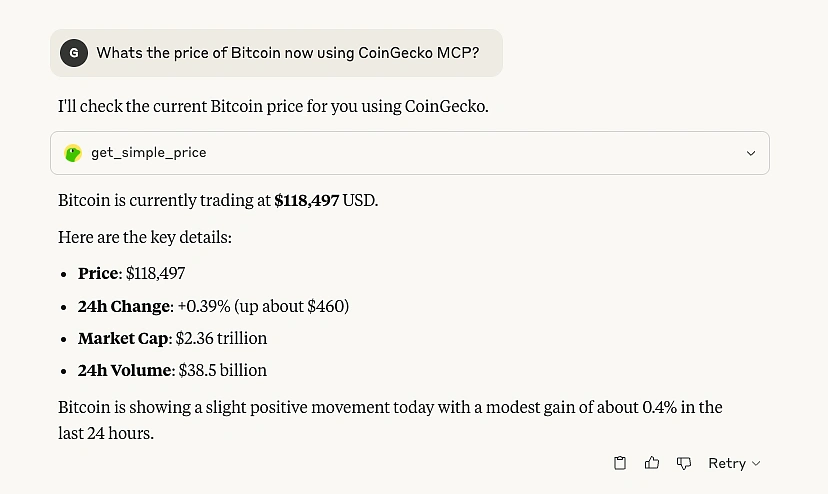
You will see that Claude used the get_simple_price tool from CoinGecko MCP to retrieve the current price of Bitcoin as instructed to provide an accurate and informative, human-readable response.

How to Use AI for Crypto Research
Below are some helpful prompt examples you can use for AI-powered crypto research. Each prompt uses specific, or a combination of CoinGecko MCP tools that correspond to CoinGecko API endpoints. Results generated by AI or LLMs should not be treated as financial advice, you should always do your own research.
Discover Newly Listed Tokens on CoinGecko
The following prompt can be used to discover and evaluate newly listed tokens on CoinGecko.
Prompt: “List the newest coins on CoinGecko and provide a quick analysis and score for each based on their market data, supply info, and trading activity.”
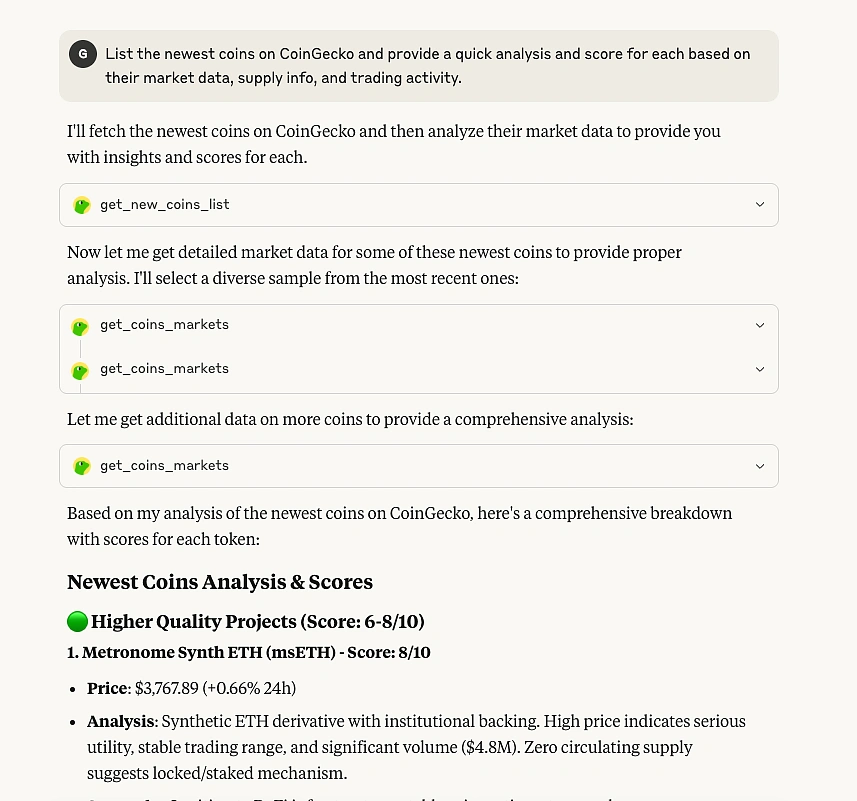

MCP tool used: get_new_coins_list, get_coins_markets
API Endpoint: /coins/list/new, /coins/markets
Assess Token Fundamentals
The following prompt can be used to assess whether a token shows credible fundamentals or warning signs before considering an investment.
Prompt: “Analyze the HYPE token. Highlight any red flags (e.g. missing supply info, low volume, extreme price volatility), and list any positive signs (e.g. consistent volume, verified metadata, healthy supply structure). Then, summarize whether this token is relatively safe to approach.”


MCP tool used: get_id_coins, get_coins_markets
API Endpoint: /coins/{id}, /coins/markets
Comparing Various Tokens
The following prompt can be used to compare tokens to determine which one has a stronger short-term growth potential based on recent market performance.
Prompt: “Compare the recent performance of BTC and ETH, including price and market cap trends. Based on the data, which one shows stronger signs of short-term growth over the next 30 days? Explain your reasoning.”


MCP tool used: get_simple_price, get_coins_markets
API Endpoint: /simple/price, /coins/markets
Discover Trending Tokens
The following prompt can be used to discover trending tokens on a network without broken supply dynamics.
Prompt: “From today’s trending tokens on Ethereum, show me those that have a verified max supply, circulating supply above 70%, and are priced under $5.”


MCP tool used: get_network_networks_onchain_trending_pools, get_id_coins
API Endpoint: /onchain/networks/{network}/trending_pools, /coins/{id}
CoinGecko MCP Example Use Case
To see what's possible with the CoinGecko MCP, let's look at how the team at Milkroad, a popular crypto newsletter, put it to the test. They used the CoinGecko MCP Server to build their own smart AI crypto researcher with Claude, making their workflow significantly faster and more efficient.
After running a few simple queries, they challenged the AI with a much more complex request. They prompted it to list down tokens with a circulating supply of at least 90% of the total supply and a market cap under $500 million. The prompt also specified that the tokens must be built on either the Solana or Ethereum blockchain, and have a positive price performance over the last seven days.
The results were impressive. Claude managed to deliver smart and accurate answers because the MCP gave it direct access to real-time, structured crypto data from CoinGecko.
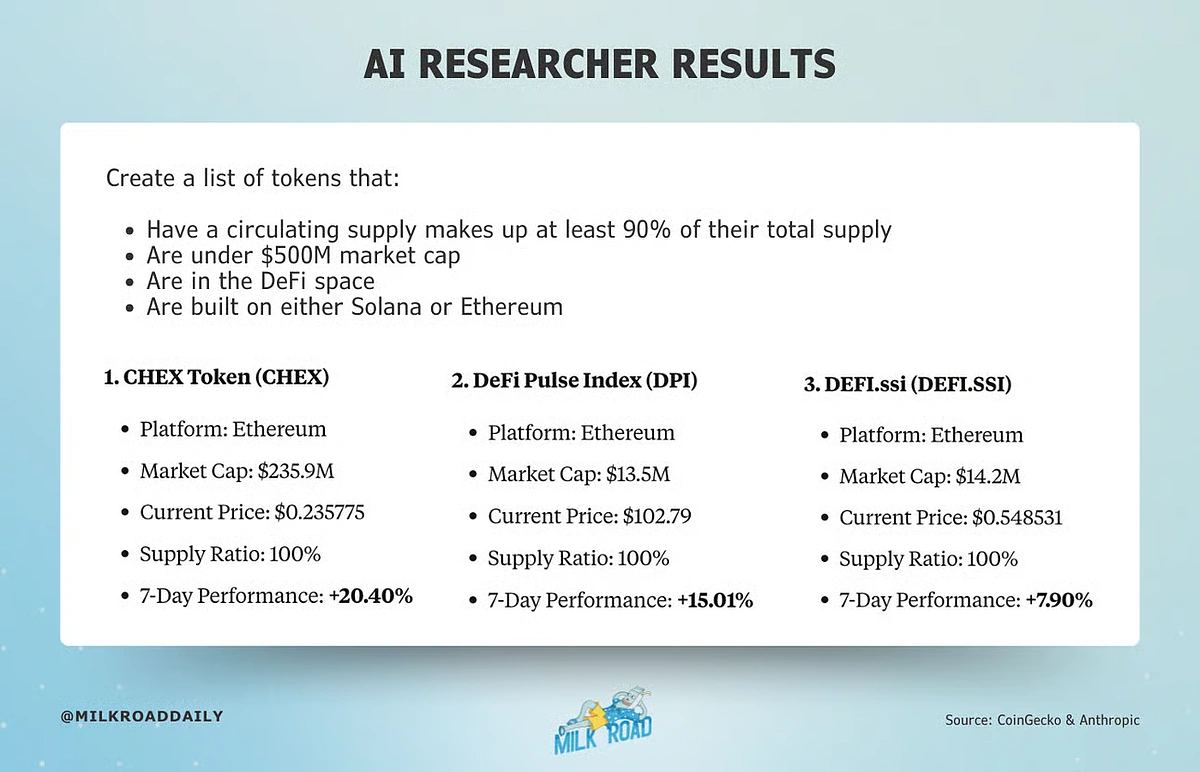
Image Source: Milkroad
Tips for Using CoinGecko MCP
To get the most out of the CoinGecko MCP, here are a few best practices to help you avoid common roadblocks and get better results.
1. Mind the Context Window and Token Limits
AI models like Claude have a limited context window, meaning they can only remember a certain amount of information at once. If you give them a very complex prompt, they might provide an incomplete response.
The best way to handle this is to break large queries into a sequence of smaller, multi-step prompts. For example, instead of asking for a complex analysis with the prompt “Give me a list and deep analysis for all DeFi tokens on Ethereum where the market cap is under $500M and the circulating supply is at least 90%.”, try the following sequence:
-
“List all DeFi tokens on Solana or Ethereum with their market cap and circulating supply.”
-
“From that list, filter for tokens where market cap is under $500M and circulating supply is at least 90%.”
-
“Conduct a deep analysis for each token from the final list.”
This approach keeps the AI focused and greatly improves the accuracy of its responses.
2. Specify Time and Date
Some AI models do not know the current time and date. Thus, requests like "last 7 days" or "this month" may be misinterpreted.
To get accurate, time-sensitive results, always provide specific date context. For instance, you could frame your question by stating the current date, such as “Today is July 21, 2025, show me the top performers from last week." A better way is to provide a precise date range, like "Analyze token performance between July 14, 2025, and July 21, 2025."
3. Usage of Static and Dynamic Tools
The MCP allows you to control which tools the AI has access to. For most tasks, allowing the AI to dynamically choose from a range of active tools works well. However, if you ever notice inconsistent results or slow performance, you can improve it by being more specific.
In those cases, try disabling the dynamic option and activate only the exact tools needed for your task. This gives you more direct control over the AI's behavior. You can learn more about managing static and dynamic tools.
Conclusion
The CoinGecko MCP unlocks real-time crypto data for AI tools and LLMs, making it a viable tool for effective AI crypto research. While this guide focused on research, the possibilities are far wider. Anyone without technical knowledge can now build sophisticated tools and agentic apps that have access to real-time market data through AI. This makes the crypto space more accessible than ever.
If you're ready to make the most of our MCP, consider subscribing to a paid API plan to unlock higher rate limits and access to exclusive MCP tools and API endpoints.







 Or check it out in the app stores



