



 Make us preferred on Google
What Is Bitget Wallet?
Bitget Wallet is an everyday finance app designed to make crypto simple, secure, and usable in daily life. Serving more than 90 million users worldwide, it offers an all-in-one platform to send, spend, earn, and trade crypto and stablecoins through blockchain-based infrastructure.
With global on- and off-ramps, the app enables faster and borderless onchain finance, supported by advanced security and a $700 million user protection fund. Bitget Wallet operates as a fully self-custodial wallet and does not hold or control user funds, private keys, or user data. Transactions are signed by users and executed on public blockchains.
Key Takeaways
-
Bitget Wallet is available on iOS, Android, and as a browser extension, supporting both mobile-first and desktop users.
-
The wallet operates under a fully self-custodial model, with private keys controlled solely by users and secured through TEE-based key isolation and encryption. It also supports instant wallet creation via social accounts — email, Google, and Apple.
-
Security features include contract verification, approval checkers, default MEV protection, and a user protection fund backed by 6,500 BTC, valued at over $700 million during 2025.
-
Bitget Wallet supports everyday crypto payments, including crypto cards, QR payments, bank transfers, and in-app shopping, making it one of the most comprehensive payment-enabled self-custodial wallets available.
-
Users can earn yield through integrated staking and stablecoin products such as Stablecoin Earn Plus, alongside multi-chain DeFi strategies.
-
Trading is powered by Bitget Wallet DEX, which aggregates liquidity from hundreds of decentralized exchanges and supports cross-chain swaps, tokenized real-world assets, and perpetuals trading, complemented by AI-driven market insights.
This article is brought to you by Bitget.

Bitget Wallet Security
Security is top priority for crypto wallets, and Bitget Wallet uses advanced encryption technology to safeguard users’ private keys.
Advanced Encryption With DESM Technology
Bitget Wallet’s encryption technology is known as the Double Encryption Storage Mechanism (DESM). DESM synergizes multiple encryption technologies to offer top-level security for wallet keys, with multiple layers of protection and using cloud-based authentication to verify and store the encrypted data, ensuring that even Bitget Wallet developers cannot access the unencrypted keys.
TEE Hardware-Based Key Protection
In addition to DESM, Bitget Wallet uses Trusted Execution Environment (TEE) technology to isolate and protect private keys in a secure hardware enclave. Keys are generated and stored inside the TEE and never leave the secure environment, even during signing operations. This prevents exposure to the device OS, malware, or external tampering, significantly enhancing the security of self-custodial key management.
PIN and Biometric Lock
Bitget Wallet features a lock system that allows users to safeguard their assets using PIN and biometrics. The PIN lock is available on the mobile wallet and browser extensions, and the mobile wallet also supports biometric locks, allowing users to protect their wallets with biometrics — like a fingerprint. Entering these is required to approve transactions within the Bitget Wallet.
MEV Protection
Bitget Wallet’s multichain MEV protection feature safeguards users from MEV attacks by integrating private transaction relays and anti-MEV mechanisms, preventing front-running and ensuring fair trade execution with minimal slippage.
Approval Detection
Bitget Wallet's upgraded approval detection lets users review all past DApp and token approvals, see risk levels (Low/Medium/High), and revoke unnecessary or unsafe permissions in one tap—helping reduce exposure from high-risk authorizations such as unlimited token transfers and NFT transfer rights.
Token Contract Risk Detection
Bitget Wallet's token contract risk detection helps users screen tokens for potential risks before interacting, now supporting Ethereum, Solana, BNB Chain, Base, Polygon, and Arbitrum. Built into the token candlestick chart interface, it surfaces key contract indicators — such as permission status, top-holder distribution, and burn ratios — to flag warning signs like excessive centralization or active minting permissions, giving users clearer insight and control in an increasingly complex token landscape.
Authorization Checker
The authorization checker reviews smart-contract request approvals granted by users, especially ones that are not terminated immediately. These approvals could allow access to users' assets, enabling foul players to drain wallets through the approval contract. With the authorization checker, Bitget Wallet users can protect themselves from this risk by regularly reviewing their smart contract approvals and terminating sessions that are no longer needed.
$700 Million User Protection Fund
Bitget Wallet shares a Protection Fund with Bitget ecosystem, backed by 6500 BTC, valued at $700 million on average during 2025. This fund serves as a financial safeguard, offering compensation in case of platform-related security incidents, reinforcing Bitget Wallet's commitment to user protection.
Installing and Setting Up Bitget Wallet
Interested in using the Bitget Wallet? Now, let’s look at how you can set up your Bitget account — the process is the same across the web and app versions.
Installing the Bitget Wallet
-
Visit the official download portal to install the wallet.

-
Select your device and follow the guidelines in the section to download.
If you are installing the wallet for your mobile device, it is recommended that you download it via official app stores and ensure that the wallet is developed by Bitget Wallet.
Once the download and installation process is complete, the wallet will be ready for use.
How to Set Up Your Bitget Wallet
Open the Bitget Wallet application to commence the setup process.
-
To set up a new wallet, tap Create a Wallet from the startup menu, or choose to log in with your social account.
-
Set a password for your wallet. While you can use the wallet without backing up immediately, it is recommended that you back up your wallet's seed phrase.
-
If you have not created a wallet using your social account, tap on Back up now to back up your seed phrase. Follow the prompts to see your seed phrase. Write down your seed phrase in the correct order on a durable physical medium (e.g., paper). Make multiple copies and store them separately and safely. Tap Next to continue.
-
On the next page, confirm your seed phrase as requested and tap Complete verification to start exploring Bitget Wallet.

How to Import an Existing Wallet to Bitget Wallet
Open the Bitget Wallet app to start the setup process.
-
If you already have a wallet from another app, tap Import wallet from the startup menu.
-
Set a passcode for your wallet.
-
You can import your wallet using the seed phrase or private key.

Buy and Sell Crypto With Bitget Wallet
Gas Abstraction: Stablecoin-Based and Zero Gas
Bitget Wallet offers full multichain gas abstraction across 8 major networks, allowing users to pay gas fees directly with stablecoins such as USDT and USDC or with BGB, without needing to hold native tokens. The wallet also provides a "gasless" experience on 6 networks through daily gas-fee waivers and wallet-sponsored transactions, enabling seamless transfers, swaps, and dApp interactions.
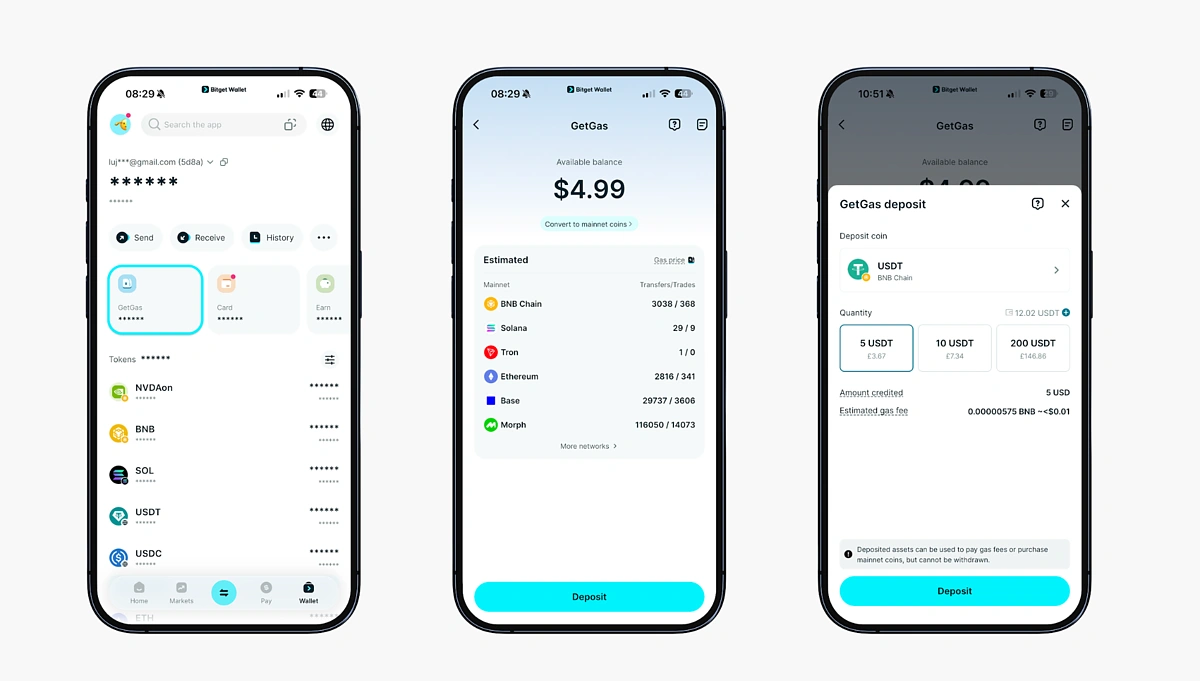
Complementing this system is GetGas, Bitget Wallet's gas top-up feature that lets users pre-fund gas using USDT, USDC, ETH, or BGB across 14 supported networks. GetGas enables smooth transfers, swaps, and dApp interactions, offering additional flexibility for users who prefer maintaining a dedicated gas balance.
How to set up GetGas
-
Tap GetGas from your wallet dashboard. The GetGas page features supported assets that can be used to fund your gas account.
-
You can fund your GetGas account using any of the supported assets. Tap Deposit to fund your account.
-
Select the asset, network, and amount you wish to deposit to continue. Then follow the prompts to complete the process.
Pay With Bitget Wallet
Bitget Wallet provides a full suite of payment tools that make crypto usable in everyday life. Users can spend, transfer, or shop with digital assets through the Bitget Wallet Card, QR payments, bank transfers, and the in-app Shop, offering one of the most complete payment stacks available in a self-custodial wallet.
Bitget Wallet Card
The Bitget Wallet Card enables users to spend crypto like cash at millions of merchants worldwide. Issued through licensed partners on the Mastercard and Visa networks, the card converts USDT or USDC to fiat at settlement and can be used for online purchases, subscriptions, travel, and NFC payments via mobile wallets.
The card is available in multiple regions and supports over 50 markets across Europe, Latin America, and Asia Pacific. It is managed fully inside the Bitget Wallet app and integrates with Apple Pay, Google Pay, PayPal, Alipay, WeChat Pay, and Line Pay. Users receive a 0-fee spending allowance each month (amount dependant on region), which refunds FX, top-up, and conversion fees, enabling near-spot-rate crypto spending without hidden markups.
How to apply for the Bitget Wallet Card
-
Download, install, and set up the Bitget Wallet app.
-
Tap the Wallet icon on the bottom menu, then tap Card.
-
Choose your region, and then tap Apply now to continue.
-
Follow the steps to enter your information and verify your identity. Once approved (typically within minutes), you can then add funds to your Bitget Wallet Card and start using it internationally.

QR Payments
Bitget Wallet supports crypto payments via QR codes in regions integrating national QR systems such as Pix (Brazil), VietQR (Vietnam), QRPh (Philippines), and Solana Pay. Payments settle in stablecoins or supported assets, and merchants will receive the payment in their local currency – offering fast, low-cost transactions similar to mobile banking apps.
Bank Transfers
In supported regions, Bitget Wallet allows users to convert crypto to local bank currencies and send funds directly to bank accounts. This includes partners supporting corridors such as Nigeria and Mexico, enabling stablecoin-to-fiat transfers inside the app without external exchanges.
In-App Shopping
The Shop section in Bitget Wallet lets users spend crypto on everyday products, including gift cards, mobile top-ups, game credits, entertainment subscriptions, and travel bookings. Purchases are settled instantly in crypto, giving users practical, day-to-day utility for their assets.
Earn With Bitget Wallet
Bitget Wallet offers a simplified earning experience that consolidates mainstream yield products into one interface. It integrates with leading protocols such as Aave, Lido, Morpho, JupiterLend, and Kamino, to provide diversified APYs ranging from 3% to 10% across major blockchains.
Stablecoin Earn Plus
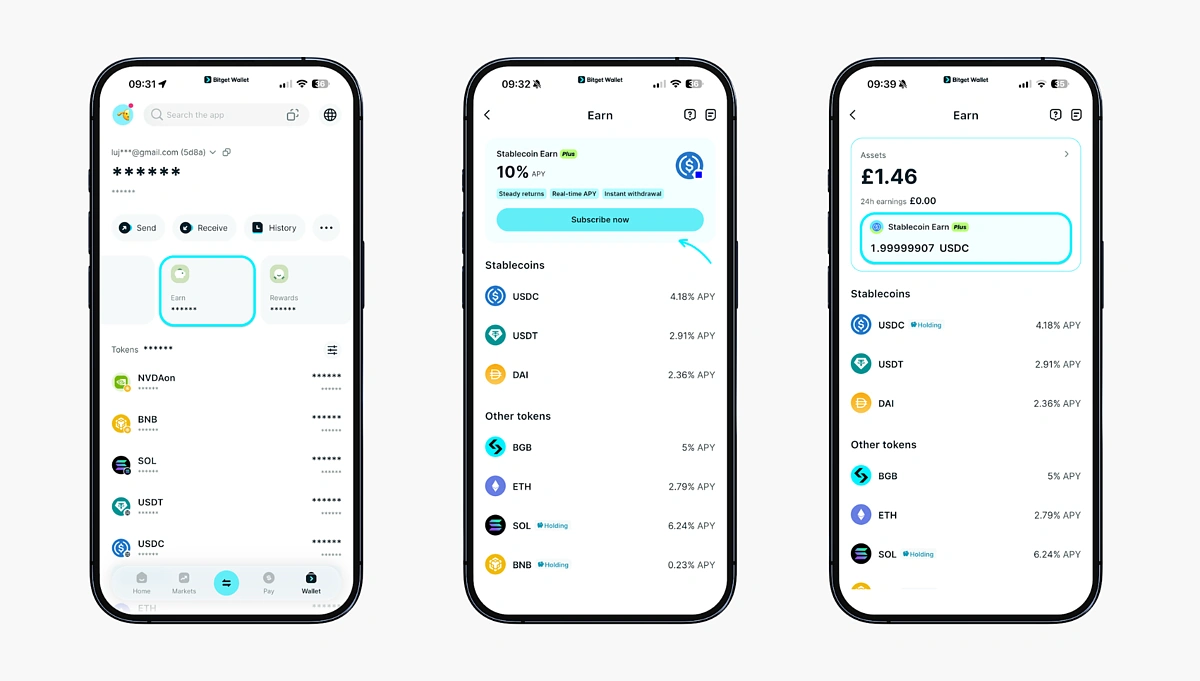
Stablecoin Earn Plus offers users a straightforward way to earn up to 10% APY on USDC with instant withdrawals. Stablecoin Earn Plus sources its yield from Aave, one of the largest DeFi protocols, and earnings update in real time through a dashboard that displays yield, performance charts, and gain history.
How to subscribe to Stablecoin Earn Plus in Bitget Wallet
-
Download and set up Bitget Wallet.
-
Swap other assets into USDC (Base network) with Swap + Bridge or tap Add funds on Home to buy directly using Google Pay, Apple Pay, credit cards, ban transfers, or your preferred method locally.
-
From Wallet, tap Earn. Then tap Subscribe now on Stablecoin Earn Plus.
-
Enter the amount of USDC you want to subscribe with. Confirm the transaction; your subscription begins earning yield immediately.
-
Withdraw anytime with instant redemption.
Trade With Bitget Wallet
Bitget Wallet supports both intrachain and cross-chain trading directly within the wallet, allowing users to swap, bridge, and trade assets without relying on centralized exchanges. Trading tools are available through the in-app Swap + Bridge interface, which provides more advanced features and market data.
-
Tap the Trade icon on the bottom menu to go to Swap + Bridge.
-
Select the tokens and their corresponding networks you wish to swap. Then enter the amount you wish to swap and tap Trade to continue.
-
Review the details of the swap and tap Confirm.
-
You will receive the swapped assets once the transaction is confirmed on both networks.

Tokenized Real-World Assets (RWAs)
Bitget Wallet also supports tokenized real-world assets, allowing users to trade blockchain-based representations of traditional financial instruments such as U.S. stocks, ETFs, and commodities. These assets are accessible directly from Bitget Wallet's Trade section and settle onchain, offering users exposure to off-chain markets without leaving a self-custodial environment.
How to buy tokenized stocks on Bitget Wallet
-
Go to Trade > Stocks
-
Choose the tokenized stock, set Buy, choose payment token, enter amount, and pick if you want to place a Market or Limit order.
-
Tap Settings to set expiry time and slippage; tap the candlestick icon to view chart details.
-
Tap Buy to review, then Confirm to place the order. You can then track status and positions on the Stocks page in your wallet.

Perps Trading
For advanced users, Bitget Wallet integrates onchain perps trading, supporting hundreds of perps pairs across crypto assets and select RWAs. Users can access leverage, real-time funding rates, and advanced trading views while maintaining custody of their funds.
How to trade perps on Bitget Wallet
-
Go to Markets to search/browse perps pairs (filter by categories like New, Stocks, or Metals), tap a pair to view details, then tap Buy long or Sell short to enter the trading page.
-
Fund your perps account: Follow the prompts to deposit to your perps account.
-
Select the pair: Choose from Cross/Isolated margin and set leverage.
-
Choose order and place it: Select Limit/Market/Trigger, enter price and amount (margin auto-calculates), then tap Buy long or Sell short and Confirm.

Alpha
Alpha is Bitget Wallet's advanced analytics and signal layer, designed to help users identify early trends and manage risk. It consolidates:
-
Real-time alerts on emerging tokens and unusual trading activity
-
Liquidity inflows and onchain volume spikes
-
Risk indicators related to contracts and token behavior
Alpha enables users to act on signals directly, whether by placing swaps, setting limit orders, or monitoring developing market narratives — all without leaving the wallet.
Final Thoughts
Bitget Wallet has grown beyond a standard crypto wallet, positioning itself as an everyday finance app that brings trading, earning, and payments into one self-custodial interface. With features like Stablecoin Earn Plus and real-world payment options, the wallet reflects a broader shift toward making blockchain-based finance usable in day-to-day life. Overall, Bitget Wallet offers a well-rounded, accessible option for users seeking a single app to manage and invest in digital assets, earn yield, and make everyday payments onchain.
That said, as with any self-custody solution, users remain responsible for securing their own assets. Bitget Wallet provides safeguards such as TEE-based key protection, contract verification tools, and an approval checker, but best practices — verifying dApps, reviewing permissions, and following proper security hygiene — still matter.
This article only reviews Bitget Wallet and its features for educational and informational purposes only and should not be taken as financial advice. Always do your own research before using any cryptocurrency product.







 Or check it out in the app stores



