



“What if you had access to a community-driven AI that never sleeps—monitoring over 1000+ crypto assets to provide clear, transparent market intelligence and insights when you need it?”
In this guide, we’ll walk you through creating your own Crypto Research AI Agent — a decentralized AI Agent that quickly fetches key insights and real-time information about any cryptocurrency you want to research leveraging the tools below
-
CoinGecko’s API to obtain real-time market data, including token prices, market cap, historical performance, and more.
-
Chromia’s Vector Database for managing embeddings and retrieving semantic cryptocurrency data from a decentralized node with powerful vector search capabilities.
Want to see it in action? Try out the live demo.

What is a Vector Database?
A vector database is a type of database optimized for storing and querying high-dimensional data—typically represented as numerical vectors. By converting data into vectors, the database captures semantic relationships and patterns. This facilitates fast similarity searches and is especially useful for machine learning and AI applications.
A centralized vector database typically stores and processes data in a single location or under a single authority, which introduces several potential drawbacks:
-
Single Point of Failure: If the central server experiences issues or attacks, the entire system may become inaccessible or compromised.
-
Limited Data Ownership: Users have less control and transparency over their data since it resides in a centralized location managed by a third party.
Chromia’s Vector Database uniquely combines the proven reliability of PostgreSQL and the decentralization of blockchain, enabling next-generation AI & crypto applications. The extension allows for the efficient storage and querying of complex multi-dimensional data in a decentralized approach.
-
Enhanced Security: With no single point of failure, the risk of downtime or data breaches is reduced as the data is spread across multiple nodes.
-
Data Ownership: Users gain full control over their data, with the transparency that comes from having it distributed rather than centralized.
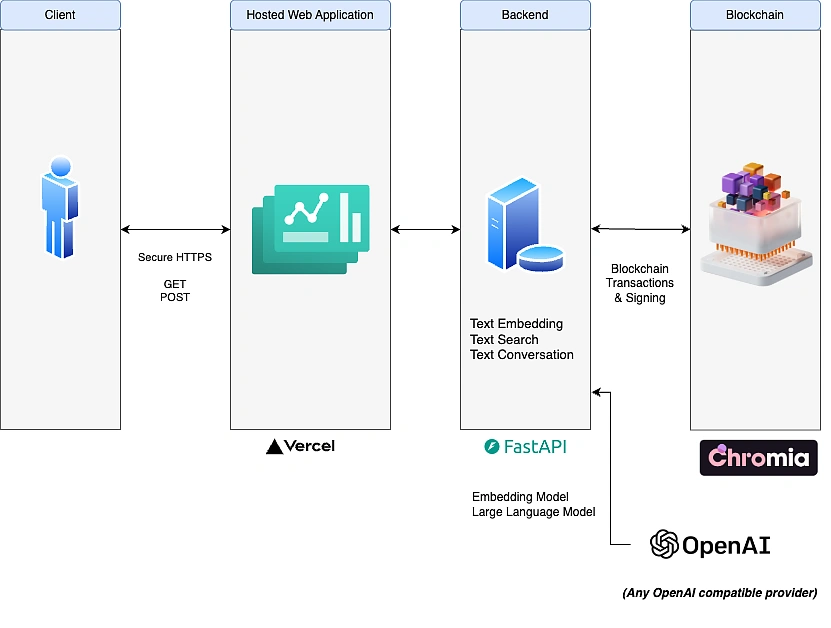
In this guide, we will build a Research Agent application, using a Python backend (REST API built with FastAPI) and a modern React frontend.
Features of our Research Agent
-
Decentralized Vector Database: Stores and retrieves cryptocurrency information using Chromia blockchain
-
Market Data Integration: Provides real-time pricing via CoinGecko API
-
Natural Language Query: Powered by LLM to have natural language conversations
As usual, all the code is open-source and is available at the end of this blog.
Pre-Requisites
Before starting, you’ll need:
-
CoinGecko API account and API Key (Free Demo or Paid analyst key)
-
Python installation (Python 3.10+)
-
Node.js & npm (React frontend)
Step 1. Setup Chromia’s Vector Database Extension
You will need to set up a PostgresQL database following this guide. For a seamless development experience, we recommend using Docker to simplify the setup process.
Run the following command to pull and start a PostgreSQL container:
You will need to install the Chromia CLI to execute some of the commands related to the vector search which will be used by our Research Agent.
The guide to installation is here. Docker can run a standalone Linux container with the Chromia CLI pre-installed. Make sure that you have set up the PostgreSQL database.
Once you have both PostgreSQL and Chromia’s CLI installed, you can follow this guide on how to run a local node for development where the Vector Database extension can be installed.
Step 2. Embed Crypto Historical Data
Create a sample data that needs to be embedded in the Vector Database to be retrieved by the AI Agent later on for the research.
You can refer to this sample over here where it contains some basic historical data about Bitcoin and Ethereum.
Once the data is prepared, you can create helper function to generate the vector embeddings using the LLM of your choice (here we used OpenAI text embedding with dimension 1536)
These functions can be used to generate the embedding and store the embedding in the blockchain of your local running node. Each successful embedding will result in a transaction id which indicates the success of the operation. However do note that the Docker node has non-persistant storage which means the data will be erased if the container is closed.
Step 3. Setup Real-time Price API Functions
Using the class below, there are multiple methods that can be used in the Research Agent as part of to retrieve the latest price information from CoinGecko’s API. Currently there are methods that can retrieve prices, market data, and coin details.
get_coin_id(name): Retrieves the API ID for a given coin name or symbol
get_price(coin_id, vs_currencies): Gets current price and market stats
get_coin_data(coin_id): Fetches detailed information about a specific coi
Note on API Endpoint - The class is configured to use the Pro API endpoint. If you're using the free tier, change BASE_URL to https://api.coingecko.com/api/v3.
Step 4. Setup the FastAPI Backend
Create respective Pydantic models that will validate the input and response of the APIs to make sure we are handing the inputs correctly to our Research Agent.
We will now create a few endpoints to add the text embedding and conversation functionalities and expose it via REST to enable our frontend to use it
Helper Functions
There are 2 helper functions that help to generate the responses from the LLM and to extract the coin symbol or ‘token’ from the user’s questions. We’re using LLM to perform this task as part of the pre-processing in the whole workflow
1. Extract Coin Symbol
By using a zero-temperature system prompt, it extracts cryptocurrency mentions and standardizes them through a symbol-to-name mapping system, ensuring compatibility with the CoinGecko API.
2. Generate Realtime Responses
This function creates comprehensive, context-aware answers about cryptocurrencies:
Combines three key information sources:
-
Vector database search results (historical/factual information)
-
Real-time market data (prices, 24h changes)
-
The original user question
Essentially acts as the "brain" of the system, turning raw data into helpful, conversational cryptocurrency insights while maintaining accuracy and avoiding speculation.
Text Embedding Endpoint
This endpoint stores cryptocurrency information in the Chromia vector database. It converts text into a numerical vector representation using OpenAI's embedding model and saves it to the blockchain for later retrieval. Use this endpoint to populate the knowledge base with cryptocurrency facts, historical data, and technical information. This will be core knowledge of the Research Agent.
Text Search Endpoint
This endpoint performs semantic search against the stored cryptocurrency information. It converts your query into a vector and finds the most semantically similar content in the database. This would retrieve the closest text that is related to the questions for the Research Agent
Text Conversation Endpoint
This endpoint provides AI-generated answers to cryptocurrency questions enriched with current market data. It:
-
Identifies cryptocurrencies mentioned in the question
-
Retrieves relevant information from the vector database
-
Fetches current market data from CoinGecko API
-
Generates a comprehensive answer using AI that combines historical context with current market information
This is the most powerful endpoint, ideal for creating conversational interfaces about cryptocurrencies with up-to-date market information.
You can start the development server by just running the command below
Step 5. Setup the Frontend for the Research Agent
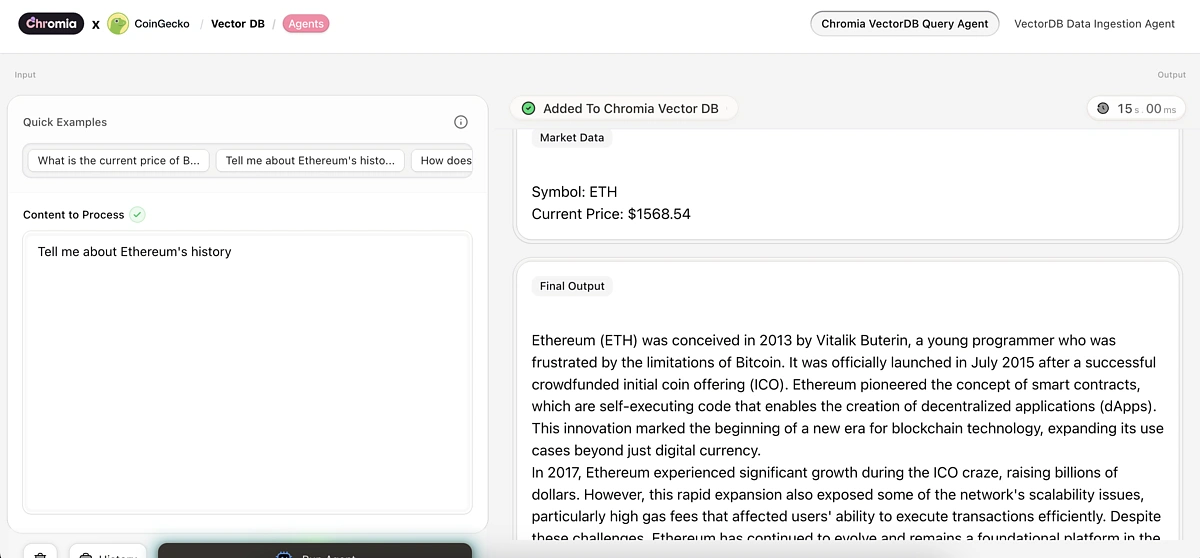
The main functionality centers around two primary features - Asking questions about cryptocurrencies and adding information to the knowledge base. These are built using APIs that make requests to the backend server.
You can setup the frontend with these simple command
npm run build
npm run dev
Once installed, you can open your browser and navigate to http://localhost:5173. Make sure to start the development server for the backend before testing this application to ensure the endpoints works as expected.
The frontend communicates with the backend through the following endpoints:
- /v1/text_search - Search for related crypto information
- /v1/text_embedding - Add new information to the vector database
Conclusion
We have successfully built your own Crypto Research Agent capable of providing rapid and insightful market research on any cryptocurrency using real-time price data.
What’s next?
-
Extend Research Agent capabilities for web search
Want to dive deeper or add your own features? This project is fully open-source, and we encourage participation. Get the source code from our GitHub repo.







 Or check it out in the app stores



