





 Make us preferred on Google
Many crypto search bars offer a poor user experience by only accepting contract addresses. Users expect to search by a coin or token's name or symbol (like 'WIF' or 'PEPE'), not a complex contract address they have to find elsewhere.
In this guide, we’ll show you how to use the CoinGecko API to build a comprehensive token search engine. This solution provides the widest coverage, querying over 17 million crypto assets across 250+ chains, which eliminates friction and delivers a smooth user experience.
Prerequisites
-
A CoinGecko API Key
-
Node.js + npm
How to Build The Best Token Search Engine?
To build the best token search engine, leverage a solution like CoinGecko API's coins and tokens search endpoints. This approach provides several key benefits:
-
Wide Token Coverage: Access a vast dataset of established cryptocurrencies (via /search) and millions of long-tail onchain tokens across 250+ chains (via /onchain/search/pools). This dual-endpoint approach gives users access to virtually any token they seek.
-
Superior User Experience: Allow users to search intuitively by token name or symbol (e.g., WIF or PEPE), not just complex contract addresses. The API handles typos and ranks results by relevance, mirroring the seamless experience on CoinGecko.com.
-
Built-in Trust & Security: Keep results relevant and safe. Leverage CoinGecko’s onchain security features, such as honeypot checks and trust scores, to filter out potential scams and malicious assets.
-
Scalability & Cost-Effectiveness: Avoid the immense complexity and expense of building and maintaining your own cross-chain search infrastructure. The CoinGecko API offers a scalable, cost-effective solution, allowing you to focus on building core features for your application.
How to Search for Established Coins and Tokens?
To search for established cryptocurrencies, Exchanges, NFTs, and categories listed on CoinGecko, use the /search endpoint.
Here’s a minimal working example:
Below is an example response when searching for a coin named 'possum':
How to Search for Onchain DEX Tokens and Pools?
To search for long-tail tokens and liquidity pools listed on GeckoTerminal, use the /onchain/search/pools endpoint:
Below is an example response for the same 'possum' query:
Building a Unified Token Search Engine
By combining the above two endpoints, you can build a powerful, intuitive search bar that delivers a superior user experience, allowing you to quickly scaffold a modern web application.
To demonstrate this, we'll build a hands-on visual example using SvelteKit, but you may use any frontend framework you prefer.
Create a new SvelteKit project with npx sv create. For a quick start, use TypeScript and TailwindCSS, and copy the settings below:
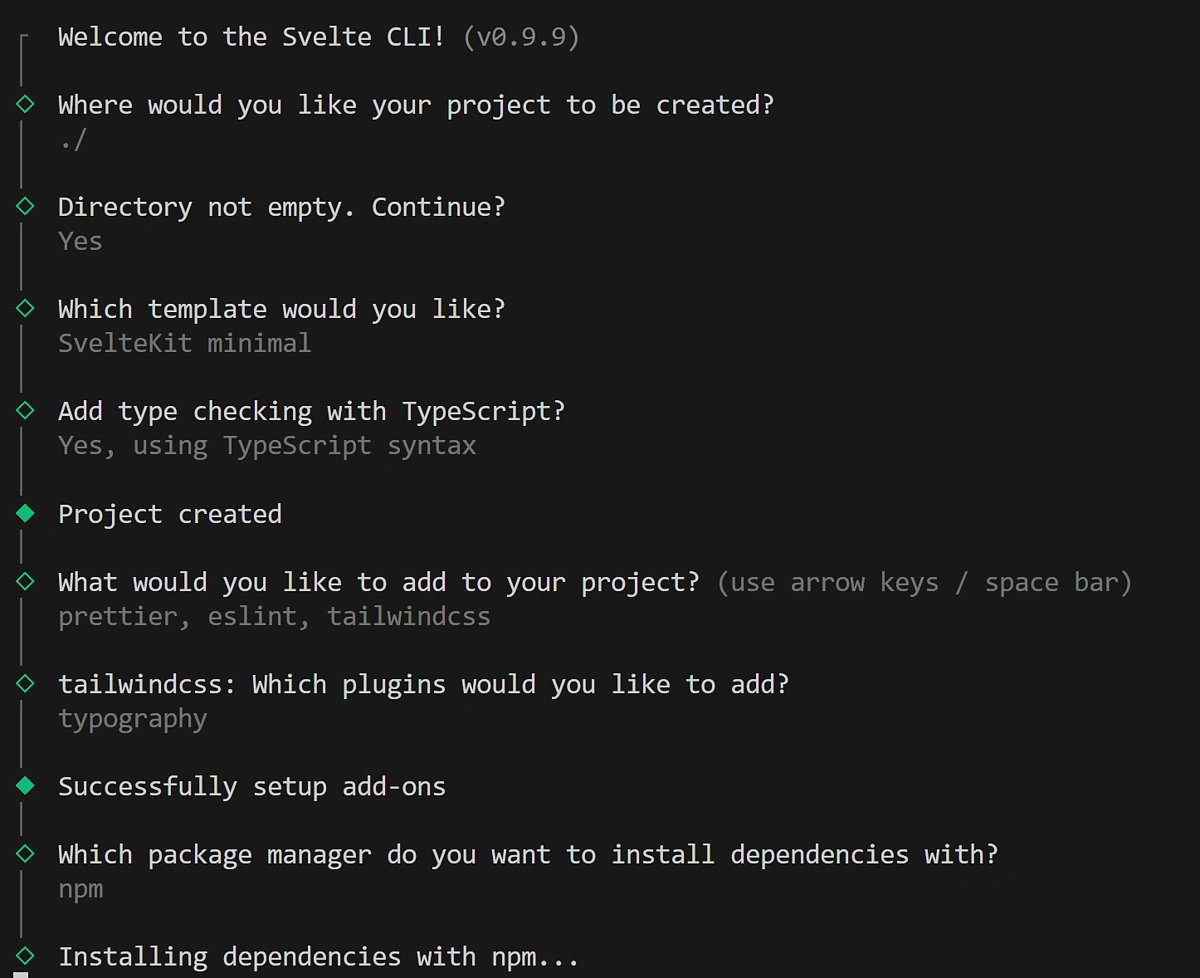
For our component library, we’re going to use Flowbite-svelte. It comes with many useful components for our token search engine, including a customizable search bar: npm i -D flowbite-svelte flowbite && npm i -D flowbite-svelte-icons.
Unifying CoinGecko API calls
Create a Coingecko class under src/providers/CoinGecko.ts
This class combines the two API call examples from above. This time around, however, we won’t be pasting the CoinGecko API key in plain text in the application.
Instead, we’re going to store it in a .env file at the root of our project, like so:
COINGECKO_API_KEY = "CG-API-KEY"
Next, we need to securely load the API key without ever exposing it to the client. Inside the src/routes directory, create a new file named +page.server.ts. This file should sit at the same level as your +page.svelte, where we will be building the UI for our search bar.
This file runs exclusively on the server. It handles all communication with the client side, taking care of search and onchain requests and sending the results back to the user.
Defining the Search and Onchain responses
Under src/types create a file called search.ts. This will define the response from the search endpoint.
Next, let’s define the onchain response in onchain.ts:
We define these types to ensure type safety, improve code clarity, and make our API responses easier to work with.
Building the user interface
The user interface consists of three main components: one for displaying the search response, another for rendering the onchain response, and a final component that combines them into a unified interface with a modern search bar.
src/lib/CoinList.svelte
src/lib/OnchainPoolList.svelte
src/routes/+page.svelte
This file serves as the main entry point for our UI. If it already exists in your project, you can replace its contents with the code below.
You should now be able to run your application locally with npm run dev and navigating to http://localhost:5173/ in your browser.
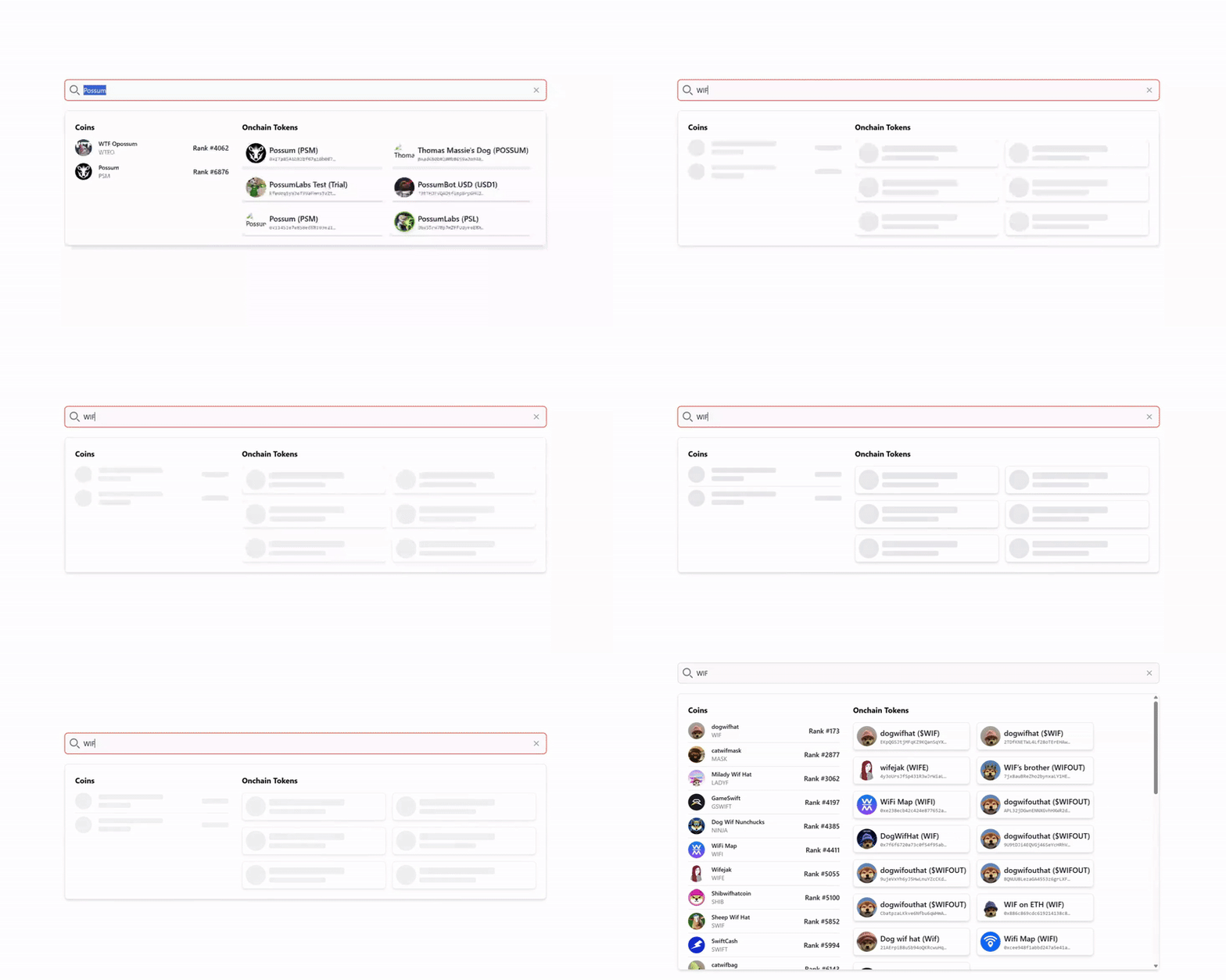
Type something in the search bar, and the result should start auto-populating. Click on a token to view it in the relevant onchain explorer.
How to Filter Out Scam or Malicious Tokens?
You can filter out scam or malicious tokens by using CoinGecko API’s /networks/{network}/pools/{pool_address}/info endpoint. This endpoint provides crucial safety data for onchain tokens, which you can evaluate using the following fields:
-
gt_score: A GeckoTerminal trust score (0-100) based on liquidity, volume, age, and community signals.
-
is_honeypot: instantly flags tokens that trap users (e.g., 99% sell tax).
Here’s a simple function that applies a filter for the GeckoTerminal trust score (gt_score) and the is_honeypot flag to check if a pool is safe:
Your application can be easily extended to include this safety check by adding this method to the CoinGecko class and calling it before rendering the search results.

Conclusion
A better user experience for crypto search bars is possible with the right tools, and searching by name should be the standard rather than the exception. By using the CoinGecko API and combining the /search and /onchain/search/pools endpoints, developers can build an industry-leading token search feature that is powerful, secure, and user-friendly without the cost and overhead of building their own data infrastructure from scratch.
When you're ready to launch a production-ready search feature in your application, consider subscribing to a CoinGecko paid API plan. This will unlock the higher rate limits and exclusive endpoints needed for production-scale projects.






 Or check it out in the app stores



