





 Make us preferred on Google
We analyzed thousands of developer queries to identify the technical roadblocks that aren't always obvious in a standard API documentation.
Here you’ll find common questions and challenges when integrating the CoinGecko API, along with guidance on how to resolve them or optimize your implementation. If you can’t find what you need here, check the CoinGecko API FAQ page or submit a ticket to our API support team.
How do I check if data for a specific coin or token is available on the CoinGecko API?
To check if data for a specific coin or token is available on the CoinGecko API, simply search for it using either our API endpoints or our websites. You can query the API with the token name or contract address to see if it returns a match, or manually check on CoinGecko or GeckoTerminal to confirm whether the token is listed. You may also reference this list to check if the token you’re looking for is supported.
Checking for availability via API
Use the /search endpoint and enter either the coin or token name or ticker symbol in the query parameter. This will return a list of available coins and tokens that match your search.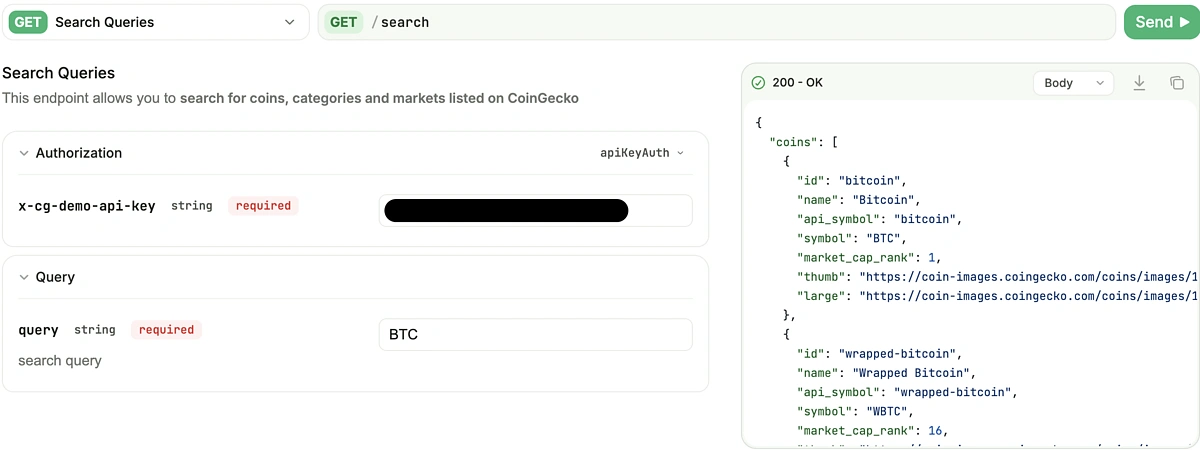
To check availability for most long-tail tokens and memecoins, you can use the /onchain/search/pools endpoint and provide the token name, ticker symbol, token contract address, or specific pool contract address in the query parameter. This will return a list of available pools that match your search.
Checking for availability via CoinGecko or GeckoTerminal
If you prefer a quick check without writing any code, you can also validate this by manually searching on our websites. In general, data for coins and tokens available and ‘listed’ on our websites will be available via our API as well.
Step 1: Check CoinGecko.com (For Listed Assets)
Search for your desired asset on the webpage. The ‘coin ID’ for that asset can be found on its dedicated coin page (labeled as “API ID”) and is required in most API endpoints to fetch specific data for a coin or token. 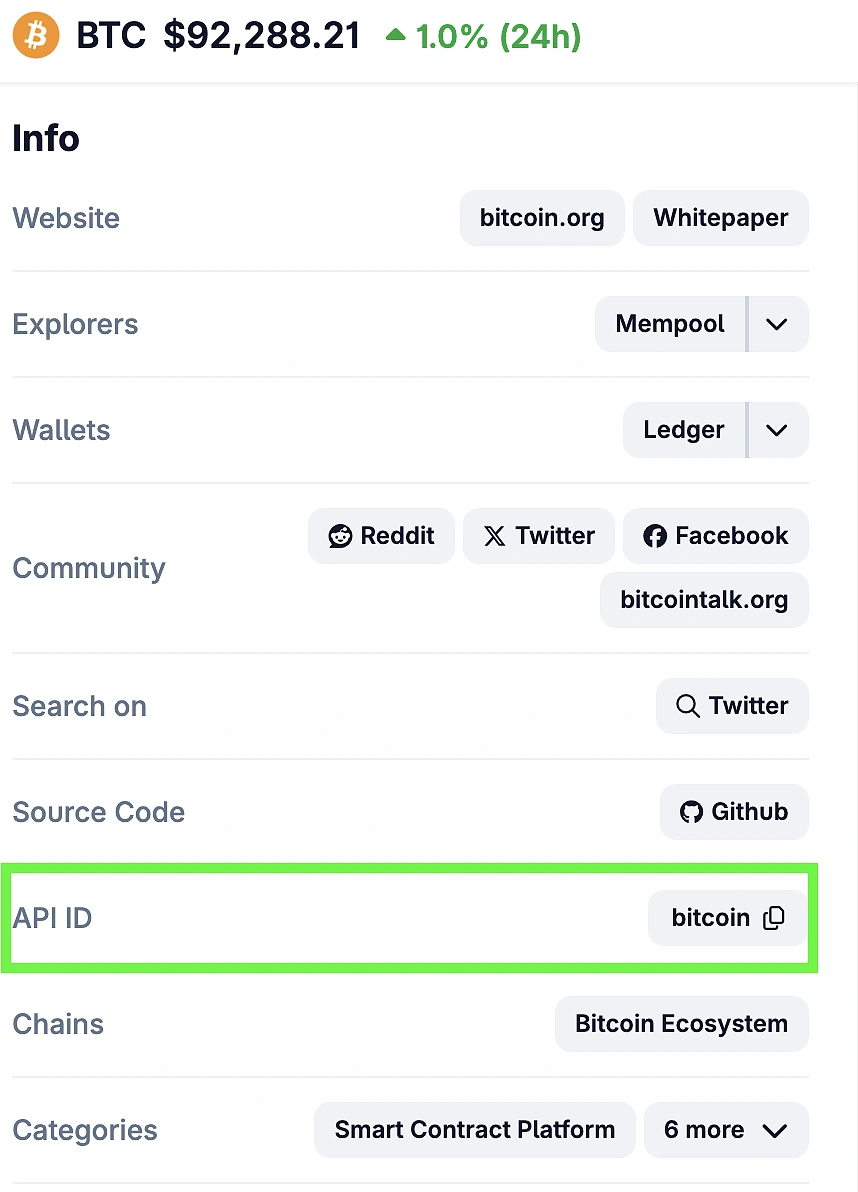
Step 2: Check GeckoTerminal.com (For Onchain Assets)
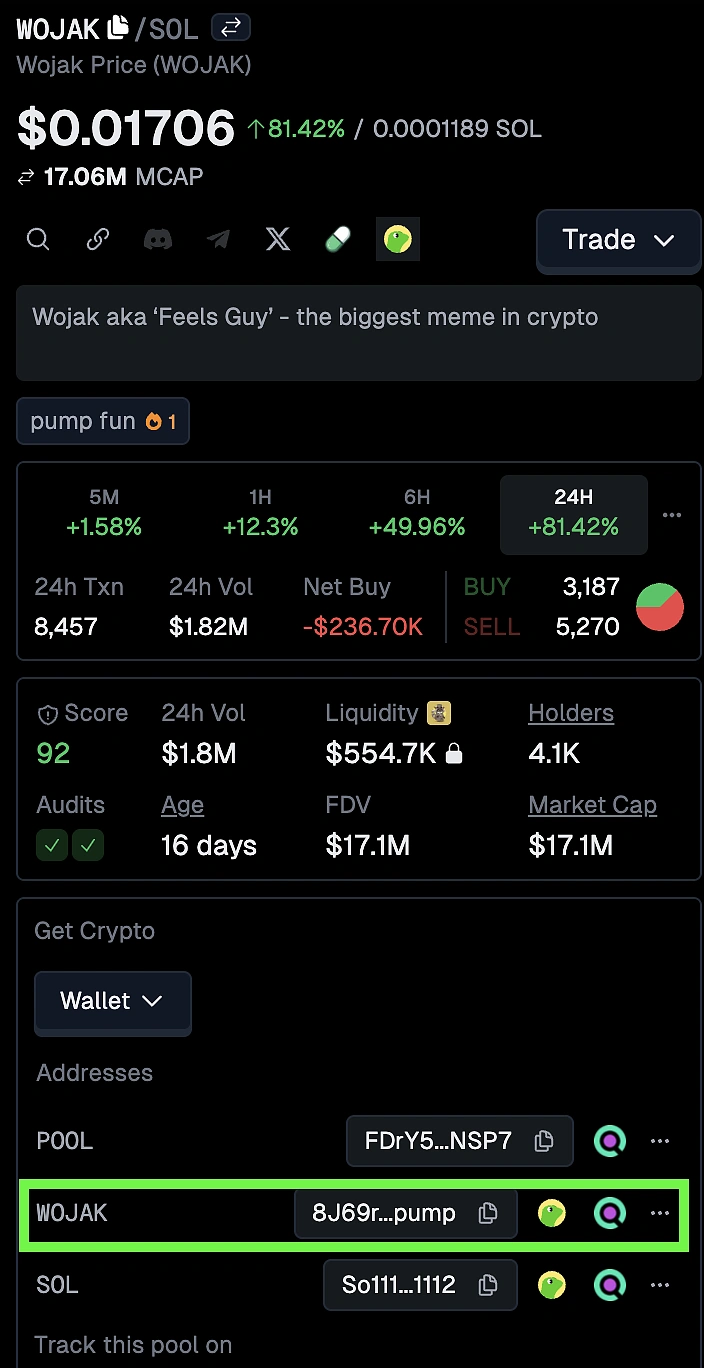
If the token is not on CoinGecko, search for it on GeckoTerminal.com. The following API parameters are required in most Onchain API endpoints to fetch specific data for a pool or token. Here is how you can locate them on its dedicated pool page:
-
Network ID: Look at the URL path of the pool page. The segment immediately following the domain is the pool’s ‘network ID’.
-
Example: In geckoterminal.com/sol/pools/..., where ‘sol’ is the ‘network ID’.
-
-
Contract Address: Scroll down to the Addresses section to find and copy the pool and base token contract address.
How can I fetch bulk market data for multiple coins in one CoinGecko API call?
While endpoints like /simple/price offer detailed, comprehensive data for a single asset, they may not be the most efficient choice for fetching bulk data within your designated rate limits.
Looping through individual endpoints for every single asset increases overhead, which leads to higher latency and greater API call credits usage.
The Solution:
The most efficient way to fetch market data (price, market cap, volume, price change) for multiple coins is the /coins/markets endpoint. This endpoint allows you to batch up to 250 coins in a single HTTP request, regardless of whether you are on a free or paid plan.
You can implement this in two ways:
-
Specific Portfolio (Known IDs): If you want data for a specific list of coins, pass their CoinGecko IDs (comma-separated) into the ids parameter.
-
Limit: Max 50 coin IDs per request.
-
/coins/markets?vs_currency=usd&ids=bitcoin,ethereum,solana,cardano,ripple-
Market Leaderboard (Pagination): If you want to list the top coins by market cap, use the per_page parameter to maximize your data throughput.
-
Limit: Max 250 coins per page.
-
/coins/markets?vs_currency=usd&order=market_cap_desc&per_page=250&page=1Note: To get the next 250 coins, simply change the parameter to page=2, then page=3, and so on.
Fetching Bulk Onchain Data (GeckoTerminal)
For tokens or liquidity pools trading on Decentralized Exchanges (DEXs) that may not be listed on the main CoinGecko market list, you should use the Onchain / GeckoTerminal API endpoints.
These endpoints allow you to batch queries by contract address rather than Coin ID.
-
Bulk Token Data:
To fetch price and market data for multiple tokens on the same chain, use the /tokens/multi endpoint.-
Endpoint:
/onchain/networks/{network}/tokens/multi/{addresses} -
How to use: Pass a comma-separated list of token contract addresses into the {addresses} parameter.
-
-
Bulk Pool Data:
To fetch data for specific liquidity pools (e.g., Uniswap V3 ETH/USDC), use the /pools/multi endpoint.-
Endpoint:
/onchain/networks/{network}/pools/multi/{addresses} -
How to use: Pass a comma-separated list of pool contract addresses.
-
Note: On the free Demo plan, you can query up to 30 addresses per request. If you are on a paid plan (Analyst and above), this limit increases to 50 addresses per request, allowing you to retrieve more data with fewer calls.
How do I get hourly historical OHLC data for time ranges longer than 90 days?
When fetching historical data, you might notice that the API returns an error or automatically lowers the data resolution (e.g., switching from Hourly to Daily) when requesting for a rather large date range.
This occurs because the CoinGecko API enforces strict maximum day-counts for high-resolution intervals to maintain API performance. For example, you cannot request a single, continuous "Hourly" dataset for a 1-year period because the maximum permissible range for hourly data is 90 days per request.
To understand the specific limitations based on historical data granularity and API plan, refer to the Historical Data Comparison tables below. The tables are segmented by endpoint to assist you in deciding which plan best suits your needs.
The Solution:
To build a high-resolution dataset over a long timeframe (e.g., a 1-year hourly chart), you can chunk your requests using the /coins/{id}/market_chart/range endpoint.
The Strategy:
-
Define your total range: (e.g., Jan 1st to Dec 31st).
-
Split into windows: Divide this period into smaller chunks that fit within the plan limits.
-
For Hourly Data: Split into 90-day chunks.
-
For 5-Minute Data (Enterprise): Split into 2-day chunks.
-
-
Iterate and Fetch: Call the /range endpoint for each window.
-
Concatenate: Merge the returned arrays in your application to form a single, seamless dataset.
How do I map a crypto ticker symbol (e.g., BTC) to a CoinGecko API ID?
A common hurdle for developers is mapping a user's search input (e.g., "BTC") to the specific API ID required by CoinGecko (e.g., bitcoin).
Because ticker symbols are not unique (e.g., multiple tokens trade as "USD" or "ETH"), you generally cannot query detailed market data endpoints (like /simple/price or /coins/markets) using symbols directly. You must identify the precise Coin ID first.
Solution 1: The /search Endpoint (Dynamic)
If your application has a search bar where users type a symbol, the /search endpoint is the best entry point. It accepts a symbol or name and returns a list of matching assets with their Coin IDs.
-
Query:
GET /search?query=BTC -
Response:
The API returns a list of matches (e.g., Bitcoin, Wrapped Bitcoin, Bitcoin Cash) along with the coin ID for each coin. -
Action:
Extract the correct id (e.g., bitcoin) from the user's selection or the top result (highest market_cap_rank) and pass this ID into other endpoints like /coins/{id} or /simple/price
Solution 2: The Reference Table (Static/Bulk)
If you need to map hundreds of symbols automatically without making hundreds of search calls, it is more efficient to build a local reference table.
-
Fetch the List:
Call the /coins/list endpoint once. This returns a comprehensive lightweight JSON array containing the id, symbol, and name for every coin on CoinGecko (over 18,000+ assets). -
Store Locally:
Save this data into your database or a local cache. -
Local Lookup:
When you need to find a coin, your application searches this local table to map "BTC" to bitcoin instantly without triggering API rate limits.
Solution 3: The Manual Search Method
If you only need to find the ID for a single coin, for example, to hard-code it into a script, you can find it directly on the CoinGecko website without making any API calls.
-
Navigate to the specific coin page (e.g., Bitcoin).
-
Locate the Info section on the right-hand side.
-
Copy the value labeled API ID (e.g., bitcoin).

How do I handle "429 Too Many Requests" rate limit errors in the CoinGecko API?
If your script suddenly crashes or your spreadsheet returns #ERROR!, you have likely hit the API rate limit. This commonly happens when an application tries to fetch data for hundreds of coins simultaneously (e.g., a portfolio update loop) or when multiple users access your app at once.
A common mistake is simply making the code "wait 1 second" and retrying immediately. If multiple requests are failing at once, this creates a bottleneck that keeps you blocked for longer.
Solution 1: Exponential Backoff (Technical Fix)
The industry-standard fix for scripts and applications is to implement Exponential Backoff. Instead of a fixed wait time, your application should increase the delay incrementally after every failed attempt. This allows the congestion to clear gracefully before you try again.
-
Attempt 1: 429 Error > Wait 1 second.
-
Attempt 2: 429 Error > Wait 2 seconds.
-
Attempt 3: 429 Error > Wait 4 seconds.
Here is a simple Python script demonstrating how to wrap your API calls in a robust retry loop:
Solution 2: Upgrade Your Plan (Operational Fix)
If your application naturally requires high-frequency data updates that exponential backoff cannot solve (e.g., a trading bot or a high-traffic dashboard), you likely need a higher rate limit capacity.
Upgrading to a paid API plan significantly increases your request allowance, allowing for more intensive operations without hitting 429 errors.
-
Demo Plan (Free): 30 requests/minute
-
Basic Plan: 250 requests/minute
-
Analyst Plan: 500 requests/minute
-
Lite Plan: 500 requests/minute
-
Pro Plan: 1,000 requests/minute
-
Pro+ Plan: Up to 2,500 requests/minute
You can compare the specific rate limits, call credits, and endpoints access for each plan on our API pricing page.
Special Note for Google Sheets & Excel Users
Rate limits are notoriously difficult to manage in spreadsheets because functions often recalculate simultaneously, firing off hundreds of requests in a split second. "Spacing out" these updates via scripts is often complex and unreliable.
Instead of writing complex scripts, use these two methods to fix #ERROR! in sheets:
-
Use Batch Endpoints: Do not write a separate API formula for every row. Use the /coins/markets endpoint to fetch data for up to 250 coins in one single API call. This reduces 250 API calls down to 1.
-
Upgrade for Capacity: If you must track thousands of coins individually in your spreadsheet, upgrading to a paid API plan is often the only way to support the volume of simultaneous requests a spreadsheet generates.

Why does real-time /tickers volume differ from daily historical volume on CoinGecko?
Developers sometimes try to calculate "Daily Volume" by manually summing up every update from the /tickers endpoint. When you cross-reference this sum with the official value in the /history endpoint or the CoinGecko chart, the numbers may not match exactly.
The Solution: Raw vs. Cleaned Data
The difference is expected and natural. You are comparing two fundamentally different datasets:
-
/tickers is Raw: This endpoint provides near real-time snapshots directly from exchanges. It includes raw market noise, arbitrage variances, and unrefined trade data.
-
/market_chart is Cleaned: CoinGecko’s algorithms post-process this data to remove outliers, wash trading, and anomalies to provide a reliable global average.
How do I convert CoinGecko API JSON data into CSV for Excel or Google Sheets?
CoinGecko API endpoints return data in JSON format. This structure allows us to nest complex information (like price changes, market caps, and sparklines) efficiently. However, spreadsheet tools like Microsoft Excel and Google Sheets are designed to work with flat rows and columns.
To analyze API data in a spreadsheet, you need to convert the nested JSON structure into a flat file format like CSV or XLSX.
The Solution: Flatten and Map
The conversion process involves "flattening" the nested JSON objects so that every piece of data corresponds to a specific column header.
Option 1: Python Script (Pandas) For automated workflows, the Python pandas library is the industry standard. It includes a built-in function (json_normalize) that automatically handles the flattening process.
Option 2: Excel Power Query (No-Code) If you prefer not to write code, you can use Excel’s built-in Power Query tool to import JSON URLs directly. You can then use the "To Table" and "Expand" features to map the columns visually. We cover this exact workflow in our guide on how to import crypto prices into Excel with CoinGecko API.
How are total_volume and 24h price change calculated in the CoinGecko API?
When analyzing market movements, it is important to understand the exact timeframe of the data you are receiving.
1. Rolling 24-Hour Window
The total_volume field represents a rolling 24-hour sum of trading volume across all tracked exchanges. It does not reset at 00:00 UTC but continuously updates to reflect the last 24 hours of activity.
Similarly, price_change_24h and price_change_percentage_24h are calculated based on a rolling 24-hour window relative to the current timestamp.
2. Currency vs. Percentage
-
price_change_24h: The absolute change in the target currency (e.g., -$500.00).
-
price_change_percentage_24h: The relative change expressed as a percentage (e.g., -2.25%).
3. Onchain Data (GeckoTerminal)
For Onchain data users, the CoinGecko Onchain API offers even more granular rolling data for liquidity pools. You can access volume and price changes across multiple timeframes, including 5m, 15m, 30m, 1h, 6h, and 24h intervals.
For more details on these specific onchain endpoints, refer to the GeckoTerminal Pool documentation.
How do I calculate Bitcoin (BTC) Market Dominance using CoinGecko API endpoints?
Currently, CoinGecko API does not provide a dedicated endpoint for market dominance. However, all the necessary data points required to derive this metric are readily available through our standard endpoints.
Given that market dominance is a derived metric, meaning you calculate it yourself by comparing a specific asset's market capitalization (cap) from the /coins/markets endpoint against the global crypto market cap from the /global endpoint. The underlying calculation is to divide the asset’s market cap by the total global crypto market cap.
How do I handle missing data (nulls) and delisted tokens (404s) in my crypto app?
Building a resilient crypto application means expecting the unexpected. In a live market, assets are constantly changing states: a token might get delisted (returning a 404), liquidity might dry up completely (returning null), or a meme coin might trade at such a low value that it breaks standard decimal parsers.
If your code strictly expects a standard float value for every request, these edge cases may lead to unexpected outcomes for your application.
The Solution:
It is best practice to design your application to handle null data fields and 404 responses gracefully to ensure your data ingestion remains stable.
1. Handling null vs. 0
Data fields like current_price or market_cap may return null when market data is unavailable, often due to a lack of recent trading activity. It is crucial to distinguish this from zero. A value of null indicates "no data available" and should not be treated as zero, as doing so distorts averages. A value of 0 indicates a confirmed price or volume of zero.
2. Handling Delistings (404 Not Found)
When an asset is delisted from CoinGecko or GeckoTerminal, requests to its specific endpoint will return a 404 Not Found status code.
Best Practice: Your code should detect this 404 status and flag the asset as "inactive" in your local database. This prevents your application from making redundant calls for assets that no longer exist on the platform.
3. High-Precision Values
Meme coins and low-cap assets often trade at extremely low prices (e.g., 0.00000001). Depending on your programming language, standard floating-point parsers may convert these into scientific notation (e.g., 1e-8) or round them down to zero.
Appendix
CoinGecko API Historical Data Comparison: Free vs. Paid Plans
Endpoint: Historical Chart Data (/market_chart, /market_chart/range, /coins/{id}/contract/{contract_address}/market_chart, /coins/{id}/contract/{contract_address}/market_chart/range)
| Feature / Limit | Demo (Free) | Basic | Analyst, Lite, Pro, Pro+ | Enterprise |
|---|---|---|---|---|
| Max Historical Range | Past 1 Year | Past 2 Years | Full History (from 2013) | |
| Daily Interval Data Max Historical Range | Past 1 Year | Past 2 Years | Full History (from 2013) | |
| Hourly Interval Data Max Historical Range | Past 1 Year | Past 2 Years | From 2018 | |
| 5-minutely Interval Data Max Historical Range | Past 1 Day | From 2018 | ||
|
1-minutely Interval Data Max Historical Range |
- | Past 1 Day per request, data from 1 June 2026 onward | ||
| Granularity Control | Auto-Granularity Only (Cannot manually select interval. See logic below) |
Full Interval Control OR Auto-Granularity | ||
|
Auto-Granularity Logic (Applied if interval param is empty) |
• Range 1 day: 5-min • Range 2–90 days: Hourly • Range >90 days: Daily |
|||
|
Interval Granularity (Applied via interval param) |
N/A | Daily: 1-90 days | • 5-minutely: Up to 10 days range • Hourly: Up to 100 days range • Daily: Full Range (No maximum) |
|
Endpoint: OHLC Chart Data (/ohlc and /ohlc/range)
| Feature / Limit | Demo (Free) | Basic | Analyst, Lite, Pro, Pro+ | Enterprise |
|---|---|---|---|---|
| Max Historical Range | Past 1 Year | Past 2 Years | Full History (from 2013) | |
| Granularity Control | Auto-Granularity Only (Cannot manually select interval. See logic below) |
Full Interval Control OR Auto-Granularity | ||
|
Auto-Granularity Logic (Applied if interval param is empty) |
• 1-2 days: 30-min candles • 3-30 days: 4-hour candles • >31 days: 4-day candles |
|||
|
Interval Granularity (Applied via interval param) |
N/A | • Hourly: Up to 90 days range • Daily: Up to 180 days range |
||
Endpoint: Onchain OHLCV (/onchain/pools/ohlcv and /onchain/token/ohlcv)
| Feature / Limit | Demo (Free) | Basic | Analyst, Lite, Pro, Pro+ | Enterprise |
|---|---|---|---|---|
| Onchain OHLCV Data | Pools Only | Pools & Tokens | ||
| Max Historical Range | Past 6 Months | Full History (from 2021) | ||
|
Interval Granularity (Applied via aggregate param) |
• Day: 1 • Hour: 1, 4, 12 • Min: 1, 5, 15 |
• Day: 1 • Hour: 1, 4, 12 • Min: 1, 5, 15 • Second: 1, 15, 30 |
||
If you require more frequent data updates or higher API rate limits for advanced analysis, consider subscribing to a paid API plan.
Need more answers?
If you have a specific question that wasn't covered in this guide, there are several other resources available to help you:
-
Check our FAQ page, which covers a wide range of general and billing-related questions.
-
Read our official API documentation for comprehensive details on every endpoint and parameter.
-
Contact Support if you are still stuck or encountering a technical issue. Please submit a ticket to our API support team. We are happy to help!
-
Subscribe to our API newsletter to receive monthly updates about our API, straight in your inbox.






 Or check it out in the app stores



