





 Make us preferred on Google
Having a clear exit strategy is one of the most critical yet overlooked aspects of cryptocurrency investing. In a market known for its volatility, a pre-defined plan helps to remove emotion from decision-making, allowing you to lock in profits and manage risk effectively.
In this article, we’ll not only provide a powerful, free exit strategy spreadsheet template but also walk through how it’s built leveraging the CoinGecko API. Creating your own custom planner allows you to log your trades, calculate your holdings in real-time, and model various exit scenarios tailored to your specific financial goals and risk appetite.
Note: To provide the most powerful experience, this planner is built with modern spreadsheet functions and is fully compatible with Google Sheets on all operating systems, Microsoft 365, and Excel 2021 or newer versions operating on Windows.

What is a Crypto Exit Strategy Planner Spreadsheet?
A crypto exit strategy planner spreadsheet is a tool that helps you decide when and how much of your crypto holdings to sell in order to secure profits, manage risk, or meet personal financial goals. A well-structured crypto exit plan spreadsheet removes emotion from your trading decisions by allowing you to set clear, data-driven rules for your exits in advance.
In our free downloadable spreadsheet template, we've built in the following capabilities to create a complete system for managing your trades:
-
Trading Journal: Log all your buy and sell transactions in a simple and clean interface to maintain a record of your activities.
-
Real-time Market Data for Any Coin: The sheet is pre-loaded with data for the top 250 coins and allows you to easily add any of the 18,000+ crypto assets tracked by CoinGecko for real-time portfolio tracking.
-
Multiple Strategy Calculators: The template includes three distinct planners to model different types of exits, based on profit targets, breakeven points, risk appetite, and trailing stop-losses.
-
Flexible Exit Planning: Plan your exit based on a single, one-time sale or an incremental, multi-step strategy with actionable trailing stop-loss price levels.
-
Real-time Viability Indicators: See exactly how far your target exit prices are from the current live market price, helping you understand how realistic your plan is at a glance.
Creating a Crypto Exit Strategy Planner Spreadsheet
This section briefly covers how the template is constructed. If you prefer to start using the planner immediately, feel free to skip to the next section, "How to use the Crypto Exit Strategy Planner Spreadsheet".
Getting Live Crypto Data in Spreadsheets
The first step to building an actionable exit planner is connecting it to live crypto price and market data. This is essential for tracking your portfolio value accurately and understanding the viability of your exit plan. For this, we will use the CoinGecko API. We’ll first create a ‘Top 250 Coins’ sheet to house the raw data. The setup process differs slightly for Google Sheets and Excel, and you can find detailed, step-by-step instructions in our previous guides:
-
For Google Sheets: Learn how to set up the API connection using Apps Script.
-
For Excel: Follow the steps to import live data using Power Query Editor.
Creating a Trading Journal Sheet
Next, to calculate our portfolio holdings and value, we need the ability to log our crypto buy and sell trades. To do this, you will create a ‘Trading Journal’ sheet with columns for the date of the trade, the action (buy or sell), and the quantity and price of the traded coin.

Creating an Exit Strategy Sheet
Finally, you can create the main ‘Exit Strategy’ sheet where you will plan your exits. This sheet uses several key formulas to aggregate and calculate the data:
-
VLOOKUP: To reference the real-time price and market data of the selected coin.
-
SUMIFS: To aggregate the trades from the ‘Trading Journal’ and provide an overview of your portfolio metrics like current holdings, average buy price, and profit & loss (P&L).
-
HSTACK (for Google Sheets): To dynamically generate the results table for the multi-step trailing stop-loss planner.
-
LET, MAP, SCAN (for Excel): To replicate the dynamic table generation for the multi-step trailing stop-loss planner functionality in Excel.
To calculate the exit prices for a single trade, the logic is:
-
Take profit = Average buy price of the coin + (Maximum money you are willing to make / number of tokens you wish to sell)
-
Stop loss = Average buy price of the coin - (Maximum money you are willing to lose / number of tokens you wish to sell)
And to calculate the exit prices for multiple, incremental trades:
-
Take profit = Average Buy Price x (1 + Stepped Profit Target %) (Where the Profit Target % increases for each trade.)
-
Trailing Stop loss = That trade's Take Profit Price x (1 - Calculated Trail %) (Where the Trail % is determined by your Risk/Reward ratio.)
You can also add several key calculators to help you understand the price levels needed to achieve specific return on investment (ROI) targets or to simply breakeven. To build these calculators, you can use the following logic:
-
Total Profit at a Target Price = (Current Number of Coins Held x Target Coin Price) - Total Amount Invested
-
ROI % at a Target Price = Total Profit at that Price / Total Amount Invested
-
Breakeven Price = Total Amount Invested / Current Number of Coins Held
-
Number of Coins to Sell to Breakeven = Total Amount Invested / Target Coin Price
The detailed formulas for each cell can be found within the spreadsheet template, allowing you to inspect, replicate, or modify them for your own specific use cases.
How to Use the Crypto Exit Strategy Planner Spreadsheet
First, download or make a copy of the spreadsheet template at the bottom of this article.
Add a CoinGecko API Key
Next, add your CoinGecko API key. This is required to fetch live data. If you don't have one, read this guide on how to get your free Demo API key.
-
For Google Sheets users: Navigate to the ‘Top 250 Coins’ sheet, click on cell A1, and in the formula bar, replace the placeholder text after x_cg_demo_api_key= with your API key.

-
For Excel users: Go to the ‘Top 250 Coins’ sheet, select “Data” > “Queries & Connections.” Right-click the 'Top 250 Coins' query, select "Edit," then click “Source” under “Applied Steps.” In the formula bar, replace the placeholder text after x_cg_demo_api_key= with your API key. Click "Close & Load."

When you first open the Excel spreadsheet template, you may see a “SECURITY WARNING” message. Click “Enable Content” to ensure the live data API connection works.

Add Any Coin to Your Portfolio
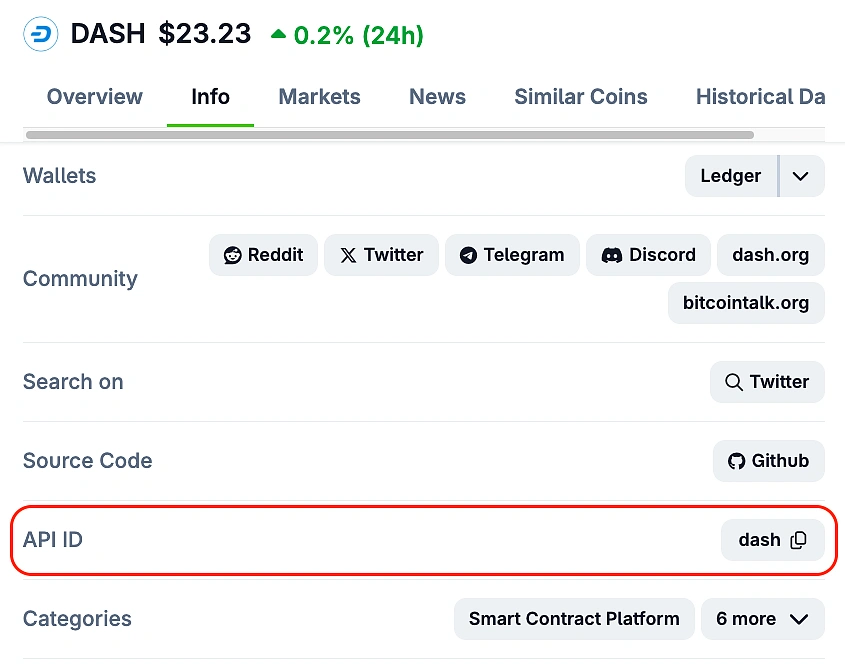
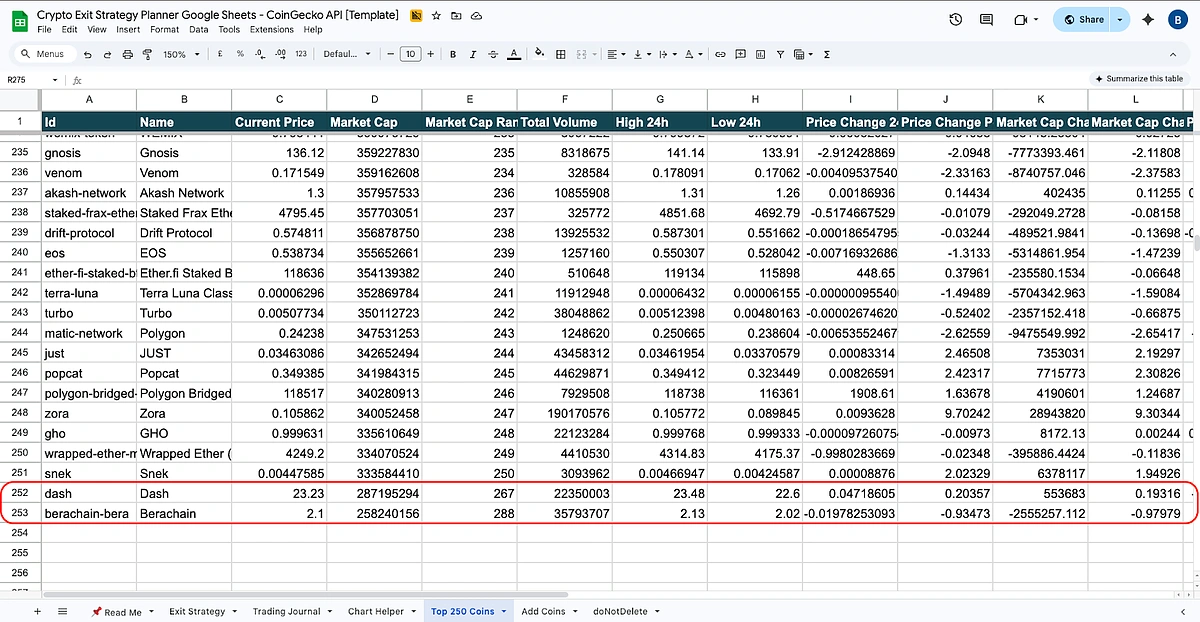
The sheet comes pre-loaded with the top 250 coins ranked by market cap, but you can add any coin tracked by CoinGecko. Simply head to the ‘Add Coins’ sheet and paste the ‘API ID’ of any coin into column A (from cell A2 onwards). You can find the API ID on any individual coin page on the CoinGecko website.

The live market data for your custom list will appear from row 252 onwards in the ‘Top 250 Coins’ sheet, directly below the default Top 250. This makes the sheet incredibly versatile, giving you easy access to popular coins while offering full flexibility to track smaller-cap assets. Excel users may need to right-click the data table and hit ‘Refresh’ to pull the new data immediately.
Log Your Trades
Before you can plan an exit strategy, you will first need to log your trades. Navigate to the ‘Trading Journal’ sheet and enter your full buy and sell history for all your assets. Select the coin, the action (Buy/Sell), the quantity, and the price of the trade.

Plan Your Crypto Exit Strategy
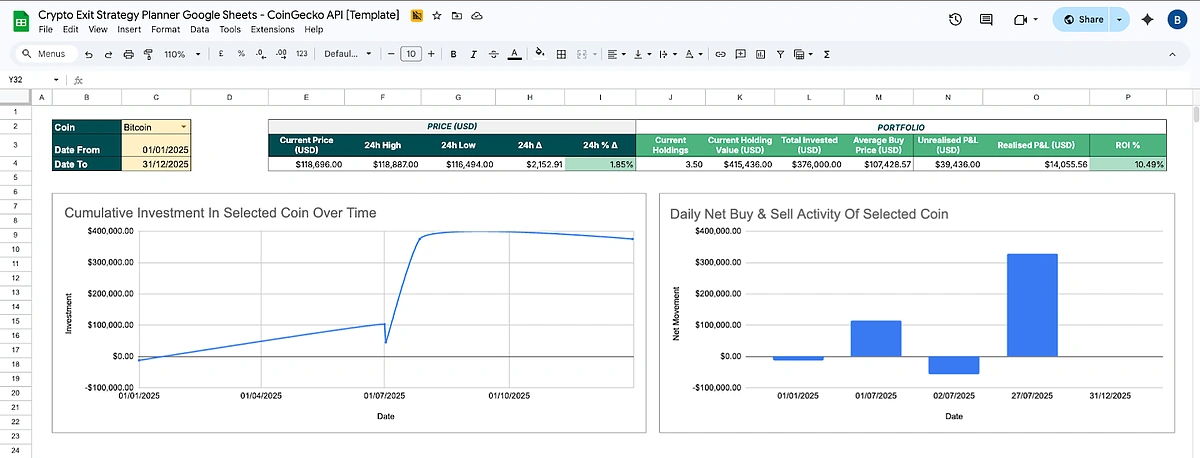
Finally, it's time to plan your exit. Head over to the ‘Exit Strategy’ sheet. Start by selecting the coin you wish to analyze from the dropdown menu (cell C2) and specify the date range.
Once you select a coin, the portfolio overview section will instantly update. Here’s how to interpret these key indicators:
-
Current Holdings: The total number of coins you currently own.
-
Current Holding Value (USD): The real-time market value of your holdings.
-
Total Invested (USD): The total amount of money you have spent to acquire your current holdings.
-
Average Buy Price (USD): Your average entry price per coin.
-
Unrealised P&L (USD): Your current paper profit or loss. This is the amount you would gain or lose if you sold all your holdings at the current price.
-
Realised P&L (USD): The actual profit or loss you have locked in from past sales.
-
ROI %: Your total return on investment for this asset.
The charts below this section will also update, showing your Cumulative Investment and Daily Buy & Sell Activity over time.
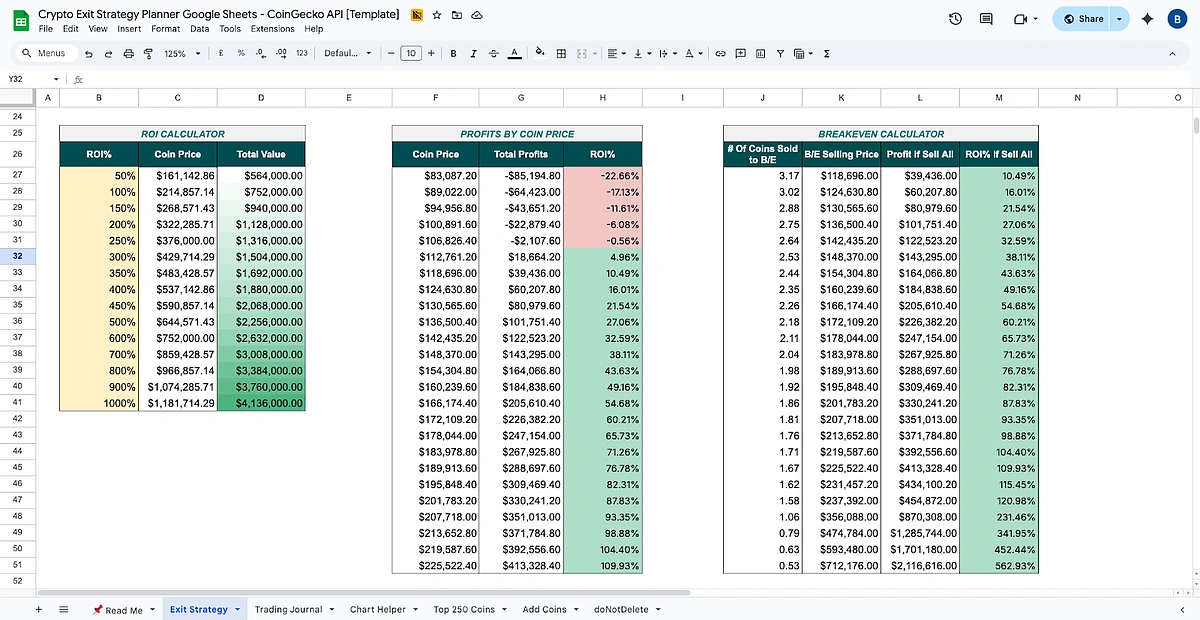
The sheet also provides a few quick-reference calculators to help you understand potential outcomes at a glance.
-
ROI Calculator: This table helps you set clear, goal-oriented price targets. It starts with a specific ROI% (e.g., 100%, 200%) and shows you the exact Coin Price your asset needs to reach to achieve that return. The cells highlighted in yellow can also be adjusted to fit your desired profit targets.
-
Profits by Coin Price: Working in reverse of the ROI Calculator, this table calculates your profit and ROI based on pre-set coin prices.
-
Breakeven Calculator: This calculator is crucial for risk management, particularly for planning how to de-risk your position. It shows you the number of coins you would need to sell at a specific Selling Price just to breakeven. Use this to determine how many coins to sell to recoup your initial investment, leaving your remaining holdings to grow as pure profit.
Now, let’s explore the three distinct planners you can use to model your exit.
1. The One-Time Exit Strategy Planner
This calculator determines fixed price targets for a single, complete sale of your trading position. It's ideal for setting clear, absolute exit points based on your financial goals.
Simply fill in the three yellow-highlighted cells with your goals: the number of coins you want to hold for the long term, your maximum acceptable loss in dollars, and your target profit in dollars.
The planner instantly determines the exact Stop Loss and Take Profit prices per coin required to meet your goals, along with the number of coins to be sold and the plan’s Risk/Reward ratio.

2. The Trailing Stop-Loss Exit Strategy Planner
This advanced planner is for a specific, positive scenario: when your investment is already in profit, and you believe it has the potential to go much higher, but you still want to protect the gains you've made. It automatically generates a multi-step exit schedule for scaling out of your position.
Simply define your scaling-out strategy using the five yellow-highlighted cells, including the number of trades you want to make, the profit target that activates the first sale, and your desired risk-to-reward ratio (R/R Ratio).
The planner will then dynamically generate a complete table showing the precise Take Profit and dynamic Trailing Stop-Loss price for each trade, along with your cumulative profit and overall ROI at each step of the plan.

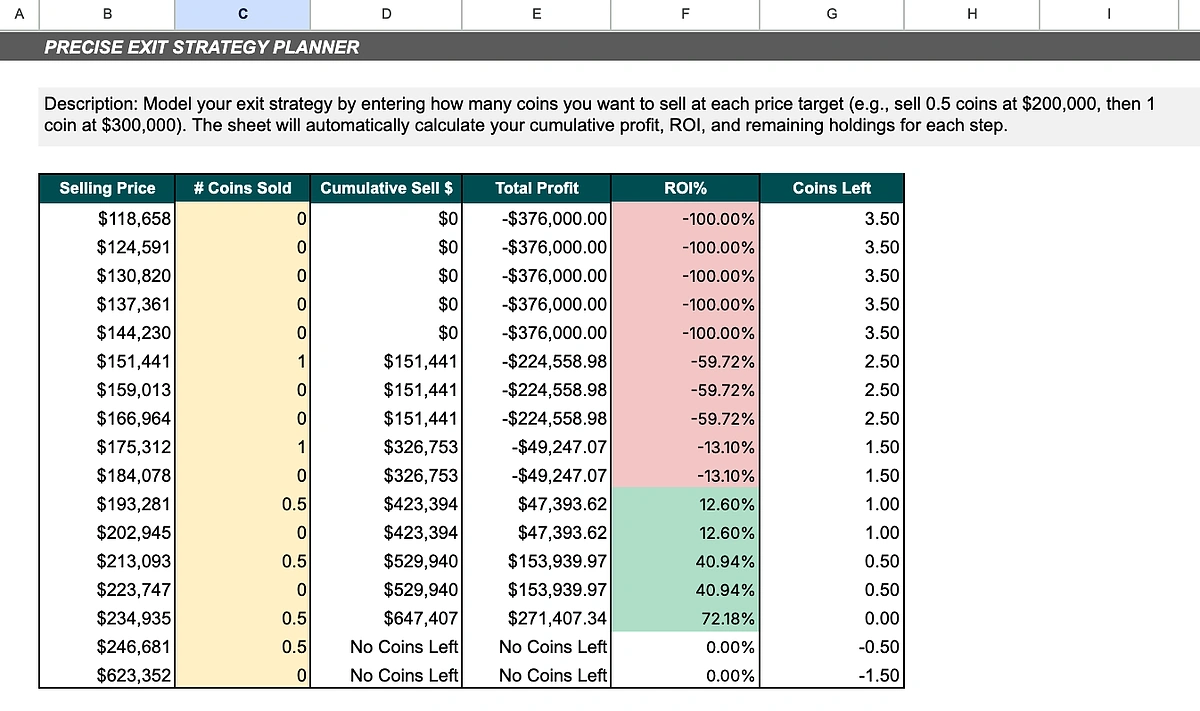
3. The Precise Exit Strategy Planner
This planner allows for the manual simulation of an incremental exit strategy, giving you the most granular control.
Unlike the other planners, you directly enter the number of coins sold in column C (highlighted in yellow) next to the various "Selling Price" targets listed in column B.
As you enter your desired sales, the sheet instantly calculates your cumulative profit, overall ROI, and the number of coins you have left to sell, giving you a real-time view of your manual exit plan's outcome.
Conclusion
Having a well-defined exit strategy is a crucial component of successful investing. By using a data-driven tool like this spreadsheet planner, you can set clear goals, manage risk, and make disciplined decisions free from the emotional pressures of a volatile market.
To get the most out of this planner and ensure reliable, real-time data without running into rate limits, consider upgrading to a CoinGecko paid API plan. A paid plan offers significantly higher call credits, rate limits, and access to exclusive endpoints.










 Or check it out in the app stores



