Coins: 17,761
Exchanges: 1,457
Market Cap: $2.524T 4.3%
24h Vol: $123.297B
Gas: 0.143 GWEI
Premium
Guides
TABLE OF CONTENTS

How to Set Crypto Price Alerts and Track Your Portfolio

4.1
| by
CoinGecko
-

CoinGecko Crypto Price Alerts Portfolio Guide

Key Takeaways

  • CoinGecko's Portfolio feature lets users track tokens and set price alerts to catch every market move.

  • Price alerts help you stay informed about price spikes or dips without needing to monitor charts 24/7.

  • The portfolio dashboard allows you to group coins by theme, strategy, or chain.

  • Mobile widgets and alert tools make it easy to stay updated on the go.

  • This guide walks you through how to set up alerts and track tokens effectively using CoinGecko.


Introduction

Crypto markets are volatile. Prices can shift quickly, and without proper tracking, it's easy to miss important moves.

Whether you're a trader monitoring entry points or a long-term holder tracking your portfolio, having a reliable alert and tracking system is essential. CoinGecko’s Portfolio and Price Alerts features help users follow thousands of tokens, get notified about price changes, and organize their holdings by theme or strategy. This guide explains how to set them up to improve your crypto monitoring process.


What are price alerts?

Price alerts allow you to set a custom price level for any token listed on CoinGecko. When the token reaches that level, you receive an instant notification on your mobile device.

Whether you’re watching potential entries, managing targets, or tracking sudden moves, alerts let you stay ahead without constantly checking charts.

Why Use Price Alerts?

  • Save time: Reduce the need to manually monitor prices.

  • Get notified: Instant push notifications for coins that meet your criteria.

  • React faster: Catch price swings early to enter or exit positions.


How to Set a Price Alert

1. Search for a Coin

Open the CoinGecko app and search for the token you want to track.
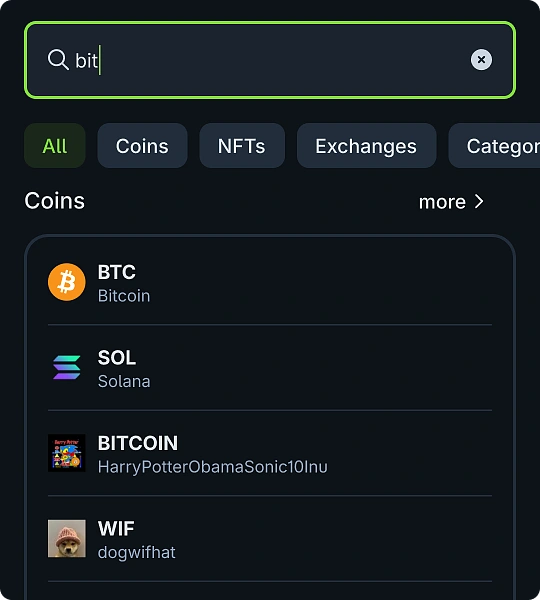
CoinGecko App Search For Coin

2. Tap the ★ Star Icon

Add the token to your portfolio by tapping the star at the top right.
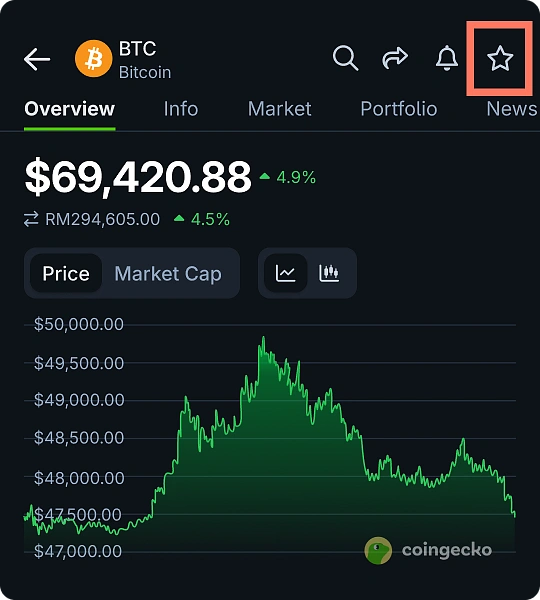
CoinGecko Add to Portfolio

3. Set Your Alert

Tap “Set Alert,” enter your target price, and save. You’ll get notified once the price crosses your threshold.
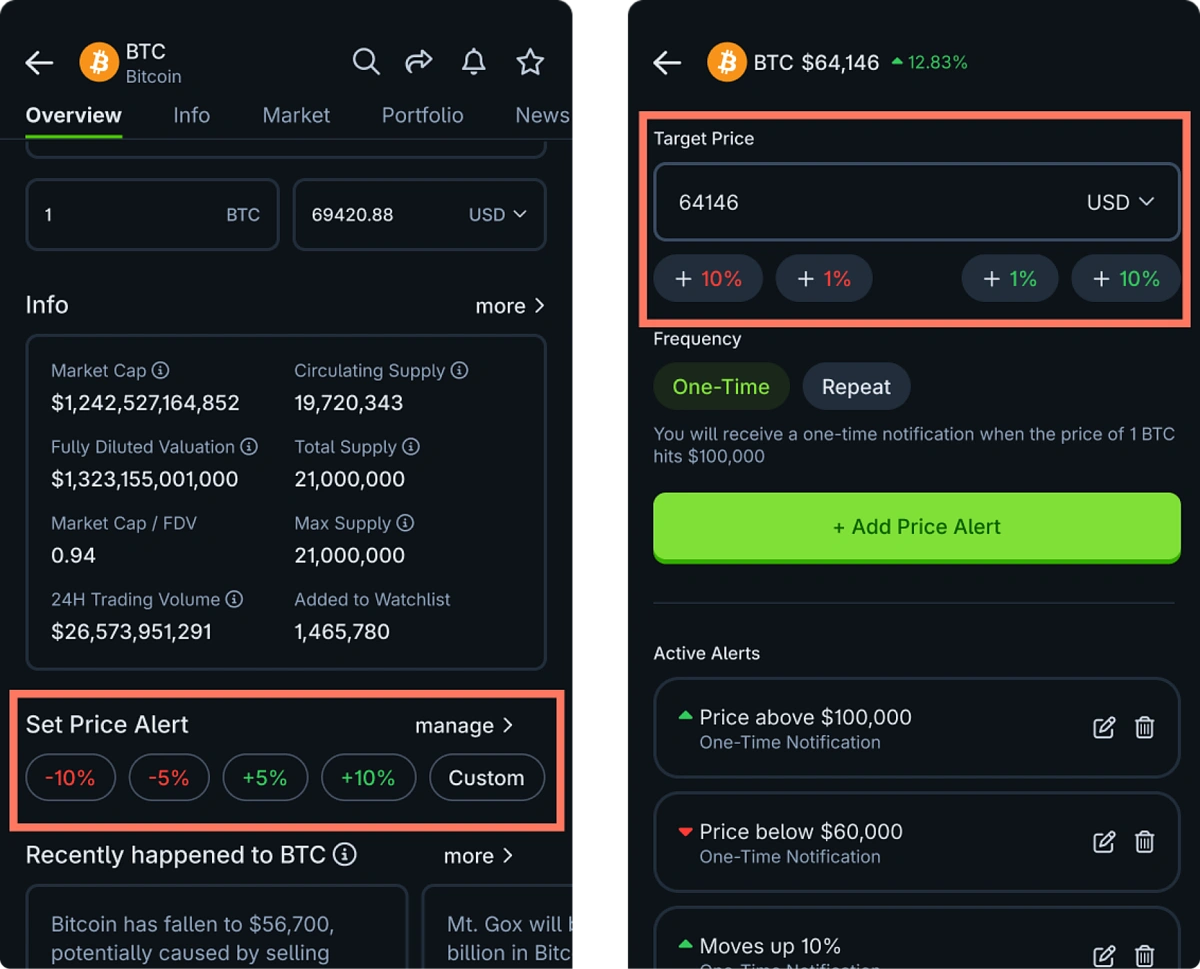
CoinGecko Set Custom Price Alerts


Why Use Alerts and Portfolios Together?

While alerts help you react, portfolios help you plan. The CoinGecko Portfolio feature lets you organize coins into custom lists, making it easier to group and monitor tokens by:

  • Sector (e.g., DeFi, Layer 1s, AI)

  • Strategy (e.g., long-term holds, airdrop candidates)

  • Blockchain (e.g., Ethereum, Solana, BNB Chain)

For a deeper walkthrough, check out our full guide on Top Crypto Portfolio Tracking Tips Using CoinGecko.

Adding coins to your CoinGecko portfolio gives you a central view of:

  • Live prices

  • 1H, 24H, 7D, 30D performance

  • Market cap and trading volume

  • P&L if you’ve entered positions

  • Coin-specific news

Together, they make it easier to spot opportunities and respond quickly.

How to Set Up a Portfolio

1. Access the Portfolio Tab

  • On App: Tap the Portfolio icon in the bottom navigation bar
  • On Desktop: Click "Portfolio" in the top navigation menu

CoinGecko Portfolio Tab

2. Create a New Portfolio

Tap "Create New Portfolio" and name it (e.g., "DeFi Watchlist", "Layer 1 Holdings").
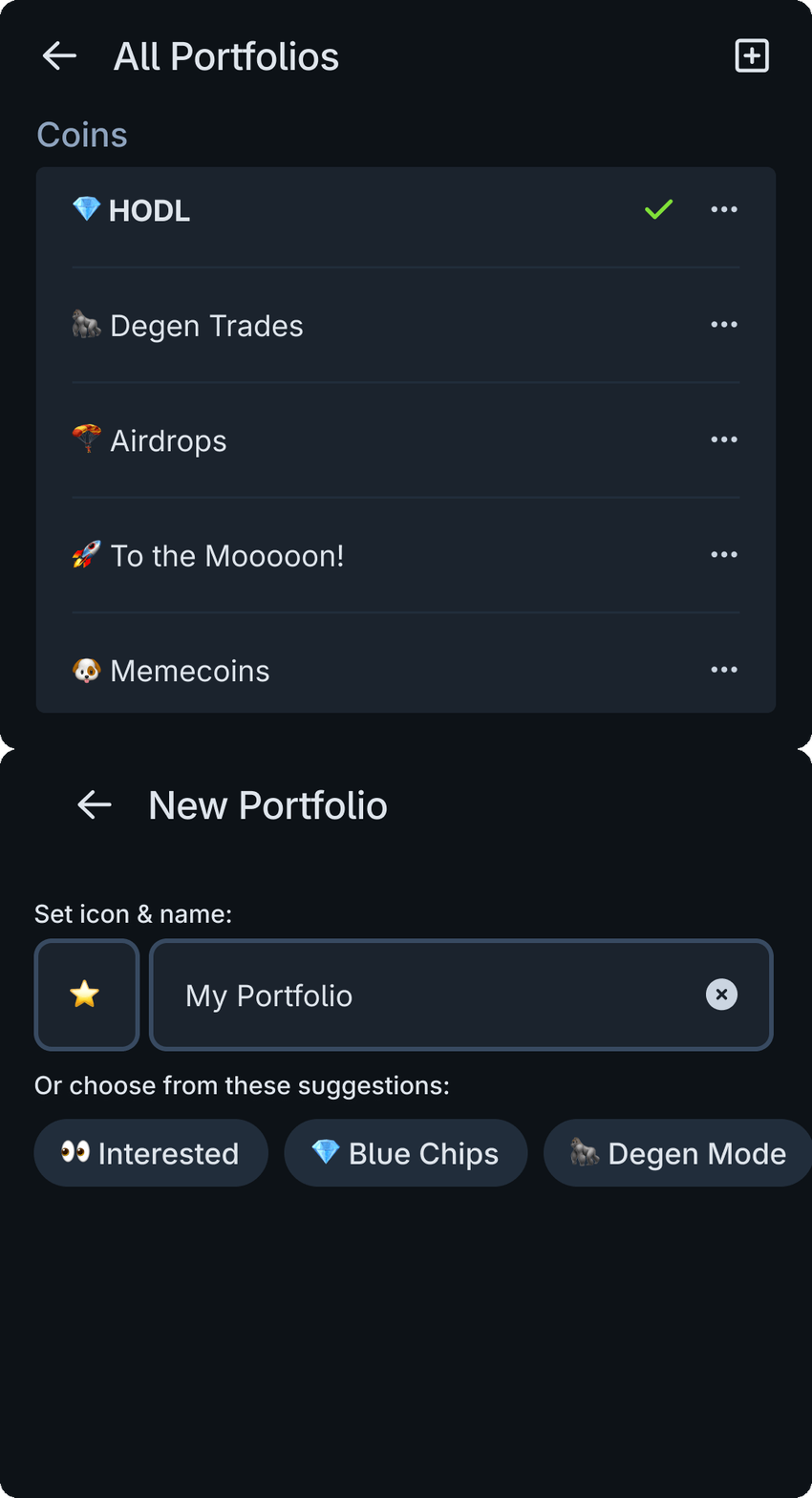
CoinGecko Name Your Portfolio

3. Add Coins to Your Portfolio

Search for a coin, tap the ★ star, and select the relevant portfolio.
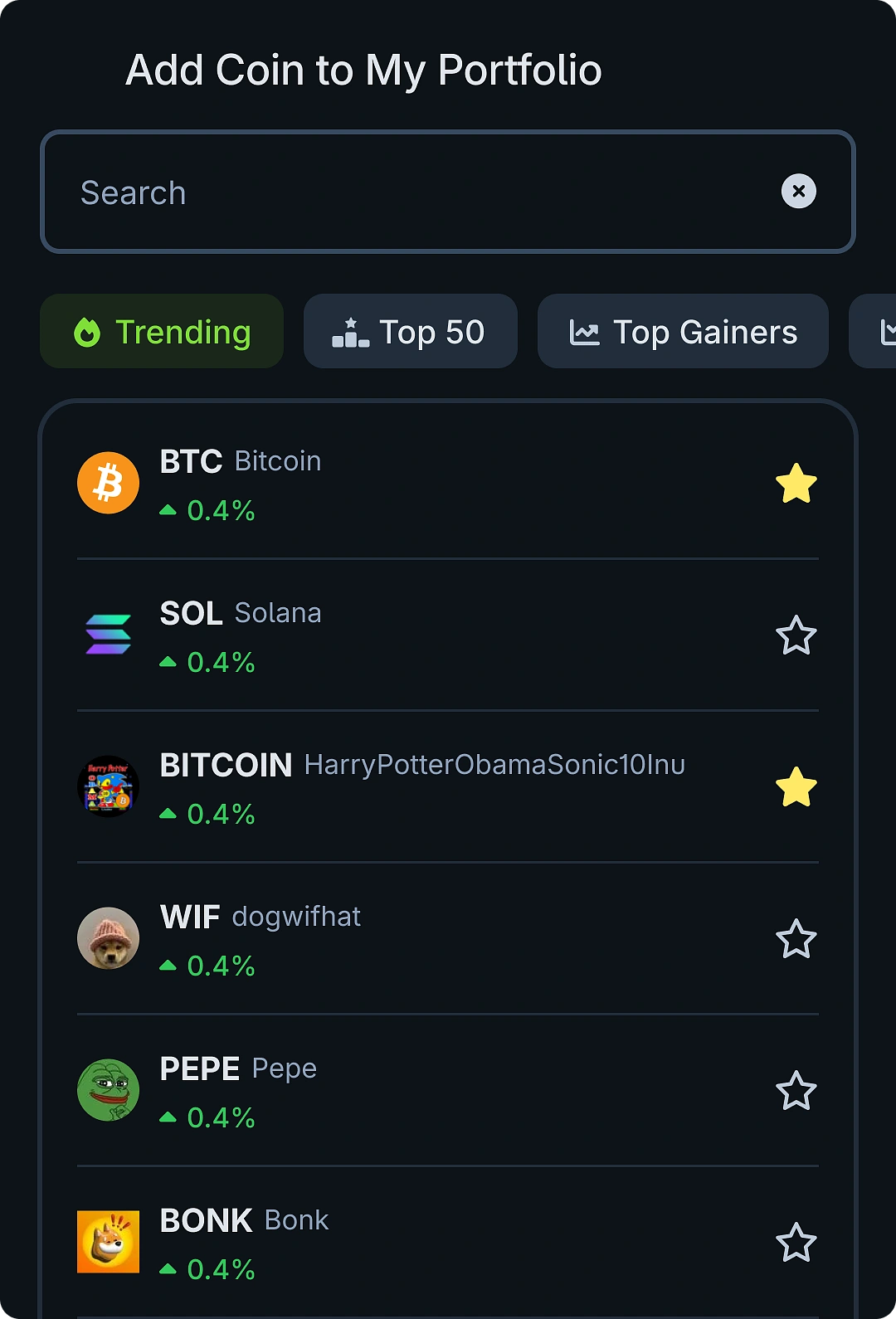
CoinGecko Add Coins to Portfolio

4. Customize Your View

Sort tokens by time-based price change, volume, market cap, or performance.
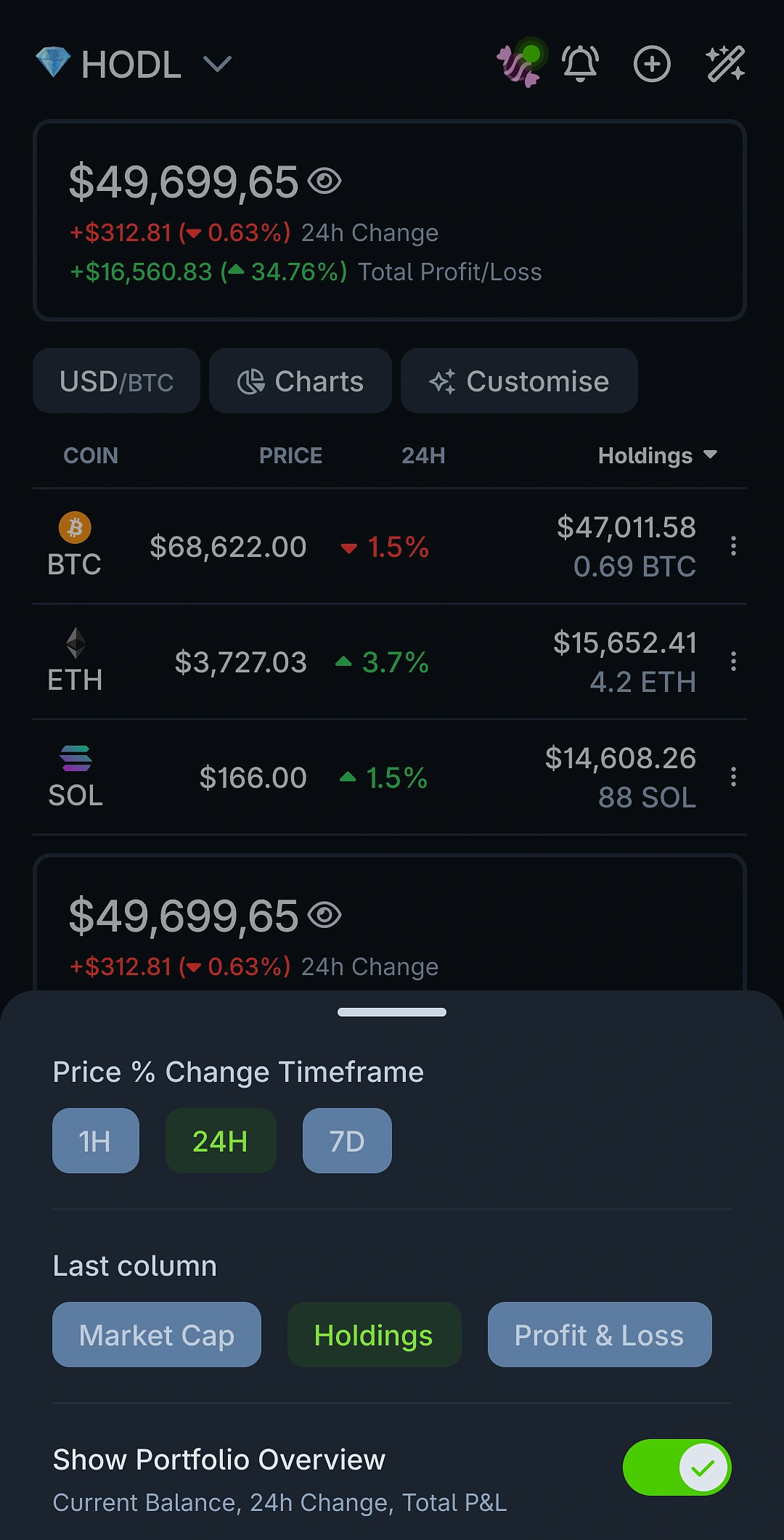
CoinGecko Customise Portfolio View

5. Set Price Alerts

Add price alerts to individual tokens within the portfolio.
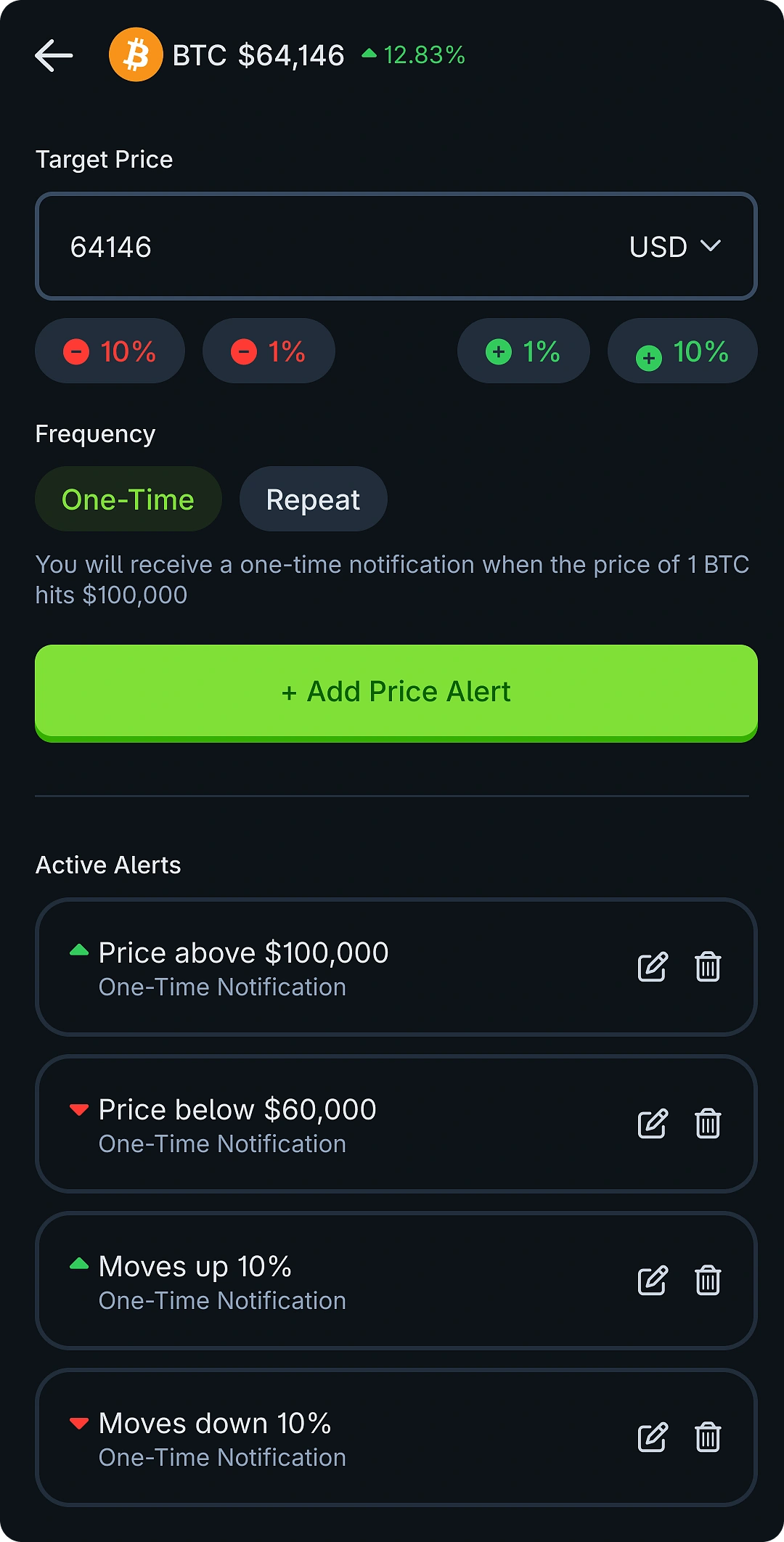
CoinGecko Add Price Alert


The CoinGecko mobile app offers mobile features that support crypto tracking on the move:

  • Use widgets to view selected tokens on your home screen

  • Enable push notifications for price movements

  • Access key data without opening the app
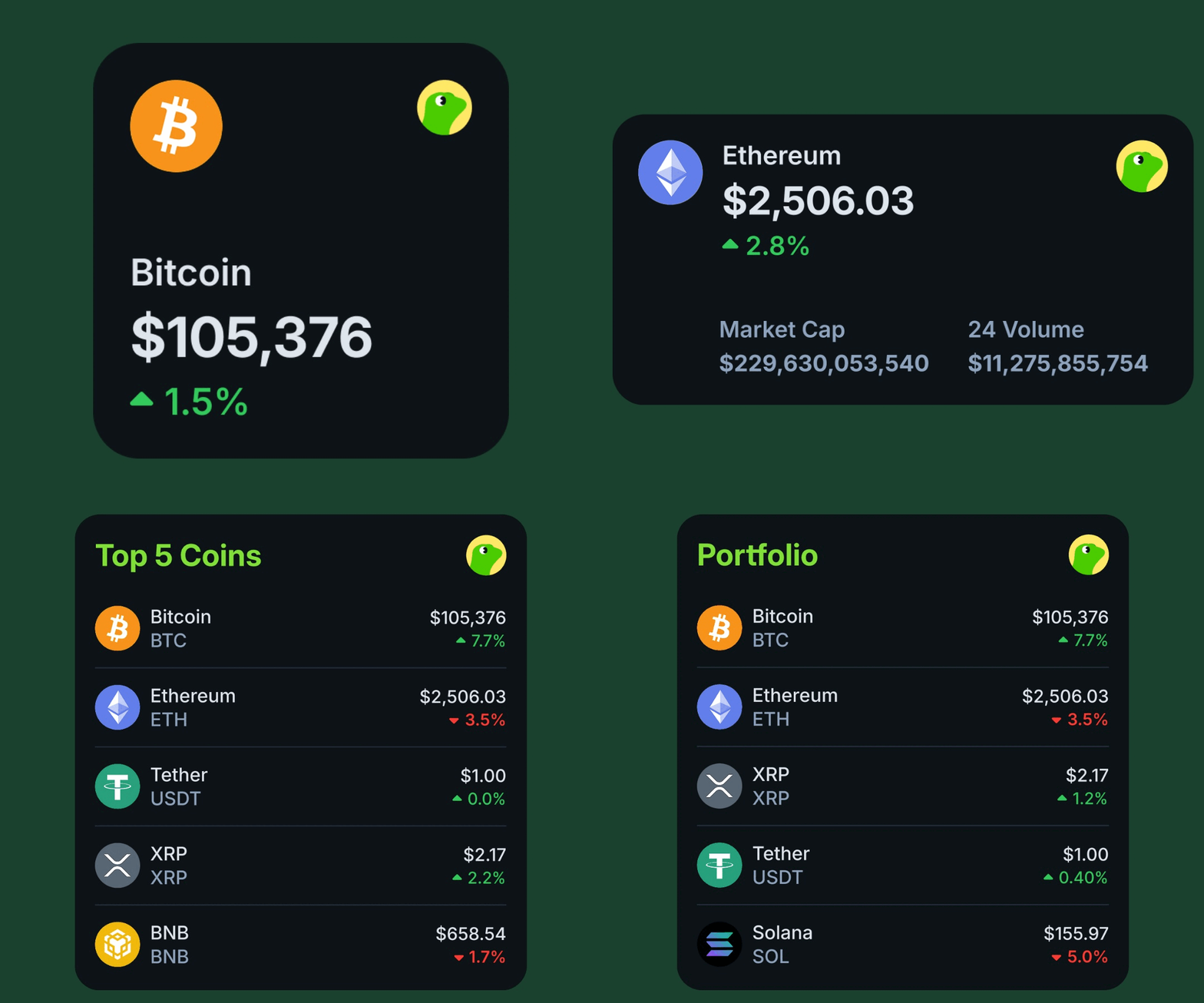
CoinGecko App Widgets


Final Thoughts

Tracking crypto effectively requires more than a watchlist. CoinGecko’s Portfolio and Price Alerts features provide a structured way to track the market. Users can monitor tokens, stay informed on price changes, and manage multiple lists without needing separate tools.

It’s free, easy to set up, and works whether you’re managing a few watchlist coins or an active trading portfolio.

Start with a few portfolios, add alerts for your key tokens, and streamline your tracking process today.

Disclaimer: This guide is for informational purposes only and does not constitute financial advice. Featured tokens are for illustration.

CoinGecko's Content Editorial Guidelines
CoinGecko’s content aims to demystify the crypto industry. While certain posts you see may be sponsored, we strive to uphold the highest standards of editorial quality and integrity, and do not publish any content that has not been vetted by our editors.
Learn more
Want to be the first to know about upcoming airdrops?
Subscribe to the CoinGecko Daily Newsletter!
Join 600,000+ crypto enthusiasts, traders, and degens in getting the latest crypto news, articles, videos, and reports by subscribing to our FREE newsletter.
Tell us how much you like this article!
Vote count: 8
CoinGecko
CoinGecko
CoinGecko's editorial team comprises writers, editors, research analysts and cryptocurrency industry experts. We produce and update our articles regularly to provide the most complete, accurate and helpful information on all things cryptocurrencies. Follow the author on Twitter @coingecko

More Articles

New Portfolio
Icon & name
Select Currency
Suggested Currencies
USD
US Dollar
IDR
Indonesian Rupiah
TWD
New Taiwan Dollar
EUR
Euro
KRW
South Korean Won
JPY
Japanese Yen
RUB
Russian Ruble
CNY
Chinese Yuan
Fiat Currencies
AED
United Arab Emirates Dirham
ARS
Argentine Peso
AUD
Australian Dollar
BDT
Bangladeshi Taka
BHD
Bahraini Dinar
BMD
Bermudian Dollar
BRL
Brazil Real
CAD
Canadian Dollar
CHF
Swiss Franc
CLP
Chilean Peso
CZK
Czech Koruna
DKK
Danish Krone
GBP
British Pound Sterling
GEL
Georgian Lari
HKD
Hong Kong Dollar
HUF
Hungarian Forint
ILS
Israeli New Shekel
INR
Indian Rupee
KWD
Kuwaiti Dinar
LKR
Sri Lankan Rupee
MMK
Burmese Kyat
MXN
Mexican Peso
MYR
Malaysian Ringgit
NGN
Nigerian Naira
NOK
Norwegian Krone
NZD
New Zealand Dollar
PHP
Philippine Peso
PKR
Pakistani Rupee
PLN
Polish Zloty
SAR
Saudi Riyal
SEK
Swedish Krona
SGD
Singapore Dollar
THB
Thai Baht
TRY
Turkish Lira
UAH
Ukrainian hryvnia
VEF
Venezuelan bolívar fuerte
VND
Vietnamese đồng
ZAR
South African Rand
XDR
IMF Special Drawing Rights
Cryptocurrencies
BTC
Bitcoin
ETH
Ether
LTC
Litecoin
BCH
Bitcoin Cash
BNB
Binance Coin
EOS
EOS
XRP
XRP
XLM
Lumens
LINK
Chainlink
DOT
Polkadot
YFI
Yearn.finance
SOL
Solana
Bitcoin Units
BITS
Bits
SATS
Satoshi
Commodities
XAG
Silver - Troy Ounce
XAU
Gold - Troy Ounce
Select Language
Popular Languages
EN
English
RU
Русский
DE
Deutsch
PL
język polski
ES
Español
VI
Tiếng việt
FR
Français
PT-BR
Português
All Languages
AR
العربية
BG
български
CS
čeština
DA
dansk
EL
Ελληνικά
FI
suomen kieli
HE
עִבְרִית
HI
हिंदी
HR
hrvatski
HU
Magyar nyelv
ID
Bahasa Indonesia
IT
Italiano
JA
日本語
KO
한국어
LT
lietuvių kalba
NL
Nederlands
NO
norsk
RO
Limba română
SK
slovenský jazyk
SL
slovenski jezik
SV
Svenska
TH
ภาษาไทย
TR
Türkçe
UK
украї́нська мо́ва
ZH
简体中文
ZH-TW
繁體中文
Welcome to CoinGecko
Welcome back!
Login or Sign up in seconds
or
Sign in with . Not you?
Forgot your password?
Didn't receive confirmation instructions?
Resend confirmation instructions
Password must contain at least 8 characters including 1 uppercase letter, 1 lowercase letter, 1 number, and 1 special character
By continuing, you acknowledge that you've read and agree fully to our Terms of Service and Privacy Policy.
Get Price Alerts with CoinGecko App
Forgot your password?
You will receive an email with instructions on how to reset your password in a few minutes.
Resend confirmation instructions
You will receive an email with instructions for how to confirm your email address in a few minutes.
Get the CoinGecko app.
Scan this QR code to download the app now App QR Code Or check it out in the app stores
Add NFT
Track wallet address
Paste
We only display assets from supported networks.
Ethereum Mainnet
Base Mainnet
BNB Smart Chain
Arbitrum
Avalanche
Fantom
Flare
Gnosis
Linea
Optimism
Polygon
Polygon zkEVM
Scroll
Stellar
Story
Syscoin
Telos
X Layer
Xai
Read-only access
We only fetch public data. No private keys, no signing, and we can't make any changes to your wallet.
Create Portfolio
Select icon
💎
🔥
👀
🚀
💰
🦍
🌱
💩
🌙
🪂
💚
CoinGecko
Better on the app
Real-time price alerts and a faster, smoother experience.
You’ve reached the limit.
Guest portfolios are limited to 10 coins. Sign up or log in to keep the coins listed below.