





 Make us preferred on Google
TL;DR
-
CoinGecko API tracks tokenized stocks across major blockchains, using tokenized-stock categories for discovery and the /coins/markets endpoints to retrieve prices.
-
GeckoTerminal’s onchain endpoints provide deeper market insights, including liquidity, holder concentration, and daily OHLCV data for tokenized assets across Solana, Ethereum, Robinhood, and 360+ other chains.
-
CoinGecko's RWA endpoints (/rwas/{id}) aggregate every issuer's tokenized version of the same stock, including tokenized pre-IPO companies like OpenAI and SpaceX, into a single price object.
Tokenized stocks such as the ones issued by xStocks, Ondo Finance, and bStocks can trade onchain across Solana, Ethereum, Robinhood, and many more chains. These tokens support continuous trading, allowing you to access price, liquidity, and trading activity at any time.
In this guide, you'll build a Python toolkit using the CoinGecko API to discover tokenized stocks, retrieve market, liquidity, holder, and historical data, and stream real-time updates via WebSockets.

What Are Tokenized Stocks and How Do You Track Them Onchain?
Tokenized stocks are blockchain tokens that represent exposure to real-world equities or ETFs. Issuers such as Backed (provider behind xStocks) hold the underlying assets and issue tokens designed to track their value, typically on a roughly 1:1 basis. These tokens are issued across multiple networks, including Solana as SPL tokens, Ethereum and other EVM-compatible chains as ERC-20 tokens, and the Robinhood chain. Because multiple issuers can tokenize the same equity across different blockchains, a single stock may exist as several distinct onchain tokens. For example, Tesla has separate tokenized versions from issuers including Backed, Ondo Finance, BTech Holdings, and Robinhood Europe.

Tokenized stocks offer several advantages compared to traditional equities, including 24/7 trading, fractional ownership that lowers the barrier to accessing higher-priced shares, and seamless integration with DeFi and other Web3 infrastructure. Their onchain settlement also enables them to be used as collateral, supplied to liquidity pools to earn trading fees, or deposited into lending protocols to mint stablecoins that can be staked for yield, and incorporated into decentralized applications.
Prerequisites & Setup
You'll need a CoinGecko API key. If you don't have one, follow the guide to get a free Demo API key.
Create a project folder with two files: requirements.txt lists the dependencies, and .env that stores your API key
Install with pip.
pip install -r requirements.txtNext, set up a configuration module that reads your API key and plan from the environment, then builds the correct base URL and headers for each request.
Every endpoint in this guide can also be called using CoinGecko's official Python SDK or TypeScript SDK instead of raw HTTP requests. The SDKs handle the base URL, headers, and authentication for you.
How to Discover Tokenized Stock Tokens
CoinGecko API enables you to discover tokenized stocks using category filtering to identify relevant assets. Start with the Coins Categories List endpoint to identify category names and IDs, including xstocks-ecosystem for Backed’s xStocks, robinhood-chain-stocks-ecosystem for Robinhood’s tokenized stocks, and the broader tokenized-stock category. Pass the selected category ID to /coins/markets to retrieve token prices, market caps, and 24-hour volumes, with up to 250 tokens returned per page. Then use /coins/{id} to retrieve each token’s cross-chain contract addresses from the detail_platforms field for subsequent onchain queries.
Running this script produces output like the following:

The output includes the tokenized-pre-ipo-stocks category. CoinGecko also tracks pre-IPO companies such as OpenAI, SpaceX, and Anthropic as tokenized assets under the stock classification rather than a separate pre-IPO category. You can query them directly via /rwas/openai-pre-ipo?tokens=true.
{

  "id": "openai-pre-ipo",

  "symbol": "openai",

  "name": "OpenAI (Pre-IPO)",

  "asset_type": "stock",

  "tokens": [

    {

      "id": "openai-republic-pre-ipo",

      "symbol": "preopai",

      "issuer_details": {

        "name": "Republic"

      }

    },

    {

      "id": "openai-prestocks-2",

      "symbol": "openai",

      "issuer_details": {

        "name": "PreStocks"

      }

    },

    {

      "id": "openai-tessera-pre-ipo",

      "symbol": "topenai",

      "issuer_details": {

        "name": "Tessera Tokenized Pre-IPO Assets"

      }

    },

    {

      "id": "openai-gate-pre-ipo",

      "symbol": "openai",

      "issuer_details": {

        "name": "Gate"

      }

    }

  ]

}
This same code also works for other tokenized real-world assets. Replace the category ID such as tokenized-commodities, tokenized-gold, or tokenized-exchange-traded-funds-etfs. For a deeper look at tokenized commodities, our guide on tracking gold, silver & tokenized commodities covers the topic in greater detail.
If you prefer working in spreadsheets, the same category IDs and logic work through CoinGecko's official Google Sheets and Excel add-ons. See our guides on pulling crypto prices into Google Sheets and tokenized stock prices into Excel to get started.
How to Get a Tokenized Stock's Price, Volume, and Liquidity Across Chains
CoinGecko’s aggregated market data endpoints provide price, market cap, and volume data, while GeckoTerminal provides onchain liquidity data through the same API credentials. The /coins/markets and /coins/{id} endpoints are the primary way to retrieve a tokenized stock’s price and market cap, as these figures are aggregated across all venues where the token trades. For a single token or short custom list, the /simple/price endpoint provides a simpler way to retrieve price data in a single request.
These endpoints work for any tokenized assets such as stocks, commodities, or ETF. The code below uses Tesla, Nvidia, and the S&P 500 ETF (SPYX). Simply replace the coin IDs with those identified during discovery.
Here is an example of how the output looks like:
If you're specifically working with RWAs, you can use /rwas/{id} to aggregate every issuer's version of the same underlying asset into a single object. For NVIDIA, GET /rwas/nvidia combines xStocks' NVDAX with Ondo's, Robinhood's, Coinbase's, and BTech's tokenized versions into a single price:
{

  "id": "nvidia",

  "symbol": "nvda",

  "name": "NVIDIA",

  "asset_type": "stock",

  "tokenized_market_data": {

    "current_price": 215.09

  },

  "tokens": [

    {

      "id": "nvidia-xstock",

      "symbol": "nvdax",

      "issuer_details": {

        "name": "xStocks"

      }

    },

    {

      "id": "nvidia-ondo-tokenized-stock",

      "symbol": "nvdaon",

      "issuer_details": {

        "name": "Ondo Finance"

      }

    },

    {

      "id": "nvidia-robinhood-token",

      "symbol": "nvda",

      "issuer_details": {

        "name": "Robinhood Europe"

      }

    },

    {

      "id": "nvidia-coinbase-tokenized-stock",

      "symbol": "nvdac",

      "issuer_details": {

        "name": "Coinbase"

      }

    }

  ]

}
Neither aggregated endpoint provides liquidity data, because liquidity is measured at the individual pool level. To see where a tokenized stock trades and the liquidity available on each chain, use the contract addresses from detail_platforms with the /onchain/networks/{network}/tokens/{token_address}/pools endpoint.

The response returns the following output:
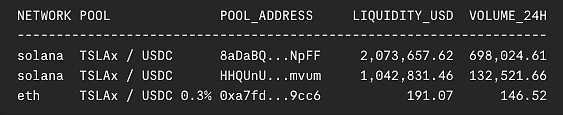
include_total_reserve_in_usd=true) in a single call, without requiring individual pool lookups.How to Track Holders of a Tokenized Stock
CoinGecko’s Token Info by Token Address endpoint returns a holder snapshot, including the total holder count and a breakdown of token supply distribution among the top holders.
Here is an example of how the output looks like:

For deeper holder, wallet, and trading analysis, the following endpoints are available on the Analyst plan and above:
- Top Token Holders by Token Address: Ranked individual wallets with their balances and share of supply
- Historical Token Holders Chart by Token Address: Holder count over time, for charting growth trends
- Top Token Traders by Token Address: Wallets ranked by realized and unrealized profit
- Past 24 Hour Trades by Token Address: Returns a token’s last 300 trades across all pools in the past 24 hours, including buy/sell direction, token amounts, and USD volume
Running this script produces output like the following:

How to Get Historical Price and OHLCV Data for a Tokenized Stock
To retrieve historical price, market cap, and volume data for a tokenized stock, /coins/{id}/market_chart returns aggregated market data over time for tokens listed on CoinGecko, making it useful for tracking historical performance.
The response returns the following output:
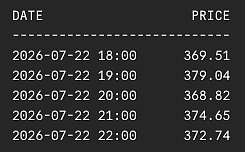
For candlestick charting, query the /onchain/networks/{network}/pools/{pool_address}/ohlcv/{timeframe} endpoint to retrieve OHLCV data for a selected pool. Resolve a token’s most liquid pool from its contract address using the /onchain/networks/{network}/tokens/{token_address}/pools endpoint. The response ranks pools by liquidity and 24-hour volume, with the first result representing the highest-ranked pool.
Each OHLCV candle includes a timestamp, open, high, low, close, and volume, allowing direct use in pandas for charting or indicator calculations. Instead of manually aggregating data, you can use timeframe and aggregate to request the candle interval needed. Each request returns up to 1,000 candles over a maximum six-month window, with before_timestamp available for retrieving older history.
Running this script produces output like the following:
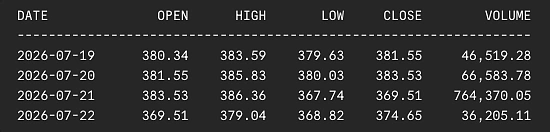
Charting this response makes trends easier to interpret at a glance. The chart below plots the same pool OHLCV data retrieved by get_pool_ohlcv():
 To simplify your workflow, you can skip the pool-resolution step entirely and query OHLCV data directly by token contract using the Token OHLCV Chart by Token Address endpoint. It supports the same
 timeframe, aggregate, limit, and before_timestamp parameters.
With this same OHLCV data, you can go beyond plotting it and calculate technical indicators such as RSI, MACD, and Bollinger Bands. Our guide on automating crypto technical analysis with Python walks through the setup in detail.

How to Stream Tokenized Stock Prices, OHLCV, and Trades via Websockets
CoinGecko's WebSocket streams real-time tokenized stock data by maintaining a persistent connection and pushing updates as they happen, instead of cached snapshots with REST API polling. It provides live price, trade, and candlestick updates with ultra-low latency, making it ideal for real-time dashboards, trading applications, and monitoring fast-moving tokenized assets.
Connect to wss://stream.coingecko.com/v1 with your API key, then subscribe to the channels and specify the tokens or pools you want to monitor. The example below subscribes to CGSimplePrice, OnchainOHLCV, and OnchainTrade in a single connection, streaming Tesla xStock's aggregated price, live candlesticks, and pool-level swaps on Solana all at once.
The response returns the following output:

This same feed is visualized in real time on GeckoTerminal's TSLAX pool:


Conclusion
With CoinGecko API, you can build a Python workflow for tracking tokenized stocks across the full data lifecycle from discovering assets and retrieving market data to mapping liquidity pools, analyzing holders, fetching historical data, and streaming real-time updates across various chains.
The same workflow extends to other tokenized real-world assets. You can swap the category ID to track tokenized commodities, treasuries, or ETFs, allowing a single codebase to support a broader range of RWA assets as more markets move onchain.
To build a user-facing application with this data, explore our guide on building a crypto portfolio dashboard in Python. To work with tokenized asset data programmatically, see our guide to discovering, analyzing, and comparing tokenized assets and issuers. For deeper holder analysis, our token holders deep dive covers concentration metrics in more detail.
Ready to start building? Get your free Demo API key and start exploring tokenized stock data today. As your needs grow, upgrade to an entry-level Basic plan (from $29/mo) to access the full suite of data delivery methods, includes REST APIs, webhook, WebSocket streams, and a commercial license, while the Analyst plan ($129/month) adds exclusive endpoints such as Pools Megafilter, more API call credits, and higher rate limits.









 Or check it out in the app stores